
The 10 Best Hyros Alternatives for 2026 (Fairly Compared)

Last updated 31 July 2026
•
11 min read
Hyros sells one promise no tag manager can match: it tells you which ad produced the sale, including the ones that closed on a phone call three weeks later. People start shopping for an alternative when they see what that promise costs, because Hyros prices on the revenue it tracks rather than on events or traffic. Grow, and the invoice grows with you. This guide covers ten tracking and attribution platforms, judged against the same criteria.
“Hyros is quoting us four figures a month now that revenue is up. What else actually does attribution, not just event delivery?”
Disclosure: PixelFlow is our product. It appears below as one of ten options, assessed against the same criteria as everyone else, and it is the wrong choice for anyone who genuinely needs attribution.
TL;DR: Hyros alternatives at a glance
There is no single best Hyros alternative, because Hyros bundles two separate jobs: capturing conversions server-side, and deciding which ad deserves credit for them. Which of those you are actually replacing decides where you land. If you have realised you were paying for attribution you never opened, a focused delivery tool like PixelFlow (our tool) removes the revenue-based bill entirely.
If attribution is the reason you bought Hyros, RedTrack and ClickMagick cover the media-buyer and info-product use case at a fraction of the price, Triple Whale and Northbeam own DTC ecommerce, and SegMetrics and Wicked Reports specialise in long, email-heavy sales cycles. Pricing and fit for each below.
Tool
Best For
Starting Price
Pros
PixelFlow (our tool)
Meta advertisers who need clean delivery, not attribution
From $29/mo
Flat price, unlimited events, no-code Visual Tagger
RedTrack
Media buyers and ecommerce wanting attribution plus CAPI
From $69/mo
Multi-touch attribution, CAPI included, 200+ integrations
ClickMagick
Info products and affiliates tracking clicks to sales
From $79/mo
Click-level tracking, several attribution models
Triple Whale
Shopify and DTC brands wanting one revenue dashboard
Free; from $179/mo
Triple Pixel, multi-touch attribution, creative analytics
AnyTrack
Affiliate and lead-gen sites wanting automatic CAPI
Free; from $100/mo
Autotracks conversions, server-side and cookieless
SegMetrics
Course and coaching businesses with long funnels
From $57/mo
Lead value over time, email and funnel attribution
Tracklution
EU teams wanting managed delivery with light attribution
Free; from €39/mo
13+ destinations, EU hosting, 16-minute setup
Quick verdict: the best Hyros alternative
If you bought Hyros for attribution and still need it, RedTrack is the most direct swap for most advertisers: multi-touch attribution, server-side conversion delivery and Conversions API support on every paid tier, from $69/mo for media buyers or $83/mo on the ecommerce Brand plan. It does the same two jobs Hyros does, priced on tracking events rather than on your revenue. If your business is Shopify-shaped, Triple Whale is the better dashboard and has a genuinely usable free tier.
If you sell courses or coaching with a long nurture sequence, SegMetrics from $57/mo is built for exactly that shape of funnel, tracking what a lead is worth across weeks of email rather than crediting the last click.
And if the honest answer is that nobody on your team has opened the attribution reports in three months, PixelFlow (our product) does the delivery half properly for $29/mo with no revenue-based meter. Attribution is a real job, but it is not everyone’s job.
What is Hyros? (And why look for an alternative?)
Hyros is an ad tracking and attribution platform aimed at high-spend advertisers, particularly info-product businesses, coaches and agencies. It installs scripts across your pages and funnels, stitches long multi-touch buying journeys together across sessions and devices, captures conversions that happen off-site (including phone calls and offline closes), and reconciles all of it against your ad spend so you can compare what Ads Manager reports with what actually got tracked.
The catch is the pricing model. Hyros bills on tracked monthly revenue, not on events, traffic or ad spend. The Business plan starts around $230/mo billed annually at the entry tier and climbs into four figures as revenue grows, with the top monthly tier at $5,249/mo. Setup is a project rather than an afternoon: multiple scripts, funnel and offer mapping, and attribution rules to configure. Those two things, a bill indexed to your success and a setup measured in days, are what the alternatives below compete on.
Hyros at a glance
Core use
Multi-touch ad attribution with server-side tracking, call tracking and ad-spend reconciliation
Best for
High-spend advertisers, info-product businesses and agencies where the question is credit, not delivery
Key features
Multi-touch attribution across sessions and devices, call tracking, offline conversions, AI ad optimisation signals, Meta and Google integrations
Pricing
Business from ~$230/mo billed annually at the entry tracked-revenue tier, rising to $5,249/mo monthly-billed at the unlimited tier; separate Shopify track from ~$69/mo
Main limits
Priced on tracked revenue, so the bill grows with sales; setup takes days of funnel mapping; no self-serve entry on the Business track; US-hosted
Hosting
United States
Attribution: deciding which ad, email or channel deserves credit for a sale, as opposed to simply making sure the conversion event arrives at the ad platform. Most tools on this list do both, and the ones that do it server-side send events through Meta’s Conversions API. Deep dive: how the Conversions API works.
Why look for a Hyros alternative?
To be clear: Hyros does something most tracking tools do not attempt, and for the right business it earns its price. These are the five reasons people genuinely move.
The bill is indexed to your revenue. Every other tool here meters events, clicks, sessions or orders. Hyros meters the revenue it tracks, which means a good quarter arrives with a bigger invoice attached. Nothing about your tracking got harder; the price went up because you did well.
It is proportionally hardest on smaller advertisers. At the entry tier Hyros costs roughly 1.15% of the revenue it tracks. At $750k it is about 0.26%. The businesses most likely to feel the price are the ones with the least revenue to spread it over.
Setup is a project. Scripts across every page and funnel, offer-level mapping, attribution rules. Teams routinely describe days, not hours, and it needs someone who understands the funnel to do it properly. If your entire budget sits in Meta Ads and you optimise on Meta’s own reporting anyway, that is a lot of setup for an answer you are not using.
You are only advertising on Meta. Hyros’s value is cross-channel credit assignment. If one platform takes your whole budget, you are buying an answer to a question you are not asking.
Nobody opens the reports. The most common quiet reason. Attribution dashboards get checked weekly for a month, then monthly, then never, while the subscription renews. If that is your situation, you are paying attribution prices for event delivery.
Signs you should look beyond Hyros
Your quote went up because revenue went up, not because you asked for anything new.
Meta is the only platform you meaningfully spend on.
You cannot name the last decision an attribution report changed.
You need someone technical every time the funnel changes.
Finance or legal wants an EU data-processing region.
What Hyros actually costs as a share of your revenue
Hyros’s headline entry price of roughly $230/mo billed annually is reasonable for a business at scale. Because it meters tracked revenue rather than events, the number that matters is not your traffic but your sales. Here is what the published monthly-billed tiers work out to as a percentage of the revenue being tracked.
Tracked monthly revenue
Hyros monthly cost
Cost as share of tracked revenue
Up to $40,000
$459
~1.15%
Up to $83,000
$759
~0.91%
Up to $250,000
$1,299
~0.52%
Up to $750,000
$1,959
~0.26%
Up to $1.25M
$2,639
~0.21%
Two things follow. First, the pricing is regressive: the smaller you are, the larger a share of revenue you hand over, which is why the loudest complaints come from businesses at the bottom two tiers rather than the top. Second, annual billing cuts roughly 23% off every tier, so anyone staying should not be paying monthly. For comparison, PixelFlow charges $29/mo for one site, $79/mo for five and $149/mo for ten with unlimited events on every tier, because it delivers to one platform and does not attempt attribution. RedTrack’s ecommerce plan starts at $83/mo and does attempt it. Confirm current numbers on Hyros’s pricing page before you budget; pricing is the element that stales fastest.
How we compared these alternatives
Every option is judged on the same four criteria, weighted equally: setup effort (how quickly a marketer gets reliable data flowing), capability (attribution models, channels covered, event and identity flexibility), pricing value (what you actually pay at real volumes, overages included), and support (how much help arrives when tracking breaks).
Each entry describes fit for the audience named in it, not a universal ranking. We have an obvious interest here: PixelFlow is our product. It was judged on the same criteria, and it is the weakest option in this list on capability because it does no attribution at all and only serves Meta. Where it is the wrong answer, the entry says so.
The categories, at a glance
The ten tools below fall into five groups, and most people only need to shortlist inside one of them. The split that matters most is whether you are replacing Hyros’s attribution or only the event delivery underneath it.
Category
Tools
Best for
Delivery without attribution
PixelFlow
Realising you only needed the events to arrive
Media buyer and affiliate tracking
RedTrack, ClickMagick, AnyTrack
Click-to-sale tracking with attribution, at media-buyer prices
Ecommerce and DTC attribution
Triple Whale, Northbeam
Shopify-shaped businesses wanting one revenue dashboard
Info product and long-cycle attribution
SegMetrics, Wicked Reports
Courses, coaching and email-heavy funnels
Managed server-side with attribution
Tracklution, Cometly
Multi-platform delivery with reporting attached
The 10 best Hyros alternatives in 2026
PixelFlow
Best for Facebook only and no attribution (disclosure: our tool)
Best for: Meta advertisers on Webflow, Squarespace, Framer, WordPress or WooCommerce who have concluded they were paying attribution prices for event delivery.
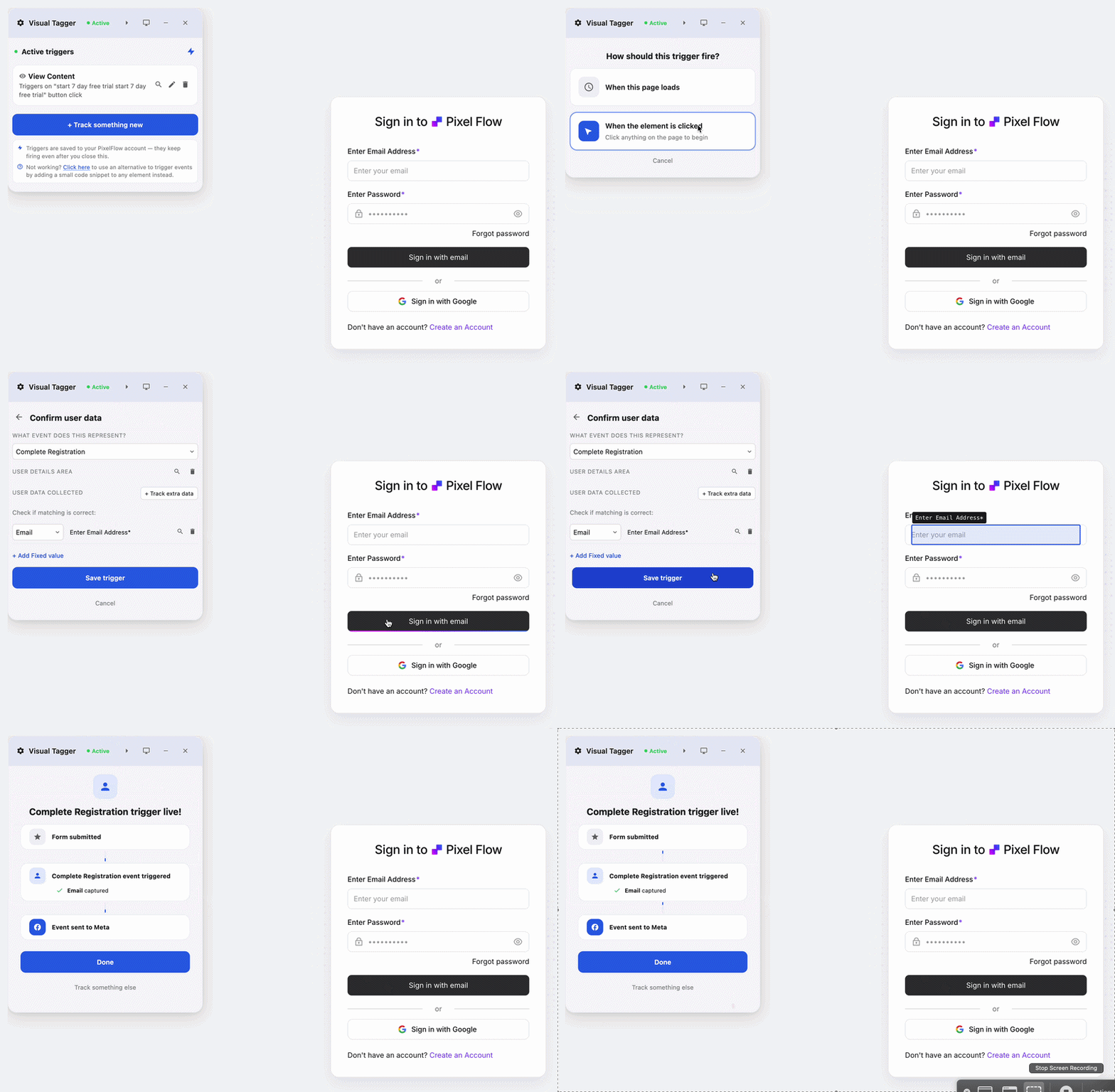
PixelFlow does the delivery half of what Hyros does, properly and cheaply. Events are created with a point-and-click Visual Tagger or URL triggers, then sent through both the browser pixel and Meta’s Conversions API with a shared event ID so deduplication is automatic. Every event carries the match data that lifts event match quality (fbp, fbc, IP, hashed customer data where you map it), and Stripe and Calendly webhooks capture conversions that happen off your site. The price is flat and events are unlimited, so nothing about your invoice moves when revenue does.
Honest limits: PixelFlow is not an attribution platform. There is no multi-touch modelling, no cross-channel credit assignment, no call tracking and no ad-spend reconciliation, which is the entire reason people buy Hyros. It is also Meta-only. If you can name a decision your Hyros reports changed, options 2 to 10 fit better.
Pricing: $29/mo (1 site), $79/mo (5 sites), $149/mo (10 sites), unlimited events and pixels on every tier, 7-day free trial.
RedTrack
The most direct swap for most Hyros users
Best for: media buyers, affiliates and ecommerce brands who need real multi-touch attribution and Conversions API delivery in one tool, without revenue-based pricing.
RedTrack does both of Hyros’s jobs. It tracks clicks and conversions across 200+ integrations, applies multi-touch attribution, tracks LTV, and fires server-to-server conversions to Meta, Google, TikTok, YouTube, Bing and Snapchat, so events land even when the browser pixel cannot. Cost data syncs from the ad platforms at 30-minute intervals at no extra charge, which is the ad-spend reconciliation piece people rely on Hyros for. Crucially, plans meter tracking events rather than your revenue.
Honest limits: the interface is built for media buyers and assumes you are comfortable with campaign and funnel structures, so it is a steeper first hour than a Shopify dashboard. Call tracking and offline-close stitching are not the deep specialism they are at Hyros.
Pricing: media buyer plans Builder $69/mo (2M tracking events), Team $333/mo (20M), Enterprise $833/mo (75M). Ecommerce plans Relay free (1 store), Brand $83/mo, Agency $499/mo. 14-day free trial, no card required.
ClickMagick
Best click-level tracking for info products and affiliates
Best for: info-product sellers, affiliates and coaches who want click-to-sale tracking with attribution models, in the same audience Hyros built its reputation on.
ClickMagick is the closest spiritual replacement for what most Hyros customers actually use day to day: tracking every click through to the sale, across landing pages, funnels and email, then attributing revenue back to the source. It supports last-click as the default plus linear, position-based and time-decay models on the higher tiers, and it is priced on click volume rather than on the money those clicks generate.
Honest limits: attribution beyond last-click only unlocks on Standard and Pro, the click allowances are firm ceilings rather than soft overages, and annual billing was withdrawn, so monthly is the only option. It is a tracking tool with attribution attached, not a full revenue analytics suite.
Pricing: Starter $79/mo (10,000 clicks), Standard $169/mo (100,000 clicks), Pro $299/mo (1M clicks). 14-day free trial.
Triple Whale
Best for Shopify and DTC brands
Best for: Shopify and Shopify Plus brands that want attribution, creative analytics and a revenue dashboard in one place.
Triple Whale is the default analytics layer for DTC ecommerce. Its own first-party Triple Pixel captures on-site behaviour, multi-touch attribution assigns credit across channels, and the dashboards are built for the daily question a store owner actually asks, which is whether today was good. Creative analytics and the Moby assistant sit on top. The free Founders Dashboard is genuinely usable rather than a trial in disguise, which makes it easy to evaluate before committing.
Honest limits: pricing is banded by annual GMV, so the tier can move without you changing anything, and it is Shopify-shaped. Lead-gen, SaaS and info-product businesses get much less from it than a store does, and it does not do Hyros’s call tracking.
Pricing: Free tier (first and last click attribution); Starter $179/mo; Advanced $259/mo; Professional $749/mo; Custom for $20M+ GMV. Annual billing gives two months free.
AnyTrack
Best automatic Conversions API for affiliate and lead-gen sites
Best for: affiliate marketers and lead-gen sites that want conversions detected and forwarded to ad platforms automatically, without building the plumbing.
AnyTrack autodetects conversions from your existing stack (forms, affiliate networks, payment tools) and forwards them server-side to Meta, Google and the other major platforms, with attribution reporting on top. The pitch is recovering the conversions that ad blockers and browser privacy settings hide, and doing it with very little configuration. The free tier at 5,000 sessions a month is enough to see whether it works on your site.
Honest limits: it meters sessions, so a traffic spike moves you up a tier, and the attribution reporting is lighter than RedTrack’s or Triple Whale’s. The entry paid plan covers one website property. More on how server-side deduplication works in our guide..
Pricing: Free (5,000 sessions/mo, 1 website); Starter $100/mo (100,000 sessions); Personal $150/mo; Advance $300/mo. 14-day trial on paid plans, annual billing gives two months free.
SegMetrics
Best for courses, coaching and long nurture funnels
Best for: digital product businesses where the sale happens weeks after the click, through email, and the question is what a lead is worth over time.
SegMetrics is built for the funnel shape Hyros sells hardest against: someone clicks an ad, joins a list, gets nurtured for six weeks and buys a $2,000 course. It tracks lead value over the whole journey, attributes revenue back through email sequences and funnel steps, and integrates with the CRM and cart tools this market actually uses. For that specific shape, it answers the attribution question at a fraction of Hyros’s price.
Honest limits: it is analytics and attribution rather than a delivery tool, so you still need something sending server-side events to your ad platforms. Ecommerce brands will find it less natural than Triple Whale.
Pricing: Launch $57/mo; Grow $197/mo; Scale $397/mo; Enterprise custom above $10M annual revenue. Annual billing gives two months free.
Tracklution
Best managed multi-platform delivery with light attribution
Best for: EU teams who want server-side delivery to a dozen platforms with an attribution engine attached, without owning a tagging server.
Tracklution sits between your website and your ad platforms, routing events to Meta, Google Ads, TikTok, LinkedIn, Microsoft Ads, Snapchat, Pinterest, Reddit, Klaviyo and GA4 from one no-code setup, with an attribution engine on the Grow plan and above. It is EU-hosted and quotes a 16-minute median implementation. If you are leaving Hyros because you wanted delivery breadth plus some reporting rather than deep multi-touch modelling, it covers that middle ground cheaply.
Honest limits: the attribution engine is a reporting layer, not a Hyros-class modelling product, so this is a downgrade on the exact axis Hyros is strongest. Events are metered at €0.0008 each past your allowance, and Free and Grow plans each cover one website.
Pricing: Free (5,000 events/mo, 1 site); Grow €39/mo billed annually (50,000 events, 1 site); Agency and Enterprise quoted.
Wicked Reports
Best for long cycles and heavy email
Best for: B2C brands with multi-month buying cycles where email and paid social interact and last-click is actively misleading.
Wicked Reports specialises in long attribution windows and first-party contact data, tracking a customer from first click through months of email touches to the eventual purchase. It is aimed squarely at businesses where the standard 7-day click window hides most of the truth, which is the same argument Hyros makes. Its pricing includes an unusual guarantee: if tracked results have not reached three times your subscription within 90 days, it is free until they do.
Honest limits: it starts around $499/mo, which makes it one of the more expensive options here and only sensible above meaningful ad spend. Setup and data hygiene expectations are high, and cost rises with order volume and integration count.
Pricing: Measure from ~$499/mo; Scale ~$699/mo; Maximize ~$999/mo; Enterprise $4,999+. Confirm on Wicked Reports’ pricing page.
Cometly
Best AI-assisted attribution with Conversions API feedback
Best for: teams that want multi-model attribution feeding enriched conversion data back into the ad platforms, and are comfortable with a sales-led purchase.
Cometly tracks the customer journey across channels, applies first-touch, last-touch and multi-touch models side by side so you can compare them before moving budget, and pushes enriched conversion data back to the ad platforms so their optimisation improves rather than just your reporting. It is a genuine tracking-plus-attribution product rather than one bolted onto the other.
Honest limits: there is no public pricing, so evaluation starts with a sales conversation, and plans are metered on website sessions starting at 50,000 a month, which puts it out of reach of smaller sites.
Pricing: custom quote. Professional and Enterprise tiers, metered by tracked sessions from 50,000/mo. Contact sales.
Northbeam
Best for high-spend DTC running MTA and MMM together
Best for: DTC brands spending six figures a month that need multi-touch attribution and media mix modelling in the same platform.
Northbeam is the enterprise end of this list. It combines multi-touch attribution with media mix modelling, refreshes data several times a day, and is built for teams with an analyst who will actually interrogate the models. For brands at the spend level where a 5% misallocation is a five-figure mistake, that rigour is the product.
Honest limits: it starts around $1,000 to $1,500/mo depending on which source you read, meters on pageviews so costs climb with traffic, and has no free plan or trial. For anyone leaving Hyros on price, this is not the escape route.
Pricing: Starter from ~$1,000-1,500/mo (under ~$250k monthly ad spend, 1 domain); Professional from ~$2,500/mo; Enterprise custom. Quote required.
Start scaling your ads with better data
No credit card required
5-minute setup
Which should you choose?
Realised you only needed the events delivered: PixelFlow.
Need genuine multi-touch attribution without revenue-based pricing: RedTrack.
Info products or affiliates tracking clicks to sales: ClickMagick.
Shopify or DTC brand wanting one revenue dashboard: Triple Whale.
Affiliate or lead-gen site wanting automatic CAPI: AnyTrack.
Courses or coaching with a long nurture sequence: SegMetrics.
EU team wanting multi-platform delivery with light reporting: Tracklution.
Long cycles where email does the heavy lifting: Wicked Reports.
Want AI-assisted attribution and will take a sales call: Cometly.
Six-figure monthly ad spend needing MTA plus MMM: Northbeam.
How to switch from Hyros
Write down what you actually use. Open Hyros and list the reports someone looked at in the last 30 days. This is the step people skip, and it is the one that decides whether you need an attribution tool at all or just delivery.
Install the replacement alongside it. Both can run at once. Server events deduplicate against the browser pixel by event ID, not against each other, so expect some temporary double counting in Ads Manager and do not panic about it.
Rebuild your highest-value conversion first: Purchase or Lead, verified in Meta Events Manager’s Test Events before you touch anything else.
Let one full sales cycle run before cancelling. This matters more with Hyros than with a delivery tool. If your average close takes three weeks, you need three weeks of parallel data before the comparison means anything.
Cut over and cancel. Turn off the Hyros scripts, confirm a full week of clean solo data, then cancel before the renewal date.
Budget about an hour for the technical work on a single site, and one sales cycle before you trust the numbers. Annual Hyros contracts complicate the timing, so check your renewal date before you start.
Final verdict
Hyros built something genuinely difficult: attribution that survives long funnels, phone calls and offline closes, in a market where most tools stop at delivering the event. For a business spending heavily across channels with a real analyst reading the reports, it remains a defensible purchase. The reasons to leave are structural rather than qualitative. The bill is indexed to your revenue, the share is heaviest for the smallest accounts, and setup is a project rather than an afternoon. Match the replacement to whichever of those actually bites. If it is the price and you still need attribution, RedTrack does both jobs for a fraction of it. If it is the price and you have quietly stopped reading the reports, a flat-priced delivery tool ends the problem entirely. The best Hyros alternative is the one that matches what you were really using.
Key takeaways
Hyros prices on tracked monthly revenue rather than events or traffic, so the invoice grows when the business does. That is the single most common reason people shop for alternatives.
The pricing is regressive: roughly 1.15% of tracked revenue at the entry tier and about 0.26% at $750k, so smaller advertisers carry the heaviest proportional cost.
Ten realistic alternatives across five categories: delivery only (PixelFlow), media buyer and affiliate tracking (RedTrack, ClickMagick, AnyTrack), ecommerce and DTC (Triple Whale, Northbeam), info product and long cycle (SegMetrics, Wicked Reports), managed server-side with attribution (Tracklution, Cometly).
Every option is judged on setup, capability, value and support. Fit beats ranking, and PixelFlow is weakest on capability because it does no attribution at all.
Free tiers exist across the board: Triple Whale (Founders Dashboard), RedTrack (Relay), AnyTrack (5,000 sessions), Tracklution (5,000 events). PixelFlow has a 7-day trial rather than a free tier.
More tracking comparisons: PixelFlow vs Stape head-to-head · Facebook Event Setup Tool alternatives · WeTracked alternative · PixelFlow vs Hyros head-to-head · PixelYourSite alternative · Stape alternatives. New to server-side tracking? Start with server-side tracking vs the pixel and why you need the Conversions API.
Frequently Asked Questions
What is the best Hyros alternative?
It depends which half of Hyros you are replacing. If you need genuine multi-touch attribution, RedTrack is the most direct swap for most advertisers: multi-touch models, LTV tracking and server-side Conversions API delivery on every paid tier, from $69/mo for media buyers or $83/mo on the ecommerce plan, metered on tracking events rather than your revenue. If your business is Shopify-shaped, Triple Whale is the better dashboard and has a free tier. If you sell courses with long email nurture sequences, SegMetrics from $57/mo is built for that funnel. And if you have quietly stopped opening the attribution reports, PixelFlow (our product) does the delivery half for $29/mo.
Why do people leave Hyros?
Four reasons come up repeatedly. The pricing model, because Hyros bills on tracked monthly revenue, so growth raises the invoice without you asking for anything. The proportional cost at the low end, which works out around 1.15% of tracked revenue at the entry tier against roughly 0.26% at $750k. The setup, which involves scripts across every page and funnel plus offer-level mapping, and takes days rather than an afternoon. And the quiet one: teams that bought attribution, checked it weekly for a month, and have not opened it since.
How much does Hyros actually cost?
The Business track starts around $230/mo billed annually at the entry tracked-revenue tier. On monthly billing the published tiers run $459 up to $40k tracked revenue, $759 up to $83k, $1,299 up to $250k, $1,959 up to $750k, $2,639 up to $1.25M and $5,249 at the unlimited tier. Annual billing saves roughly 23% across every tier. There is a separate, cheaper Shopify track starting around $69/mo at $5k tracked revenue. Agencies are quoted individually. Check Hyros’s own pricing page before budgeting, since these numbers move.
Is Hyros worth it?
For a business spending heavily across multiple channels, closing deals on phone calls, and with someone who actually reads the reports, yes. Nothing else on this list stitches a three-week, multi-device, phone-closed sale back to the ad that started it with the same confidence, and at $250k tracked revenue the cost works out around half a percent of the revenue it measures. It stops being worth it in three situations: when your entire spend sits in one ad platform, when nobody has opened the attribution dashboard in a quarter, and when you are at the bottom tiers where the price is proportionally heaviest.
Is there a cheaper Hyros alternative that still does attribution?
Yes, several. RedTrack starts at $69/mo for media buyers and $83/mo for ecommerce with multi-touch attribution and Conversions API included. ClickMagick starts at $79/mo for click-to-sale tracking with multiple attribution models on its higher tiers. SegMetrics starts at $57/mo for long-funnel lead value attribution. AnyTrack has a free tier at 5,000 sessions and paid plans from $100/mo. None of them match Hyros’s call tracking, but all of them answer the core question of which ad produced the sale at a fraction of the price.
Do these alternatives support the Facebook Conversions API?
Most do, in different ways. RedTrack, AnyTrack, Cometly, Tracklution and PixelFlow all send server-side conversions to Meta as a core function. Triple Whale captures first-party data through its own Triple Pixel and feeds conversions back to the ad platforms. SegMetrics and Wicked Reports are attribution and analytics layers rather than delivery tools, so they are usually paired with something else sending the events. Northbeam focuses on modelling rather than delivery. If CAPI delivery is the non-negotiable, shortlist RedTrack, AnyTrack, Tracklution or PixelFlow.
Is there a free Hyros alternative?
There are free tiers, with real limits. Triple Whale’s Founders Dashboard is permanently free with first and last click attribution. RedTrack’s Relay plan is free for one store with Meta, TikTok and Snapchat delivery. AnyTrack is free up to 5,000 sessions a month on one website. Tracklution is free up to 5,000 events a month. None of them replace what Hyros does at scale, but all of them are enough to test whether you need multi-touch attribution before paying for it. PixelFlow has a 7-day trial rather than a free tier.
Is PixelFlow a replacement for Hyros?
Only for the half of Hyros that delivers events. PixelFlow sends conversions to Meta through both the pixel and the Conversions API with automatic deduplication, unlimited events on every plan, and a flat price that does not move with your revenue. It does not do multi-touch attribution, call tracking, offline close stitching or ad-spend reconciliation, which is most of why people buy Hyros in the first place. Disclosure: PixelFlow is our product, which is exactly why that limit is stated this bluntly. If attribution is the job, look at RedTrack instead.
What does Hyros do that the alternatives cannot?
Two things stand out. Phone-call attribution, tying a call that closed a sale back to the ad that generated the lead, which almost nothing else on this list attempts. And long-window, cross-device journey stitching combined with ad-spend reconciliation in the same product, so reported ROAS and tracked revenue sit side by side. Wicked Reports comes closest on long windows and RedTrack comes closest on the reconciliation, but no single cheaper tool covers both as completely.
How do I switch from Hyros without losing attribution history?
Run both in parallel through at least one full sales cycle. Install the replacement alongside Hyros, rebuild your most important conversion first (usually Purchase or Lead) and verify it in Meta Events Manager’s Test Events. Compare 48 hours of event volume first, then let a complete buying cycle run before trusting the attribution comparison, because a tool that looks wrong on day three often looks right on day twenty-one. Historical reporting stays inside Hyros, so export anything you need before cancelling, and check your renewal date since annual contracts are common.
See how PixelFlow can help your business
 Ask ChatGPT
 Ask Gemini
 Ask Claude
 Ask Perplexity