PixelFlow vs Stape: An In-Depth Comparison (2026)
Last updated: 29th December 2025

Emmett Cooke
Founder, PixelFlow.so
Last updated 19 June 2026
•
12 min read
If you're looking for a Stape alternative for Meta Conversions API tracking, especially one that skips Google Tag Manager entirely, PixelFlow is the option most often weighed against Stape sGTM. Both ship Facebook events server-side. The difference is how much GTM and server-container work you want to take on to get there.
"Is there a Stape alternative that handles Facebook CAPI without GTM Server-Side or container hosting?"
Yes - that's the gap PixelFlow is built for. Stape is GTM Server-Side infrastructure made for technical teams comfortable with containers, tags, and triggers. PixelFlow is a fully managed Conversions API tool you install with one script. This guide compares them honestly covering strengths, limitations and real-world tradeoffs so you can choose the right fit for your setup, skill level, and how much tracking infrastructure you want to own.
Short version: Wondering if you even need this? If you want server-side Meta tracking without learning GTM, PixelFlow is usually the better choice. If you already run GTM Server-Side across multiple platforms and want full container-level control, Stape sGTM may be a better fit.
If you're broader-shopping the GTM landscape, see our roundup of Google Tag Manager Alternatives.
If you are setting up server-side tracking for Meta using the Facebook Conversions API, two tools you will likely come across are PixelFlow and Stape.
Both aim to improve tracking accuracy, attribution, and resilience against browser restrictions. However, they are built for very different types of users.
This guide compares PixelFlow vs Stape sGTM honestly, including strengths, limitations, and real-world tradeoffs, so you can choose the right solution for your setup, skill level, and goals.
Both tools improve tracking accuracy and attribution. The difference is how much technical setup you want to deal with.
The Short Answer:
PixelFlow is built for people who want server-side Meta tracking without learning Google Tag Manager or managing servers.
If you want tracking to work quickly and reliably, PixelFlow is usually the better choice.
Stape is built for teams who want full control over tracking logic and are comfortable with GTM and server-side infrastructure.
If you want deep customization, can handle complexity and already use GTM, Stape may be a better fit.
PixelFlow vs Stape: Overview
Stape is an infrastructure platform designed to host Google Tag Manager Server-Side (sGTM). It is powerful, flexible, and commonly used by agencies and technical teams.
PixelFlow is a fully managed, plug-and-play server-side tracking solution built specifically for founders, marketers, and teams who want reliable Meta CAPI tracking without managing Google Tag Manager, event deduplication or server infrastructure.
PixelFlow
Stape sGTM
Best For
No-code sites, Founders & marketers
Agencies & technical teams
Setup
Plug-and-play
Requires GTM Server-Side
Infrastructure
Fully managed
You manage containers & logic
GTM Required
No
Yes
Custom logic
Yes via programmatic API
Yes
Learning Curve
Very low
Medium to high
Setup & Integrations
Both platforms support Facebook Conversions API, but the initial setup and ongoing technical cost is drastically different.
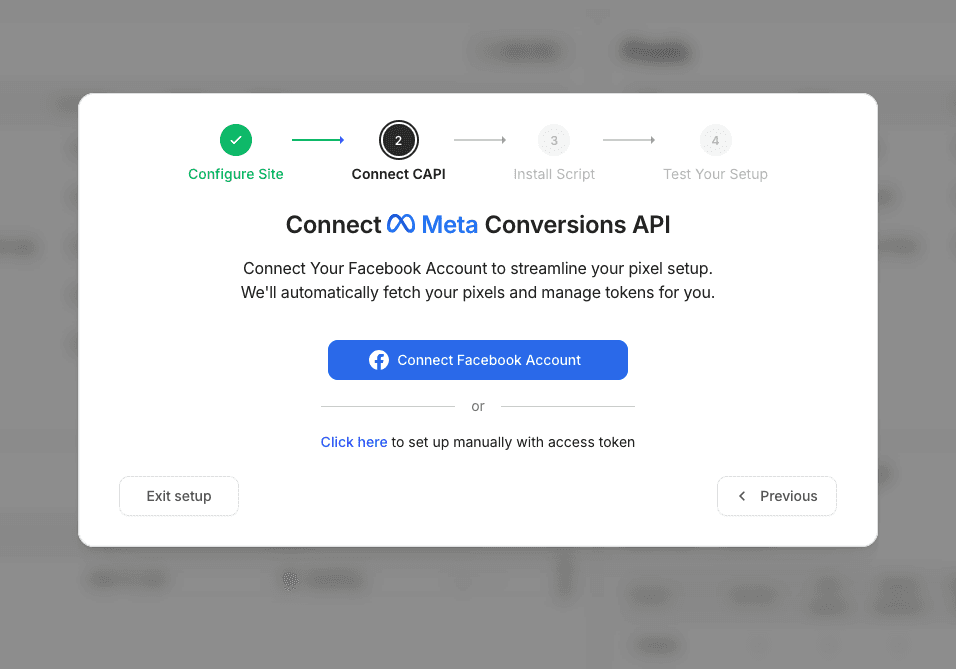
PixelFlow Setup
PixelFlow setup typically takes 5–10 minutes:
Add your site
Connect your Meta Pixel
Add a single script to your site
Events start flowing server-side automatically
No GTM. No server container. No manual event mapping.
After the initial setup you can trigger events using one of two simple methods:
Trigger an event from a specific page - eg. have your /thank-you page fire a lead event
Trigger an event from an element click or form submission using a “class” - eg. add a specific class to your “Signup” button to trigger a “Complete Registration” event when a user completes the signup form.
PixelFlow supports a wide range of platforms with direct integrations and simple guided setup for each platform including:
WooCommerce
Custom HTML websites
In the case of some platforms like WooCommerce, Squarespace and Webflow eCommerce, PixelFlow actually offers instant setup and tracking with no further setup required due to how those platforms are configured.
This makes PixelFlow suitable for no-code websites, traditional CMS platforms, eCommerce stores, funnel builders, and custom implementations via developers/technical users.
The key difference is not platform compatibility, but how tracking is configured.
With PixelFlow, the same tracking model applies across all supported platforms. You install a single script and define events using page URLs, element clicks, or tagged form fields. There is no need for dataLayers, GTM containers, or server infrastructure.
PixelFlow vs Stape: Overview
Stape is an infrastructure platform designed to host Google Tag Manager Server-Side (sGTM). It is powerful, flexible, and commonly used by agencies and technical teams.
PixelFlow is a fully managed, plug-and-play server-side tracking solution built specifically for founders, marketers, and teams who want reliable Meta CAPI tracking without managing Google Tag Manager, event deduplication or server infrastructure.
Setup & Integrations
Both platforms support Facebook Conversions API, but the initial setup and ongoing technical cost is drastically different.
PixelFlow Setup
PixelFlow setup typically takes 5–10 minutes:
Add your site
Connect your Meta Pixel
Add a single script to your site
Events start flowing server-side automatically
No GTM. No server container. No manual event mapping.
After the initial setup you can trigger events using one of two simple methods:
Trigger an event from a specific page - eg. have your /thank-you page fire a lead event
Trigger an event from an element click or form submission using a “class” - eg. add a specific class to your “Signup” button to trigger a “Complete Registration” event when a user completes the signup form.
PixelFlow supports a wide range of platforms with direct integrations and simple guided setup for each platform including:
Framer
Webflow
Squarespace
WordPress
WooCommerce
Kajabi
ClickFunnels
Custom HTML websites
In the case of some platforms like WooCommerce, Squarespace and Webflow eCommerce, PixelFlow actually offers instant setup and tracking with no further setup required due to how those platforms are configured.
This makes PixelFlow suitable for no-code websites, traditional CMS platforms, eCommerce stores, funnel builders, and custom implementations via developers/technical users.
The key difference is not platform compatibility, but how tracking is configured.
With PixelFlow, the same tracking model applies across all supported platforms. You install a single script and define events using page URLs, element clicks, or tagged form fields. There is no need for dataLayers, GTM containers, or server infrastructure.
Stape sGTM Setup
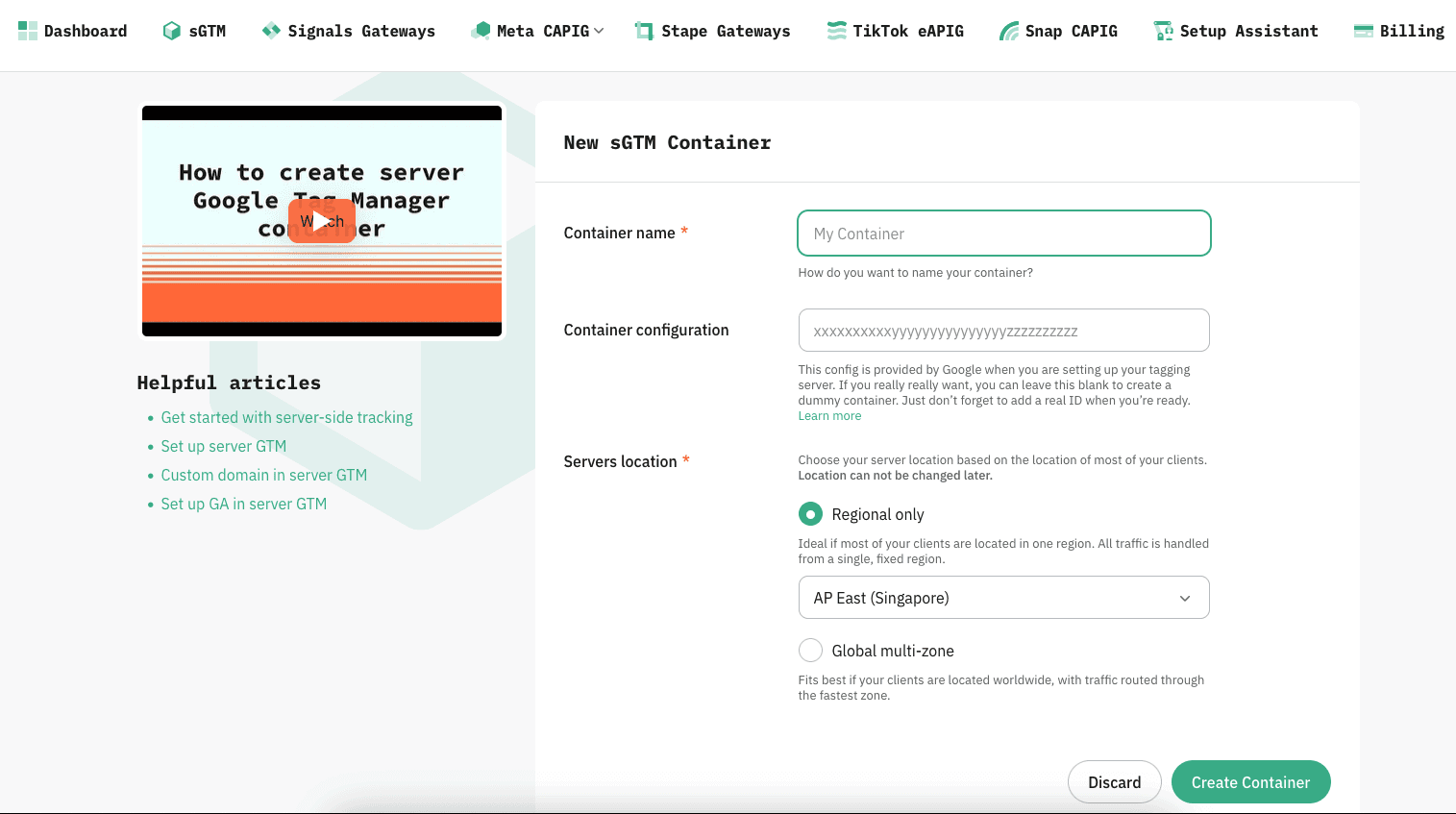
Setting up Stape as a new user can take multiple hours if you're not experienced with the platform or Google Tags Manager. It requires:
Creating a GTM Server-Side container
Deploying server infrastructure
Configuring tags, triggers, and clients
Debugging events manually
Maintaining the setup over time
For agencies and advanced teams, this is fine.
For solo founders or marketers, it can quickly become overwhelming.
Stape also supports all of the platforms listed above, but typically through Google Tag Manager and GTM Server-Side, which adds setup complexity and ongoing maintenance. Additionally, it supports a wide ecosystem including Meta, Google, TikTok etc. but while this flexibility is excellent for agencies managing complex stacks, it's overkill for smaller teams and adds further complexity.
Stape sGTM Setup
Setting up Stape as a new user can take multiple hours if you're not experienced with the platform or Google Tags Manager. It requires:
Creating a GTM Server-Side container
Deploying server infrastructure
Configuring tags, triggers, and clients
Debugging events manually
Maintaining the setup over time
For agencies and advanced teams, this is fine.
For solo founders or marketers, it can quickly become overwhelming.
Stape also supports all of the platforms listed above, but typically through Google Tag Manager and GTM Server-Side, which adds setup complexity and ongoing maintenance. Additionally, it supports a wide ecosystem including Meta, google, TikTok etc. but while this flexibility is excellent for agencies managing complex stacks, its overkill for smaller teams and adds further complexity.
Features and Capabilities
Features and Capabilities
Both platforms support Facebook Conversion API, but the way they provide that setup is very different.
PixelFlow Features
PixelFlow focuses on simplicity and outcomes, not configuration.
Key features include:
Server-side Facebook Conversion API (CAPI)
First-party event tracking via a lightweight script
Dedicated integrations for different website setups
No Google Tag Manager required
Clean dashboard showing events, health, and delivery status
Automatic handling of event forwarding & payload structure
3 months of event logs
PixelFlow is ideal if you want accurate tracking without becoming a tracking expert. You install one script, connect Meta, and you’re done. Tracking more events or elements can be done in under 1 minute.
There’s no container logic, no tag sequencing, and much less risk of breaking things accidentally. You'll see results in your Ads Manager within 48 hours.
Stape sGTM Features
Stape is essentially infrastructure for GTM Server-Side.
Key capabilities include:
GTM Server-Side container hosting
Advanced tag routing & logic
Multi-platform support (Meta, Google Ads, TikTok, GA4, etc.)
Custom server domains
Fine-grained control over events and requests
3 days of event logs
Stape sGTM is extremely powerful, but only if you already understand GTM server-side or are willing to learn it.
It’s not a “tool you turn on”, it’s a platform you build on.
Both platforms support Facebook Conversion API, but the way they provide that setup is very different.
PixelFlow Features
PixelFlow focuses on simplicity and outcomes, not configuration.
Key features include:
Server-side Facebook Conversion API (CAPI)
First-party event tracking via a lightweight script
Dedicated integrations for different website setups
No Google Tag Manager required
Clean dashboard showing events, health, and delivery status
Automatic handling of event forwarding & payload structure
3 months of event logs
PixelFlow is ideal if you want accurate tracking without becoming a tracking expert. You install one script, connect Meta, and you’re done. Tracking more events or elements can be done in under 1 minute.
There’s no container logic, no tag sequencing, and no risk of breaking things accidentally. You'll see results in your ads manager within 48 hours.
Stape sGTM Features
Stape is essentially infrastructure for GTM Server-Side.
Key capabilities include:
GTM Server-Side container hosting
Advanced tag routing & logic
Multi-platform support (Meta, Google Ads, TikTok, GA4, etc.)
Custom server domains
Fine-grained control over events and requests
3 days of event logs
Stape sGTM is extremely powerful, but only if you already understand GTM server-side or are willing to learn it.
It’s not a “tool you turn on”, it’s a platform you build on
Technical Comparison
Technical Comparison
Server-Side Tracking & Script Delivery
Stape offers the ability to load their script via your own domain. This is more complex to setup but can improve cookie lifetime as well as data accuracy.
PixelFlow does not currently offer this feature, but it’s on our roadmap.
Both PixelFlow and Stape send events via the Meta Conversions API.
Stape relies on correct event identifier handling between browser and server containers. This provides flexibility but requires careful configuration.
PixelFlow loads both your Pixel & CAPI together which provides perfect event deduplication with no further setup or configuration required.
Understand the difference between Facebook pixel vs Conversions API.
Event Types
PixelFlow supports all standard Meta events but doesn’t support custom events - this is on our roadmap for 2026.
Stape supports all of the above plus custom events and advanced conditional logic.
Event Triggers
PixelFlow supports event triggering in two ways:
Page load
Element clicks / form submissions etc.
Simple, efficient and easy to manage. We will release more ways to trigger events in the future (such as page scroll depth) but for now this covers 99% of all use cases for customers.
Server-Side Tracking & Script Delivery
Stape offers the ability to load their script via your own domain. This is more complex to setup but can improve cookie lifetime as well as data accuracy.
PixelFlow does not currently offer this feature, but it’s on our roadmap.
Both PixelFlow and Stape send events via the Meta Conversions API.
Stape relies on correct event identifier handling between browser and server containers. This provides flexibility but requires careful configuration.
PixelFlow loads both your Pixel & CAPI together which provides perfect event deduplication with no further setup or configuration required.
Event Types
PixelFlow supports all standard Meta events but doesn’t support custom events - this is on our roadmap for 2026.
Stape supports all of the above plus custom events and advanced conditional logic.
Event Triggers
PixelFlow supports event triggering in two ways:
Page load
Element clicks / form subsmissions etc.
Simple, efficient and easy to manager. We will release more ways to trigger events in the future (such as page scroll depth) but for now this covers 99% of all use cases for customers.
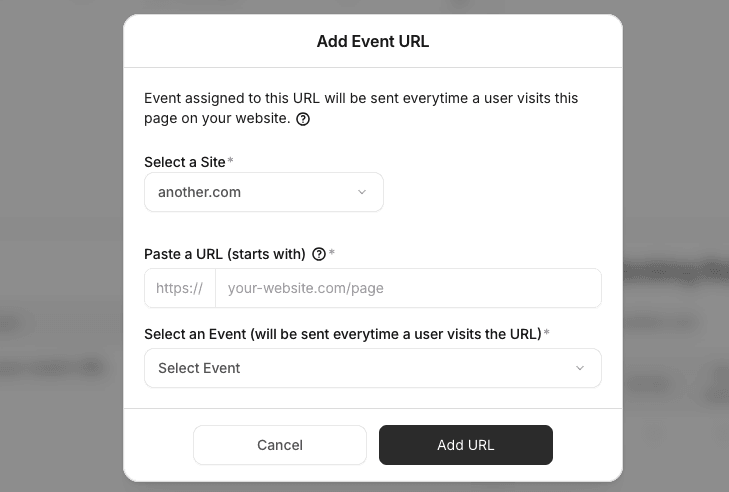
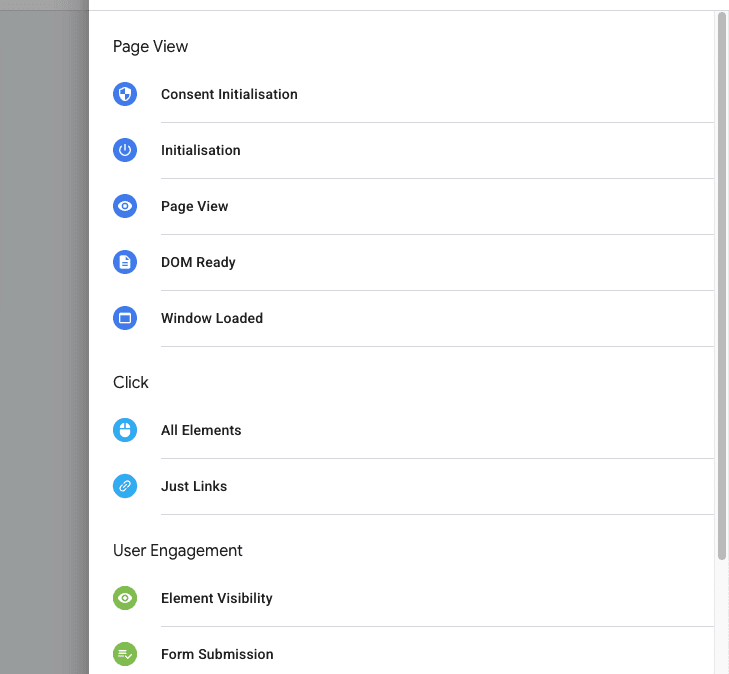
Because Stape sGTM uses GTM, it supports a wider range of triggers and event logic, though it's more difficult to setup and begins to add a lot more complexity and maintenance over time to your tracking.
Because Stape sGTM uses GTM, it supports a wider range of triggers and event logic, though its more difficult to setup and begins to add a lot more complexity and maintenance over time to your tracking.
User Data and Match Quality
PixelFlow automatically sends Meta-supported identifiers such as fbp, fbc, IP address, user agent, and location data. Additional user data can be captured from tagged page elements or URLs. See how Facebook generates event match quality scores.
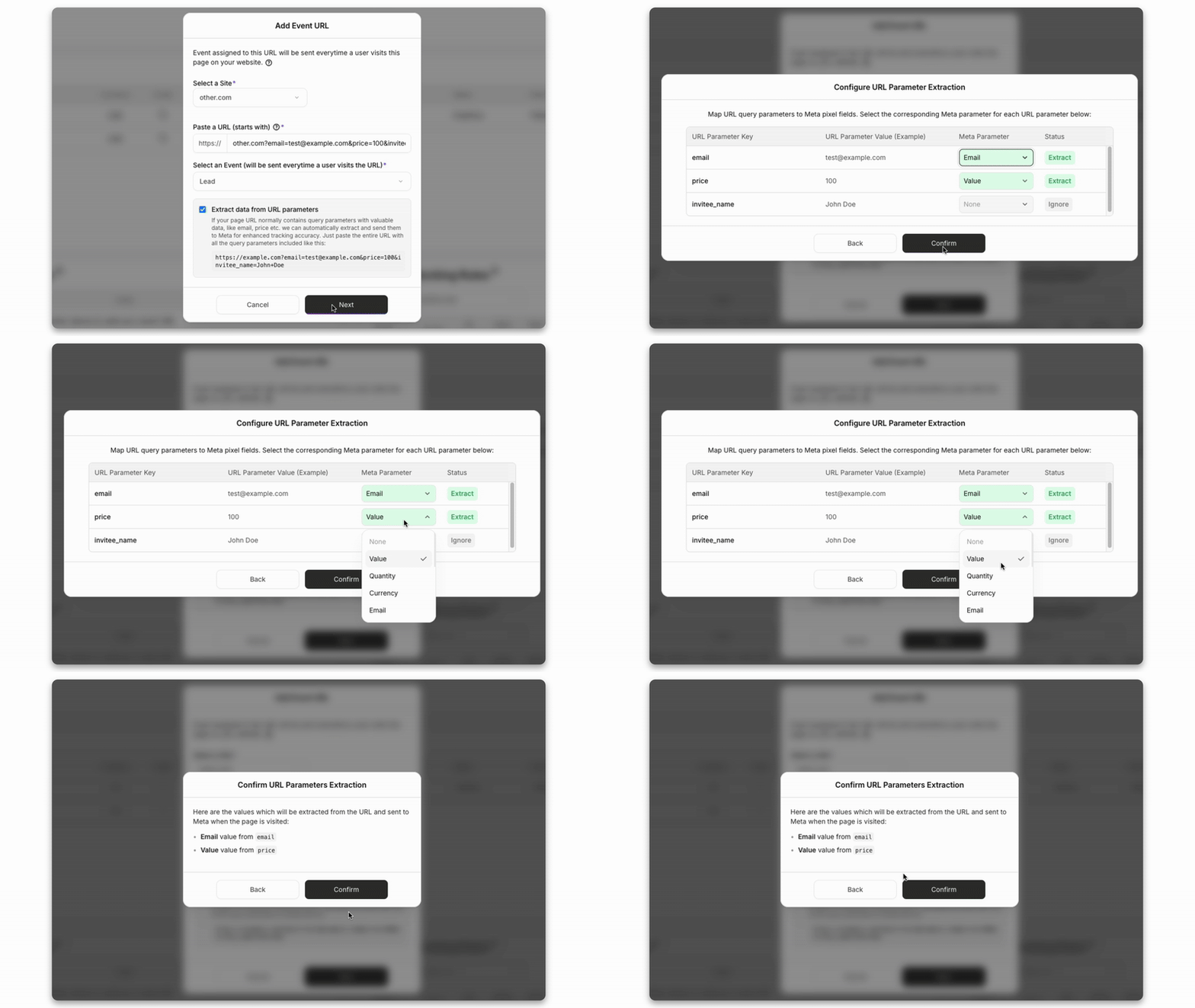
PixelFlow additionally has a number of unique features such as data extraction from URL that lets customers auto extract customer data from URLs and add it to the event payload.
PixelFlow does not currently support external_id or direct CRM integrations.
Stape supports CRM-based data via dataLayer and external identifiers.
Deduplication
Stape sGTM requires you to pass the event_id from the pixel via dataLayer, cookies, request headers to ensure the server side event matches and deduplication can happen.
PixelFlow however loads the Meta Pixel and Conversions API together and generates a single event identifier internally. This allows automatic event deduplication without any manual setup and in many cases, better event deduplication overall.
Unique Features
PixelFlow has a number of unique features based on the requirements of our users who use platforms like Framer, Webflow, Squarespace, WordPress etc.
For example, if you use a platform like Calendly to redirect the user to a thank you page, Calendly can add variables to the URL like the users name, email, phone etc. PixelFlow has functionality that will let you input an example URL and automatically extract that data from the URL to further improve your event match quality score.
User Data and Match Quality
PixelFlow automatically sends Meta-supported identifiers such as fbp, fbc, IP address, user agent, and location data. Additional user data can be captured from tagged page elements or URLs.
PixelFlow additionally has a number of unique features such as data extraction from URL that lets customers auto extract customer data from URLs and add it to the event payload.
PixelFlow does not currently support external_id or direct CRM integrations.
Stape supports CRM-based data via dataLayer and external identifiers.
Deduplication
Stape sGTM requires you to pass the event_id from the pixel via dataLayer, cookies, request headers to ensure the server side event matches and deduplication can happen.
PixelFlow however loads the Meta Pixel and Conversions API together and generates a single event identifier internally. This allows automatic event deduplication without any manual setup and in many cases, better event deduplication overall.
Unique Features
PixelFlow has a number of unique features based on the requirements of our users who use platforms like Framer, Webflow, Squarespace, WordPress etc.
For example, if you use a platform like Calendly to redirect the user to a thank you page, Calendly can add variables to the URL like the users name, email, phone etc. PixelFlow has functionality that will let you input an example URL and automatically extract that data from the URL to further improve your event match quality score.
Additionally PixelFlow offers a set of simple blocking rules to easily define when to block events from being triggered like if someone refreshes a page or if they came from a specific location etc.
Additionally PixelFlow offers a set of simple blocking rules to easily define when to block events from being triggered like if someone refreshes a page or if they came from a specific location etc.
Data Accuracy and Reliability
Data Accuracy and Reliability
Both PixelFlow and Stape significantly improve tracking accuracy compared to browser-only pixels.
PixelFlow
Uses first-party event delivery
Automatically formats Meta CAPI payloads correctly
Designed to minimize setup errors
Loads both Pixel & Conversions API together to ensure events are perfectly deduplicated
Focuses on reliable conversion delivery, not complex logic
Because there are fewer moving parts, there’s also less that can go wrong.
Stape
Accuracy depends heavily on how well GTM is configured
Extremely reliable when implemented correctly
More room for human error during setup
In short:
Stape is powerful
PixelFlow is consistent and safer for non-technical users
Both PixelFlow and Stape significantly improve tracking accuracy compared to browser-only pixels.
PixelFlow
Uses first-party event delivery
Automatically formats Meta CAPI payloads correctly
Designed to minimize setup errors
Loads both Pixel & Conversions API together to ensure events are perfectly deduplicated
Focuses on reliable conversion delivery, not complex logic
Because there are fewer moving parts, there’s also less that can go wrong.
Stape
Accuracy depends heavily on how well GTM is configured
Extremely reliable when implemented correctly
More room for human error during setup
In short:
Stape is powerful
PixelFlow is consistent and safer for non-technical users
Integrations and Compatibility
Integrations and Compatibility
PixelFlow Integrations
PixelFlow is purpose-built for:
Meta (Facebook / Instagram Ads)
No-code and lightweight websites
Simple analytics and event verification
It intentionally avoids overloading users with unnecessary integrations.
Stape Integrations
Stape supports a wide ecosystem:
Meta Ads
Google Ads
GA4
TikTok
Snap
Custom APIs
This flexibility is excellent for agencies managing complex stacks but often overkill for smaller teams.
PixelFlow Integrations
PixelFlow is purpose-built for:
Meta (Facebook / Instagram Ads)
No-code and lightweight websites
Simple analytics and event verification
It intentionally avoids overloading users with unnecessary integrations.
Stape Integrations
Stape supports a wide ecosystem:
Meta Ads
Google Ads
GA4
TikTok
Snap
Custom APIs
This flexibility is excellent for agencies managing complex stacks but often overkill for smaller teams.
Pricing & Value
Pricing & Value
PixelFlow Pricing
PixelFlow offers transparent, simple pricing with a free trial.
$19 for unlimited server side event tracking on one website - simple.
You pay for:
Reliable server-side tracking
Zero infrastructure maintenance
No learning curve
For most founders, this translates to time saved and fewer mistakes, which is often worth more than raw flexibility.
Stape Pricing
Stape pricing depends on:
Server usage
Requests
Container complexity
While affordable at first, costs can scale with traffic and complexity. As pricing is based on "requests" (eg. loading your script), your costs could spiral over time. You also need to factor in the time cost of setup and maintenance.
PixelFlow Pricing
PixelFlow offers transparent, simple pricing with a free trial.
$19 for unlimited event tracking on one website - simple.
You pay for:
Reliable server-side tracking
Zero infrastructure maintenance
No learning curve
For most founders, this translates to time saved and fewer mistakes, which is often worth more than raw flexibility.
Stape Pricing
Stape pricing depends on:
Server usage
Requests
Container complexity
While affordable at first, costs can scale with traffic and complexity. As pricing is based on "requests" (eg. loading your script), your costs could spiral over time. You also need to factor in the time cost of setup and maintenance.
PixelFlow vs Stape: Which Should You Choose?
PixelFlow vs Stape: Which Should You Choose?
Choose PixelFlow if:
You don’t want to touch GTM
You want fast, reliable Facebook CAPI tracking
You value simplicity and speed
Choose Stape if:
You already use GTM Server-Side
You manage multiple ad platforms
You need deep customization
You have technical resources available
Final Verdict: There’s no universal winner, but there is a clear difference in philosophy.
Stape sGTM is a flexible, developer-centric platform
PixelFlow is a focused, no-code solution built for founders and marketers
If your goal is better Meta tracking without technical headaches, PixelFlow is the more practical choice.
If you're also evaluating multi-platform attribution tools, see our Hyros alternative comparison.
See also our plain-English guide to Facebook ads and the Conversions API
Related Reading
01
PixelFlow vs Hyros
PixelFlow vs Hyros
PixelFlow vs Hyros
Understand the difference between PixelFlow & Hyros
Understand the difference between PixelFlow & Hyros
02
PixelFlow vs WeTracked
PixelFlow vs WeTracked
PixelFlow vs WeTracked
Understand the difference between PixelFlow & WeTracked
Understand the difference between PixelFlow & WeTracked
03
PixelFlow vs PixelYourSite
PixelFlow vs PixelYourSite
PixelFlow vs PixelYourSite
Understand the difference between PixelFlow & PixelYourSite
Understand the difference between PixelFlow & PixelYourSite
01
Facebook Ads & Conversions API
Facebook Ads & Conversions API
Facebook Ads & Conversions API
A plain-English guide to Facebook ads and the Conversions API
A plain-English guide to Facebook ads and the Conversions API
02
The Ultimate Guide for Running Facebook Ads
The Ultimate Guide for Running Facebook Ads
The Ultimate Guide for Running Facebook Ads
Understand the correct strategies to use for running Facebook ads in 2026
Understand the correct strategies to use for running Facebook ads in 2026
03
Meta Ads Checklist 2026
Meta Ads Checklist 2026
Meta Ads Checklist 2026
Ensure you're optimising all of your tracking and ad structures for Facebook ads in 2026
Ensure you're optimising all of your tracking and ad structures for Facebook ads in 2026
Choose PixelFlow if:
You don’t want to touch GTM
You want fast, reliable Facebook CAPI tracking
You value simplicity and speed
Choose Stape if:
You already use GTM Server-Side
You manage multiple ad platforms
You need deep customization
You have technical resources available
Final Verdict: There’s no universal winner, but there is a clear difference in philosophy.
Stape sGTM is a flexible, developer-centric platform
PixelFlow is a focused, no-code solution built for founders and marketers
If your goal is better Meta tracking without technical headaches, PixelFlow is the more practical choice.
Fix Your Meta Tracking Today
Accurate reporting and attribution for your Facebook Ads
" height="100.6684426229508px" id="ma1DKTrBT" transform="translate(0 0)" width="88.76467964518449px"/><path d="M 15.897 30.055 L 0 76.25 C 4.86 77.681 9.901 78.408 14.968 78.408 C 21.138 78.408 27.055 77.342 32.563 75.405 C 32.416 75.173 32.29 74.929 32.186 74.675 Z M 61.46 0 C 61.688 1.688 61.817 3.499 61.817 5.448 C 61.817 10.825 60.812 16.869 57.788 24.427 L 41.603 71.22 C 57.355 62.034 67.95 44.969 67.95 25.422 C 67.951 16.21 65.598 7.547 61.46 0 Z" fill="rgb(33, 117, 155)" height="78.40846721311476px" id="vdGl3t_2R" transform="translate(38.017 27.562)" width="67.9504429467883px"/></g></svg>)
" height="32px" id="xF0bVmvvR" width="40px"/></svg>)
" height="69px" id="NxRFF0ru6" transform="translate(34 0)" width="295.9px"/><path d="M 33 370.4 L 0 0 L 362.8 0 L 329.8 370.2 L 181.1 411.4" fill="rgb(228, 77, 38)" height="411.4px" id="v4P_5GIsc" transform="translate(0 100.5)" width="362.79999999999995px"/><path d="M 0 349.5 L 0 0 L 148.3 0 L 120 316" fill="rgb(241, 101, 41)" height="349.5px" id="GBPQmVsU7" transform="translate(181.5 131)" width="148.29999999999995px"/><path d="M 0 0 L 114 0 L 114 45.4 L 49.8 45.4 L 54 91.9 L 114 91.9 L 114 137.2 L 12.4 137.2 M 14.4 160 L 60 160 L 63.2 196.3 L 114 209.9 L 114 257.3 L 20.8 231.3" fill="rgb(235, 235, 235)" height="257.30000000000007px" id="CyozgdR8b" transform="translate(67.5 176.5)" width="114px"/><path d="M 113.8 0 L 0 0 L 0 45.4 L 109.6 45.4 M 105.5 91.9 L 0 91.9 L 0 137.3 L 56 137.3 L 50.7 196.3 L 0 209.9 L 0 257.1 L 93 231.3" fill="rgb(255, 255, 255)" height="257.1px" id="XOiUNaVC2" transform="translate(181.5 176.5)" width="113.80000000000001px"/></g></svg>)
"/><stop offset="1" stop-color="rgb(143, 1, 130)"/></linearGradient><linearGradient id="JsoQaAseI-2255077377-linear-gradient" x1="1" x2="0" y1="0.2729855317795909" y2="0.7270144682204092"><stop offset="0" stop-color="rgb(143, 1, 130)"/><stop offset="1" stop-color="rgb(255, 152, 176)"/></linearGradient><linearGradient id="pymFQODqf-2255077377-linear-gradient" x1="0.33671501612872723" x2="0.6632849838712728" y1="5.551115123125783e-17" y2="1"><stop offset="0" stop-color="rgb(255, 152, 176)"/><stop offset="1" stop-color="rgb(143, 1, 130)"/></linearGradient><linearGradient id="PYUwiuDld-2255077377-linear-gradient" x1="0.49751243781094523" x2="0.5024875621890548" y1="0" y2="1"><stop offset="0" stop-color="rgb(255, 152, 176)"/><stop offset="1" stop-color="rgb(143, 1, 130)"/></linearGradient></defs><g d="M 0 0 L 150 0 L 150 150 L 0 150 Z M 40.917 130.27 L 7.917 130.27 C 5.877 130.27 4.507 128.28 5.167 126.39 L 41.247 19.5 L 74.577 19.5 L 38.317 126.34 C 37.607 128.42 38.647 130.27 40.917 130.27 Z M 8.47 130.64 L 41.28 130.64 C 43.84 130.64 46.25 129.5 47.91 127.61 L 114.18 50.5 L 87.57 50.5 C 85.58 50.5 83.69 51.3 82.27 52.77 L 9.08 129.74 C 8.37 130.5 7.71 130.45 7 130.31 C 7.62 130.64 8.04 130.64 8.47 130.64 Z M 87.122 50.5 L 119.312 50.5 C 124.192 50.5 124.852 55.14 122.102 58.17 C 115.572 65.37 110.032 71.14 103.782 82.79 C 95.682 97.75 94.882 132.73 125.132 128.24 C 119.072 130.23 112.632 130.65 108.702 130.65 L 92.182 130.65 C 90.902 130.65 86.262 130.22 83.852 129.51 C 59.092 121.79 71.972 77.34 88.022 58.22 C 91.242 54.39 89.872 50.88 87.262 50.55 C 87.072 50.5 87.262 50.5 87.122 50.5 Z M 115 105 L 145.82 105 C 143.41 117.4 134.13 130.66 108.47 130.66 L 92.52 130.66 C 90.11 130.66 85.84 130.09 84 129.52 C 110.37 128.62 113.49 112.95 115.01 105 Z" fill="transparent" height="150px" id="EbF3dhvA8" width="150px"><path d="M 0 0 L 150 0 L 150 150 L 0 150 Z" fill="transparent" height="150px" id="NkPM6JHJT" width="150px"/><path d="M 35.917 110.77 L 2.917 110.77 C 0.877 110.77 -0.493 108.78 0.167 106.89 L 36.247 0 L 69.577 0 L 33.317 106.84 C 32.607 108.92 33.647 110.77 35.917 110.77 Z" fill="url(%23xfKGli8ox-2255077377-linear-gradient)" height="110.76999999999998px" id="xfKGli8ox" transform="translate(5 19.5)" width="69.577315259616px"/><path d="M 1.47 80.14 L 34.28 80.14 C 36.84 80.14 39.25 79 40.91 77.11 L 107.18 0 L 80.57 0 C 78.58 0 76.69 0.8 75.27 2.27 L 2.08 79.24 C 1.37 80 0.71 79.95 0 79.81 C 0.62 80.14 1.04 80.14 1.47 80.14 Z" fill="url(%23JsoQaAseI-2255077377-linear-gradient)" height="80.13999999999999px" id="JsoQaAseI" transform="translate(7 50.5)" width="107.18000000000006px"/><path d="M 17.122 0 L 49.312 0 C 54.192 0 54.852 4.64 52.102 7.67 C 45.572 14.87 40.032 20.64 33.782 32.29 C 25.682 47.25 24.882 82.23 55.132 77.74 C 49.072 79.73 42.632 80.15 38.702 80.15 L 22.182 80.15 C 20.902 80.15 16.262 79.72 13.852 79.01 C -10.908 71.29 1.972 26.84 18.022 7.72 C 21.242 3.89 19.872 0.38 17.262 0.05 C 17.072 0 17.262 0 17.122 0 Z" fill="url(%23pymFQODqf-2255077377-linear-gradient)" height="80.14999999999998px" id="pymFQODqf" transform="translate(70 50.5)" width="55.13171886981604px"/><path d="M 31 0 L 61.82 0 C 59.41 12.4 50.13 25.66 24.47 25.66 L 8.52 25.66 C 6.11 25.66 1.84 25.09 0 24.52 C 26.37 23.62 29.49 7.95 31.01 0 Z" fill="url(%23PYUwiuDld-2255077377-linear-gradient)" height="25.659999999999968px" id="PYUwiuDld" transform="translate(84 105)" width="61.819999999999936px"/></g></svg>)
" height="2097.9411764705883px" id="S76HjnTqj" width="2515.2941176470586px"/><path d="M 547.353 1310.588 C 577.668 1260.259 637.75 1236.226 694.412 1251.765 C 719.946 1260.628 747.985 1258.745 772.105 1246.546 C 796.225 1234.347 814.359 1212.879 822.353 1187.059 C 842.295 1133.481 816.313 1073.723 763.529 1051.765 C 712.193 1028.361 683.168 973.214 692.941 917.647 C 702.048 859.486 751.442 816.158 810.294 814.706 C 868.455 813.478 915.036 766.114 915.294 707.941 C 915.02 649.09 867.38 601.45 808.529 601.176 L 806.765 601.176 C 747.791 599.434 697.808 557.253 686.176 499.412 C 682.971 482.405 682.971 464.948 686.176 447.941 C 692.264 409.82 716.354 376.97 750.882 359.706 C 801.253 332.447 821.323 270.424 796.471 218.824 C 777.589 164.117 717.973 135.032 663.235 153.824 C 636.65 164.466 607.144 165.3 580 156.176 C 556.668 145.678 536.416 129.375 521.176 108.824 C 497.844 77.711 488.859 38.137 496.471 0 L 6.471 0 C 233.824 122.059 450.294 367.353 455.588 692.941 C 461.471 1045.882 274.706 1330.882 0 1466.176 L 553.529 1466.176 C 515.603 1422.035 513.045 1357.597 547.353 1310.588 Z" fill="rgb(60, 155, 214)" height="1466.176470588235px" id="lMvmPOhNY" transform="translate(305.588 445.294)" width="915.2941176470588px"/><path d="M 241.971 141.471 C 287.547 179.106 300.551 243.512 273.147 295.882 C 250.731 350.295 194.82 383.12 136.382 376.176 C 109.633 371.075 81.961 377.103 59.757 392.868 C 37.553 408.633 22.738 432.771 18.735 459.706 C 6.941 515.354 41.024 570.431 96.088 584.706 C 150.474 599.894 187.643 650.018 186.382 706.471 C 185.567 763.776 144.91 812.761 88.735 824.118 C 37.534 833.049 0.126 877.437 0 929.412 C 0.274 988.295 47.94 1035.962 106.824 1036.235 C 112.882 1036.235 118.941 1035.735 124.912 1034.706 C 183.433 1027.402 239.264 1061.413 259.618 1116.765 C 265.294 1133.118 267.882 1150.353 267.265 1167.647 C 267.335 1206.509 248.595 1243.002 216.971 1265.588 C 170.816 1300.28 160.415 1365.287 193.441 1412.647 C 207.952 1435.245 228.268 1453.53 252.265 1465.588 L 906.971 1465.588 C 698.735 1362.353 505.206 1168.235 457.853 892.059 C 390.794 500.588 575.5 159.412 885.794 0 L 218.441 0 C 187.613 45.954 197.927 107.97 241.971 141.471 Z" fill="rgb(231, 79, 56)" height="1465.5882352941173px" id="nCo89Cxwh" transform="translate(1303.029 445.294)" width="906.9705882352946px"/><path d="M 19.118 0 L 0 0 C 6.235 1.824 12.882 1.824 19.118 0 Z" fill="rgb(60, 155, 214)" height="1.3676470588234224px" id="knW1DunOE" transform="translate(1714.412 1932.353)" width="19.117647058823422px"/></g></svg>)
Frequently Asked Questions

PixelFlow is not a direct replacement for Stape. Stape is infrastructure for Google Tag Manager Server-Side and is designed for technical users who want full control. PixelFlow is designed to deliver reliable Facebook Conversions API tracking without requiring GTM or server management. If you want flexibility and custom logic, Stape may be a better fit. If you want simplicity and speed, PixelFlow is usually the better choice.
PixelFlow is significantly easier to set up than Stape. PixelFlow typically takes 5 to 10 minutes and requires adding a single script and connecting your Meta Pixel. Stape requires setting up GTM Web and GTM Server containers, configuring tags and triggers, and validating events manually. PixelFlow is designed for founders and marketers. Stape is designed for technical teams and agencies.
Yes. Both PixelFlow and Stape support Facebook Conversions API. PixelFlow loads the Meta Pixel and Conversions API together and handles event deduplication automatically. Stape supports Conversions API through GTM Server-Side but requires correct event_id handling and manual configuration. Both improve tracking accuracy compared to browser-only pixels, but PixelFlow reduces setup complexity.
Yes. PixelFlow is a strong Stape alternative for teams that primarily advertise on Meta and want server-side tracking without GTM. PixelFlow offers faster setup, lower maintenance, and predictable behavior. Stape is better suited for complex multi-platform tracking and users who want full control. If your main goal is better Meta optimization without technical overhead, PixelFlow is often the more practical choice.
No. PixelFlow does not require Google Tag Manager. Stape is built specifically around GTM Server-Side and cannot be used without it. PixelFlow removes the need for GTM entirely by handling event triggering, payloads, and server-side delivery internally. This is one of the main reasons PixelFlow appeals to non-technical users.
PixelFlow is better suited for non-technical users. PixelFlow avoids concepts like dataLayers, containers, triggers, and server hosting. Events are triggered using page URLs, element clicks, or tagged form fields. Stape assumes familiarity with GTM and server-side tracking concepts and is better suited for developers or agencies.
No. PixelFlow intentionally does less than Stape. Stape supports advanced routing, custom events, multiple ad platforms, and deep customization. PixelFlow focuses on the most common Meta tracking use cases and prioritizes reliability over flexibility. For most founders and marketers, PixelFlow covers what they actually need. For advanced tracking stacks, Stape offers more control.
Yes, but you need to handle event identifiers carefully or you will send Meta two events for every conversion and temporarily inflate your numbers. The cleanest path is to run them in parallel for a short overlap period (typically 1 to 2 weeks) with one important caveat: route them to different Meta Pixels. Keep your existing Stape setup firing into your live Pixel, and connect PixelFlow to a fresh test Pixel inside the same Meta Business account. Compare event volumes and Event Match Quality between the two for a week. Once you are confident PixelFlow is matching what you expected, swap the production Pixel to PixelFlow and remove the Stape script. If you would rather not maintain two Pixels, the alternative is to disable the Stape Conversions API sending temporarily, run PixelFlow alone for a validation week, and only then fully retire Stape. This avoids double-counting but means a brief reliance on a single channel during validation. Do not leave them running in parallel into the same Pixel for more than a few days without coordinating event IDs between the two. Meta deduplicates events with matching IDs, but Stape and PixelFlow generate IDs differently, so an extended overlap will double-count conversions.
Honest answer: Stape wins on this one today, and the difference is real. Stape lets you load your tracking script through a custom subdomain (like track.yoursite.com) instead of routing it through Meta's CDN or a third-party host. The practical benefits are slightly longer first-party cookie lifetime, marginally better attribution accuracy, and reduced exposure to ad blockers that specifically target Meta-owned domains. For high-traffic ecommerce stores running large ad budgets, that delta can be meaningful. PixelFlow currently loads through our hosted infrastructure rather than a custom subdomain. Custom tracking domains are on our roadmap for 2026, and we will bring the feature to all paid tiers when it ships. In the meantime, the gap is real but usually small in absolute terms. For most founders and marketers we work with, the time saved on Stape's GTM setup outweighs the marginal data-quality lift from custom domains. If custom domains are non-negotiable for your stack (you are running six-figure monthly ad spend, or your auditors require all third-party scripts to load from your own domain), Stape is the right tool today. For everyone else, PixelFlow's simpler setup is usually the better trade.
No. Your historical event data lives in Meta, not in Stape, so it stays with Meta when you switch tools. Stape sends events to Meta's Conversions API endpoint, where Meta stores them in your Events Manager and uses them in your Pixel or dataset. PixelFlow does exactly the same thing. Switching from one to the other does not move or delete anything that has already been sent. Your historical conversion data, your custom audiences, your lookalikes, and your campaign learning all stay intact. The only thing you "lose" is Stape's internal dashboard view of past events, which most teams never look at after setup. PixelFlow has its own event log showing every event we send going forward, plus Meta's response to each one, so you keep that kind of visibility on the PixelFlow side. One note worth flagging: any custom audiences you built from past events continue ageing out on their normal Meta retention windows (180 days for most website events, 730 days for purchase events). Switching tools does not reset or shorten these windows.
Frequently Asked Questions
PixelFlow is not a direct replacement for Stape. Stape is infrastructure for Google Tag Manager Server-Side and is designed for technical users who want full control. PixelFlow is designed to deliver reliable Facebook Conversions API tracking without requiring GTM or server management. If you want flexibility and custom logic, Stape may be a better fit. If you want simplicity and speed, PixelFlow is usually the better choice.
PixelFlow is significantly easier to set up than Stape. PixelFlow typically takes 5 to 10 minutes and requires adding a single script and connecting your Meta Pixel. Stape requires setting up GTM Web and GTM Server containers, configuring tags and triggers, and validating events manually. PixelFlow is designed for founders and marketers. Stape is designed for technical teams and agencies.
Yes. Both PixelFlow and Stape support Facebook Conversions API. PixelFlow loads the Meta Pixel and Conversions API together and handles event deduplication automatically. Stape supports Conversions API through GTM Server-Side but requires correct event_id handling and manual configuration. Both improve tracking accuracy compared to browser-only pixels, but PixelFlow reduces setup complexity.
No. PixelFlow does not require Google Tag Manager. Stape is built specifically around GTM Server-Side and cannot be used without it. PixelFlow removes the need for GTM entirely by handling event triggering, payloads, and server-side delivery internally. This is one of the main reasons PixelFlow appeals to non-technical users.
PixelFlow is better suited for non-technical users. PixelFlow avoids concepts like dataLayers, containers, triggers, and server hosting. Events are triggered using page URLs, element clicks, or tagged form fields. Stape assumes familiarity with GTM and server-side tracking concepts and is better suited for developers or agencies.
No. PixelFlow intentionally does less than Stape. Stape supports advanced routing, custom events, multiple ad platforms, and deep customization. PixelFlow focuses on the most common Meta tracking use cases and prioritizes reliability over flexibility. For most founders and marketers, PixelFlow covers what they actually need. For advanced tracking stacks, Stape offers more control.
Yes. PixelFlow is a strong Stape alternative for teams that primarily advertise on Meta and want server-side tracking without GTM. PixelFlow offers faster setup, lower maintenance, and predictable behavior. Stape is better suited for complex multi-platform tracking and users who want full control. If your main goal is better Meta optimization without technical overhead, PixelFlow is often the more practical choice.