PixelFlow vs WeTracked: In-Depth Comparison (2026)

Last updated: 29th December 2025

Last updated: 16th February 2026

If you are looking for PixelYourSite alternatives, you are likely trying to solve one core problem:

How do I get accurate Meta conversion tracking without unnecessary complexity or ongoing maintenance?

Both platforms improve tracking beyond standard browser-based pixels by using the Meta Conversions API, but they approach the problem differently and are built for different types of users.

This page explains the difference in simple terms first. A technical section is included later if you want deeper detail.

The Short Answer

The Short Answer

PixelFlow is a lightweight WordPress solution designed to send clean, reliable Meta Conversions API events for WooCommerce and common form interactions, with minimal setup and built-in event logs for visibility and debugging.

PixelYourSite is a powerful WordPress plugin that acts as a full tracking and tag management system across Meta, Google, TikTok, Pinterest, and more, but does not provide dedicated server-side event delivery logs.

If you want reliable Meta tracking on WordPress with simple defaults, fast setup, and clear visibility into which events are being sent, PixelFlow is usually the better choice.

If you want deep control over events, multi-platform tracking, and advanced WooCommerce configuration and are comfortable without delivery logs, PixelYourSite may be a better fit.

If you're looking for WeTracked alternatives, you're likely trying to solve one core problem:

How do I get accurate Meta conversion tracking for my WooCommerce store without overpaying or getting locked into a single platform?

Both PixelFlow and WeTracked improve tracking beyond standard browser-based pixels by using the Meta Conversions API (CAPI), but they approach the problem differently and are built for different types of users.

This page explains the difference in simple terms first. A technical section is included later if you want deeper detail.

The Short Answer

PixelFlow is a lightweight WooCommerce solution that sends clean, reliable events via BOTH Pixel & Meta Conversions API with minimal setup and additional customisable settings like tracking free products etc.. It has built-in event logs for visibility and debugging, and unlimited event tracking on all plans.

WeTracked provides similar functionality but without event logs for visibility of what's being tracked (so you need to take their word for it) and comes at a significantly higher price point of $149/month.

If you want reliable Meta tracking for WooCommerce with simple setup, full event visibility, and predictable pricing starting at $19/month, PixelFlow is usually the better choice.

If budget isn't a concern, WeTracked may be worth considering. Just know that you'll pay 3-8x more for less functionality.

PixelFlow vs PixelYourSite: Overview


What PixelFlow is Designed For

PixelFlow focuses on one thing: making the Meta Conversions API work properly with minimal setup and minimal ongoing maintenance.

It is designed for:

  • Founders and marketers

  • Small to mid-sized businesses

  • No-code and modern site builders

  • CMS-based, WordPress, and custom websites

  • Teams that want fast setup and reliable tracking

PixelFlow includes an optional WordPress plugin that can automatically track WooCommerce events, while still supporting non-WordPress sites through a simple script-based setup.

PixelFlow prioritizes simplicity, speed, and consistency.

What PixelYourSite Is Designed For

PixelYourSite is a powerful WordPress tracking plugin.

It is designed to support:

  • Meta Conversions API and browser-based tracking

  • WooCommerce and WordPress-specific events

  • Advanced and custom event configuration

  • Multiple advertising and analytics platforms

PixelYourSite is commonly used by:

  • WordPress and WooCommerce site owners

  • Developers and technical marketers

  • Businesses that want granular control over tracking logic

  • Teams comfortable managing plugins, updates, and settings

PixelYourSite prioritizes flexibility and control over simplicity.

PixelFlow vs WeTracked: Overview


PixelFlow vs WeTracked: Overview


What PixelFlow is Designed For

PixelFlow focuses on one thing: making the Meta Conversions API work properly with minimal setup and minimal ongoing maintenance.

It is designed for:

  • Founders and marketers who want tracking that just works

  • Small to mid-sized e-commerce businesses

  • WooCommerce store owners who don't want to overpay

  • Teams that want fast setup, reliable tracking, and full visibility into what's being sent

  • Businesses that need both Pixel and CAPI working together for accurate data

PixelFlow includes a dedicated WooCommerce plugin that automatically tracks all e-commerce events, while also supporting non-WordPress sites through a simple script-based setup.

Beyond e-commerce, PixelFlow lets you track any interaction on your site by adding simple CSS classes to buttons, forms, or links. Want to track a lead form submission or a specific button click? Just add a code snippet and you're done.

PixelFlow loads both your Meta Pixel and Conversions API together, handling deduplication automatically so Meta receives complete, accurate data without double-counting events.

PixelFlow prioritizes simplicity, affordability, and flexibility.

What WeTracked is Designed For

WeTracked is a premium WooCommerce tracking service that supports multiple ad platforms including Meta, TikTok, and Google Ads.

It is designed to support:

  • Server-side tracking across multiple advertising platforms

  • WooCommerce stores exclusively

  • Hands-off, fully managed setup

  • Store owners who prefer to pay for done-for-you configuration

WeTracked is commonly used by:

  • WooCommerce store owners with larger budgets

  • Businesses advertising across Meta, TikTok, and Google who want one solution

  • Teams willing to pay a premium ($149/month) for a managed service

  • Stores that only need e-commerce event tracking and don't need visibility into individual events

WeTracked uses a proprietary tracking system and sends CAPI data only (not Pixel and CAPI together). It does not provide event logs, so you cannot see exactly which events have been sent or troubleshoot delivery issues directly. Tracking is limited to WooCommerce e-commerce events only. Custom events like lead form submissions or button clicks are not supported.

WeTracked prioritizes multi-platform coverage and convenience over cost, flexibility, and transparency.

PixelFlow

WeTracked

Primary Focus

Meta Conversions API

Multi-platform (Meta, TikTok, Google)

Designed For

Small to mid-sized businesses

Larger budget stores

Platform support

WooCommerce, WordPress & more

WooCommerce only

eCommerce tracking

Automatic

Automatic

Custom event tracking

Yes

No

Analytics

Yes

No

Pixel & CAPI

Yes

No CAPI only

Event logs

Yes

No

Starting price

$19/month

$149/month

  1. Setup & Integrations

Setup & Integrations

Both platforms support the Meta Conversions API with quick WooCommerce setup. The difference is what you can do after installation.

PixelFlow Setup

PixelFlow setup takes under 5 minutes:

  • Install the PixelFlow WooCommerce plugin

  • Connect your Meta account

  • Click enable

  • Events start flowing automatically

PixelFlow loads both your Meta Pixel and Conversions API together, handling event deduplication automatically. WooCommerce events like Add to Cart, Initiate Checkout, and Purchase are tracked with zero configuration.

Beyond e-commerce, you can track any interaction like button clicks, form submissions using simple CSS classes (code snippets). No custom JavaScript or tag managers required.

WeTracked Setup

WeTracked setup is similarly quick:

  • Install the WeTracked plugin

  • Add your API key

  • E-commerce events start tracking automatically

WeTracked sends CAPI data only and does not load the Meta Pixel alongside it. Tracking is limited to WooCommerce e-commerce events. Custom events like lead forms or button clicks are not supported.

Both platforms support the Meta Conversions API, but the initial setup experience and ongoing technical overhead are very different.

PixelFlow Setup (Wordpress/WooCommerce)

PixelFlow setup on WordPress typically takes 5 to 10 minutes:

  • Add your site

  • Connect your Meta Pixel

  • Install the PixelFlow WordPress plugin

  • Events start flowing server-side automatically

No Google Tag Manager.
No server containers.
No manual event mapping.

For WooCommerce users, PixelFlow’s plugin can automatically track core eCommerce events such as Add to Cart, Initiate Checkout, and Purchase with minimal configuration.

Triggering Additional Events

After the initial setup, you can trigger additional events using two simple methods:

1. Page-based events

Trigger an event when a specific page is viewed.
For example, fire a Lead event when a user visits your /thank-you page.

2. Element or form-based events

Trigger events from button clicks or form submissions using predefined CSS classes.

For example:

  • Add a class to a “Sign up” button to fire a Complete Registration event

  • Track form submissions from popular WordPress form plugins like Contact Form 7

No custom JavaScript, tag rules, or data layers are required.

WordPress Support Scope

PixelFlow is designed specifically for WordPress + WooCommerce Meta tracking.

It supports:

  • WordPress websites

  • WooCommerce stores

  • Common WordPress form plugins

  • Custom interactions via documented CSS classes

PixelFlow does not attempt to support every WordPress commerce or download plugin (such as Easy Digital Downloads). This is a deliberate tradeoff to keep tracking simple, predictable, and easy to maintain.

Why This Matters

This makes PixelFlow suitable for:

  • WooCommerce-based eCommerce stores

  • Lead generation sites on WordPress

  • Marketing pages and funnels

  • Teams that want reliable Meta tracking without configuration overhead

The key difference is not whether Meta Conversions API is supported, but how tracking is configured and maintained.

With PixelFlow, you install a single WordPress plugin and define events using page URLs or element classes. There is no need for Google Tag Manager containers, complex rule engines, or custom server infrastructure.

PixelYourSite Setup

PixelYourSite supports the Meta Conversions API, but its setup is designed around flexibility and granular WordPress-level control rather than speed or uniform simplicity.

A typical PixelYourSite setup involves:

  • Installing and configuring a WordPress plugin

  • Enabling browser-based and server-side tracking options

  • Configuring WooCommerce (and optionally Easy Digital Downloads) events

  • Defining custom events, click rules, and trigger conditions

  • Managing consent, privacy, and plugin-specific settings

Because PixelYourSite offers deep configuration options, setup often requires:

  • Navigating multiple plugin settings panels

  • Understanding WordPress hooks, page structure, and plugin interactions

  • Manual configuration for custom buttons, forms, scroll events, or video interactions

PixelYourSite does not use a single standardized tracking model. Tracking logic is defined inside WordPress and can vary depending on theme, active plugins, and which features (free vs Pro) are enabled.

Setup time can range from quick for standard WooCommerce stores using default events to more involved for custom themes, advanced triggers, or multi-platform tracking setups.

The benefit of this approach is greater control over:

  • Exactly which events fire and under what conditions

  • Advanced WooCommerce parameters and custom event data

  • Integration with multiple advertising and analytics platforms beyond Meta

PixelYourSite is therefore best suited to teams that:

  • Operate entirely on WordPress or WooCommerce

  • Want detailed, fine-grained control over tracking behavior

  • Are comfortable managing plugins, updates, and configuration over time

  • Prefer flexibility and platform breadth over a standardized, minimal setup

Setup & Integrations

Setup Meta Conversions API

Both platforms support the Meta Conversions API, but the initial setup experience and ongoing technical overhead are very different.

PixelFlow Setup (Wordpress/WooCommerce)

PixelFlow setup on WordPress typically takes 5 to 10 minutes:

  • Add your site

  • Connect your Meta Pixel

  • Install the PixelFlow WordPress plugin

  • Events start flowing server-side automatically

No Google Tag Manager.
No server containers.
No manual event mapping.

For WooCommerce users, PixelFlow’s plugin can automatically track core eCommerce events such as Add to Cart, Initiate Checkout, and Purchase with minimal configuration.

Triggering Additional Events

After the initial setup, you can trigger additional events using two simple methods:

1. Page-based events

Trigger an event when a specific page is viewed.
For example, fire a Lead event when a user visits your /thank-you page.

2. Element or form-based events

Trigger events from button clicks or form submissions using predefined CSS classes.

For example:

  • Add a class to a “Sign up” button to fire a Complete Registration event

  • Track form submissions from popular WordPress form plugins like Contact Form 7

No custom JavaScript, tag rules, or data layers are required.

WordPress Support Scope

PixelFlow is designed specifically for WordPress + WooCommerce Meta tracking.

It supports:

  • WordPress websites

  • WooCommerce stores

  • Common WordPress form plugins

  • Custom interactions via documented CSS classes

PixelFlow does not attempt to support every WordPress commerce or download plugin (such as Easy Digital Downloads). This is a deliberate tradeoff to keep tracking simple, predictable, and easy to maintain.

Why This Matters

This makes PixelFlow suitable for:

  • WooCommerce-based eCommerce stores

  • Lead generation sites on WordPress

  • Marketing pages and funnels

  • Teams that want reliable Meta tracking without configuration overhead

The key difference is not whether Meta Conversions API is supported, but how tracking is configured and maintained.

With PixelFlow, you install a single WordPress plugin and define events using page URLs or element classes. There is no need for Google Tag Manager containers, complex rule engines, or custom server infrastructure.

PixelYourSite Setup

PixelYourSite supports the Meta Conversions API, but its setup is designed around flexibility and granular WordPress-level control rather than speed or uniform simplicity.

A typical PixelYourSite setup involves:

  • Installing and configuring a WordPress plugin

  • Enabling browser-based and server-side tracking options

  • Configuring WooCommerce (and optionally Easy Digital Downloads) events

  • Defining custom events, click rules, and trigger conditions

  • Managing consent, privacy, and plugin-specific settings

Because PixelYourSite offers deep configuration options, setup often requires:

  • Navigating multiple plugin settings panels

  • Understanding WordPress hooks, page structure, and plugin interactions

  • Manual configuration for custom buttons, forms, scroll events, or video interactions

PixelYourSite does not use a single standardized tracking model. Tracking logic is defined inside WordPress and can vary depending on theme, active plugins, and which features (free vs Pro) are enabled.

Setup time can range from quick for standard WooCommerce stores using default events to more involved for custom themes, advanced triggers, or multi-platform tracking setups.

The benefit of this approach is greater control over:

  • Exactly which events fire and under what conditions

  • Advanced WooCommerce parameters and custom event data

  • Integration with multiple advertising and analytics platforms beyond Meta

PixelYourSite is therefore best suited to teams that:

  • Operate entirely on WordPress or WooCommerce

  • Want detailed, fine-grained control over tracking behavior

  • Are comfortable managing plugins, updates, and configuration over time

  • Prefer flexibility and platform breadth over a standardized, minimal setup

  1. Features and Capabilities

Features and Capabilities

PixelFlow Features (WooCommerce)

PixelFlow focuses on simplicity, visibility, and outcomes rather than configuration depth.

Core tracking features:

  • Server-side Meta Conversions API (CAPI)

  • Automatic Meta Pixel loading alongside CAPI for proper event deduplication

  • First-party event tracking via a lightweight WordPress plugin

  • Automatic WooCommerce event tracking (Add to Cart, Initiate Checkout, Purchase)

  • Simple form and interaction tracking using documented CSS classes

  • No Google Tag Manager required

Event visibility and debugging:

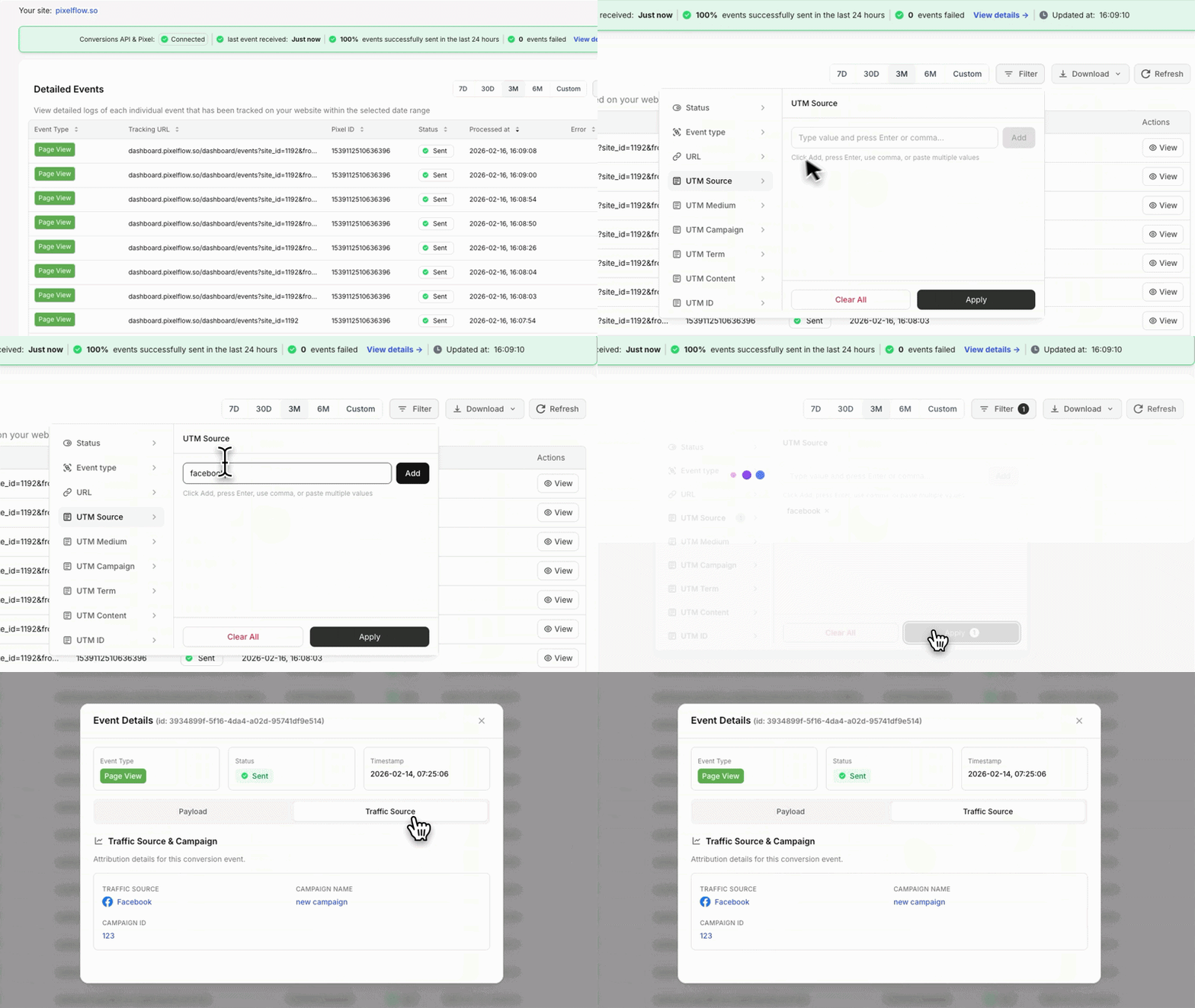
  • Real-time event logs showing every event sent to Meta

  • See exact payloads, delivery status, and any errors

  • Debug issues instantly without guessing

  • Built-in event logs with up to three months of history

  • Know exactly what Meta is receiving at all times

Simplicity by design:

  • Automatic handling of event forwarding, deduplication, and payload structure

  • Clean dashboard showing event status, health, and delivery

  • No container logic, no tag sequencing, and very little risk of breaking your setup accidentally

Additional features:

  • Exclude tracking for user roles (administrators, editors etc.)

  • Enable/disable tracking for free products

PixelFlow is ideal if you want accurate Meta tracking on WordPress without becoming a tracking expert. You install one plugin, connect Meta, and core events start flowing automatically.

Tracking additional events like form submissions or button clicks can usually be done in under a minute by adding a predefined class. Want to track a lead form? Add pf-track-lead to your submit button. Done.

Most users see improved signal quality inside Meta Ads Manager within 24 to 48 hours.

WeTracked Features (WooCommerce)

WeTracked is a premium WooCommerce tracking service focused on server-side event delivery across multiple ad platforms.

Core tracking features:

  • Server-side Conversions API support for Meta, TikTok, and Google Ads

  • Automatic WooCommerce event tracking (Add to Cart, Initiate Checkout, Purchase)

  • Proprietary tracking system for event delivery

  • CAPI only (does not load Meta Pixel alongside for deduplication)

Reporting (limited):

  • Basic reporting on revenue, orders, and average order value

  • Attribution data based on UTM parameter stitching

  • No event logs showing individual events sent

  • No visibility into payloads, delivery status, or errors

Limitations to be aware of:

  • E-commerce events only. No support for custom events like lead forms, button clicks, or page-based triggers

  • No way to see which individual events have been sent or troubleshoot delivery issues directly

  • Cannot verify what data Meta is actually receiving

  • WooCommerce only. Does not support non-WordPress sites

WeTracked's UTM-based reporting can be useful for attribution insights, but it's not the same as seeing your actual event data. You're viewing stitched-together order data, not the events themselves. If something breaks, you won't know until your ad performance drops.

Why This Matters

Both platforms offer quick setup for WooCommerce e-commerce tracking. The difference comes down to what happens after setup:

PixelFlow gives you:

  • Full visibility into every event sent (real-time event logs)

  • Ability to track custom events beyond e-commerce

  • Pixel + CAPI together for proper deduplication

  • Works on WooCommerce and non-WordPress sites

  • Pricing starting at $19/month

WeTracked gives you:

  • E-commerce event tracking only

  • Basic revenue reporting via UTM stitching (no event logs)

  • CAPI only (no Pixel loading)

  • Multi-platform support (Meta, TikTok, Google Ads)

  • WooCommerce only

  • Pricing at $149/month

If you need TikTok or Google Ads server-side tracking and only care about e-commerce events, WeTracked covers more platforms.

If you need visibility into your actual events, flexibility to track beyond e-commerce, proper Pixel + CAPI deduplication, and better value for Meta tracking, PixelFlow is the stronger choice.

PixelFlow Features (WordPress)

PixelFlow focuses on simplicity and outcomes, not configuration depth.

Key features include:

  • Server-side Meta Conversions API (CAPI)

  • First-party event tracking via a lightweight WordPress plugin

  • Automatic WooCommerce event tracking (Add to Cart, Initiate Checkout, Purchase)

  • Simple form and interaction tracking using documented CSS classes

  • No Google Tag Manager required

  • Clean dashboard showing event status, health, and delivery

  • Built-in event logs with up to three months of history

  • Automatic handling of event forwarding, deduplication, and payload structure

PixelFlow is ideal if you want accurate Meta tracking on WordPress without becoming a tracking expert. You install one plugin, connect Meta, and core events start flowing automatically.

Tracking additional events, such as form submissions or button clicks, can usually be done in under a minute by adding a predefined class. There is no container logic, no tag sequencing, and very little risk of breaking your setup accidentally.

Most users see improved signal quality inside Meta Ads Manager within 24 to 48 hours.

PixelYourSite Features (WordPress)

PixelYourSite is a full WordPress tracking and tag management plugin rather than a lightweight Meta-focused tool.

It is designed to support a broader range of platforms, triggers, and tracking scenarios.

Key features include:

  • Meta Pixel and Meta Conversions API support

  • Google Analytics 4 and Google Tag Manager integration

  • TikTok, Pinterest, Bing, and Reddit tracking (Pro plans)

  • Advanced event triggers (clicks, scroll depth, video views, custom selectors)

  • Deep WooCommerce and Easy Digital Downloads parameters

  • Custom event data, audience tools, and remarketing support

PixelYourSite is built for teams that want to manage many tracking platforms and highly customized event logic directly inside WordPress.

Rather than using a single standardized tracking model, PixelYourSite relies on plugin-level configuration, rules, and conditions that can vary by site, theme, and enabled features.

PixelYourSite is extremely flexible when configured correctly, but it assumes you are willing to invest time into setup, testing, and ongoing maintenance. Unlike PixelFlow, it does not provide dedicated server-side event delivery logs, so troubleshooting relies more on testing tools and external platform diagnostics.

Technical Comparison

PixelFlow

WeTracked

Meta CAPI

Yes

Yes

Other ad platforms

No

Yes

Platform support

WooCommerce, WordPress & more

WooCommerce only

Event logs

Yes

No

View event payloads

Yes

No

  1. Technical Comparison

Server-Side Tracking & Script Delivery (WordPress)

Both PixelFlow and PixelYourSite send events via the Meta Conversions API, but they take very different approaches to server-side tracking and event delivery on WordPress.

PixelFlow

PixelFlow delivers server-side tracking through a single, lightweight WordPress plugin that handles both browser and server-side Meta events together.

This approach allows PixelFlow to:

  • Automatically generate and manage event identifiers

  • Ensure reliable event deduplication

  • Handle payload structure and forwarding automatically

  • Minimize configuration and setup risk

Because browser and server-side events are managed as part of the same system, there is no additional setup required to achieve clean deduplication or delivery.

PixelFlow does not currently support loading scripts via a custom tracking domain. This feature is planned on the roadmap.

PixelYourSite

PixelYourSite uses a plugin-based, rule-driven tracking model designed to support many platforms, triggers, and tracking scenarios inside WordPress.

PixelYourSite setup typically involves:

  • Installing and configuring a WordPress plugin

  • Enabling browser-based and server-side tracking options

  • Defining event rules and trigger conditions

  • Managing multiple tags and integrations from within WordPress

PixelYourSite focuses less on standardized event delivery and more on flexibility and configurability. As a result, accuracy depends on correct configuration, theme compatibility, and ongoing maintenance as site structure or plugins change.

PixelYourSite does not provide dedicated server-side event delivery logs, so validation relies on testing tools, browser helpers, and external platform diagnostics.

Event Types

PixelFlow

PixelFlow supports all standard Meta events used for campaign optimization, including Purchase, Lead, Complete Registration, Add to Cart, and others.

It does not currently support fully custom Meta events. For most WordPress advertisers, standard Meta events are sufficient and recommended for stable optimization.

Custom events are planned on the roadmap.

PixelYourSite

PixelYourSite supports both standard Meta events and custom events.

Because PixelYourSite is built around flexible rule-based tracking, events can be tied to:

  • Button clicks and CSS selectors

  • Scroll depth and interaction triggers

  • WooCommerce and Easy Digital Downloads actions

  • Custom forms and embedded content

This flexibility is useful for teams that need highly customized tracking and multi-platform event strategies.

Event Triggers

With PixelFlow, events are triggered using:

  • Page URLs

  • Predefined CSS classes for buttons and forms

This approach is simple, efficient, and easy to maintain. It covers the majority of real-world WordPress use cases without introducing complex rules or dependencies.

Additional trigger types, such as scroll depth and advanced interaction tracking, are planned for future releases.

Server-Side Tracking & Script Delivery

Both PixelFlow and WeTracked send events via the Meta Conversions API, but they take different approaches to how tracking works and what visibility you get.

PixelFlow

PixelFlow delivers server-side tracking through a lightweight WordPress plugin that handles both browser and server-side Meta events together.

This approach allows PixelFlow to:

  • Automatically load both Meta Pixel and CAPI together

  • Generate and manage event identifiers for proper deduplication

  • Handle payload structure and forwarding automatically

  • Provide full visibility into every event via real-time logs

Because browser and server-side events are managed as part of the same system, there is no additional setup required to achieve clean deduplication or reliable delivery.

WeTracked

WeTracked uses a proprietary tracking system that sends CAPI data only.

WeTracked does not load the Meta Pixel alongside CAPI, which means deduplication is handled differently than a combined Pixel + CAPI approach. WeTracked does not provide event logs, so you cannot see individual events being sent or verify what data Meta is receiving.

WeTracked supports multiple ad platforms (Meta, TikTok, Google Ads) through its proprietary system, but the tradeoff is less transparency into how events are processed and delivered.

Event Types

PixelFlow

PixelFlow supports all standard Meta events used for campaign optimization:

  • Purchase, Add to Cart, Initiate Checkout (automatic for WooCommerce)

  • Lead, Complete Registration, View Content, and others

  • Custom events via CSS classes on any element

For most WooCommerce advertisers, standard Meta events are sufficient and recommended for stable optimization.

WeTracked

WeTracked supports standard WooCommerce e-commerce events only:

  • Purchase, Add to Cart, Initiate Checkout

Custom events like Lead, Complete Registration, or page-based triggers are not supported. If you need to track interactions beyond e-commerce purchases, WeTracked cannot accommodate this.

Event Triggers

With PixelFlow, events are triggered using:

  • Automatic WooCommerce detection (e-commerce events)

  • Page URLs (fire events when specific pages are viewed)

  • Predefined CSS classes for buttons, forms, and any clickable element

This approach is simple, efficient, and easy to maintain. It covers e-commerce tracking plus lead generation, signups, and any other conversion point you need to measure.

With WeTracked, events are triggered using:

  • Automatic WooCommerce detection only

There are no options for page-based triggers, CSS class tracking, or custom event configuration. Tracking is limited to what WeTracked automatically detects from WooCommerce.

Event Visibility

PixelFlow gives you full visibility into what's being sent to Meta. If something breaks, you know immediately.

WeTracked offers basic revenue and order reporting based on UTM stitching, but this shows aggregated order data rather than individual events. If tracking fails, you won't know until your ad performance drops.

PixelYourSite supports a wider range of trigger types out of the box, including scroll depth, video interactions, and advanced selectors, but these require more configuration and testing to maintain accuracy.

User Data and Match Quality

Strong match quality is critical for Meta optimization. Both PixelFlow and PixelYourSite improve match rates compared to browser-only tracking, but they approach user data and identity very differently.

PixelFlow

PixelFlow automatically sends all Meta-supported identifiers where available, including:

  • fbp

  • fbc

  • IP address

  • User agent

  • Location data such as country, city, and postal code

In addition, PixelFlow allows customers to enrich events with user data captured directly from the WordPress page or URL.

This includes:

  • Email

  • Phone number

  • First name and last name

User data can be captured in two simple ways:

  • By tagging page elements or form inputs using documented CSS classes

  • By extracting values from dynamic URLs

Current limitations

  • No direct CRM integrations

  • No external_id support at this time

PixelFlow is optimized for WordPress setups where user data exists in forms, page markup, or URLs. This covers the majority of WooCommerce stores, lead generation sites, and marketing funnels built on WordPress.

PixelYourSite

PixelYourSite approaches user data from a configuration-first, plugin-driven perspective.

It supports:

  • Standard Meta user parameters

  • Advanced WooCommerce customer data

  • Custom parameters and event-level enrichment

  • Additional identifiers through plugin configuration and integrations

PixelYourSite typically captures user data through:

  • WooCommerce and Easy Digital Downloads events

  • Plugin-defined event rules and triggers

  • Optional integrations with analytics and marketing platforms

Because PixelYourSite supports many platforms and event types, match quality depends on correct configuration, enabled features (free vs Pro), and compatibility with the active WordPress theme and plugins.

PixelYourSite does not provide persistent identity resolution across sessions or devices, and does not offer CRM-backed attribution. Its focus is on flexible event enrichment rather than long-term user identity tracking.

Deduplication

PixelFlow

PixelFlow loads browser and server-side Meta events as part of the same system and generates a single internal event identifier.

This enables:

  • Automatic event deduplication

  • No dataLayer setup

  • No manual event_id handling

  • No additional configuration

Because both browser and server events are managed together, deduplication works reliably out of the box.

PixelYourSite

PixelYourSite deduplication depends on correct plugin configuration and event setup.

Because tracking logic is rule-based and configurable, deduplication typically requires:

  • Correct event rules

  • Consistent parameter mapping

  • Validation using Meta diagnostics and testing tools

When configured correctly, PixelYourSite can deduplicate events effectively, but it requires more setup, testing, and ongoing maintenance than PixelFlow.

Unique PixelFlow Capabilities (WordPress)

PixelFlow includes several features designed specifically for WordPress users who want better match quality without complex integrations.

One notable example is URL-based user data extraction.

If a third-party tool redirects users to a WordPress thank-you page with parameters such as email or phone number, PixelFlow can automatically extract and attach that data to Meta events.

This is particularly useful for:

  • Booking tools like Calendly

  • Form tools that do not expose data layers

  • Funnel-style setups built on WordPress pages

These capabilities allow PixelFlow users to improve match quality and tracking accuracy without CRM access, backend integrations, or advanced plugin configuration.

Additionally PixelFlow offers a set of simple blocking rules to easily define when to block events from being triggered like if someone refreshes a page or if they came from a specific location etc.

View traffic sources from events

Additionally PixelFlow shows the exact traffic source of each event down to the campaign, adset and ad level.

Data Accuracy and Reliability

  1. Data Accuracy and Reliability

Tracking Accuracy and Reliability

Both PixelFlow and PixelYourSite significantly improve tracking accuracy compared to browser-only pixels. However, they optimize for accuracy in different ways.

PixelFlow

PixelFlow is designed to deliver clean, reliable conversion signals to Meta with minimal setup and minimal opportunity for misconfiguration.

It achieves this by:

  • Using server-side event delivery via the Meta Conversions API

  • Automatically formatting Meta CAPI payloads correctly

  • Loading browser and server-side events as part of the same system

  • Generating a single internal event identifier for automatic deduplication

  • Reducing configuration options that commonly introduce tracking errors

PixelFlow focuses on conversion delivery quality, not attribution complexity.

Because there are fewer moving parts and no dependency on Google Tag Manager, rule engines, or deeply nested plugin settings, there is less that can break over time. For most WordPress advertisers, this results in more consistent and predictable data inside Meta Ads Manager.

PixelYourSite

PixelYourSite focuses on flexibility and configurability, allowing users to define detailed tracking logic inside WordPress.

It is designed to:

  • Support browser-based and server-side Meta tracking

  • Capture a wide range of events and interaction types

  • Enrich events with advanced WooCommerce and custom parameters

  • Integrate multiple advertising and analytics platforms

Accuracy in PixelYourSite depends heavily on:

  • Correct plugin configuration

  • Proper event rules and trigger conditions

  • Compatibility with themes and other WordPress plugins

  • Ongoing validation as site structure or tracking requirements change

When configured and maintained correctly, PixelYourSite can deliver accurate event data. However, because the setup is more flexible and rule-driven, there is more room for human error as settings evolve over time.

PixelYourSite does not provide dedicated server-side delivery logs, which can make long-term reliability harder to validate compared to a logged delivery model.

In Summary

  • PixelFlow prioritizes consistency, reliability, and ease of use for Meta optimization on WordPress

  • PixelYourSite prioritizes flexibility, customization, and multi-platform support inside WordPress

For teams focused on improving Meta performance with minimal technical overhead and clear visibility into event delivery, PixelFlow is often the safer and more predictable choice.

For teams that need deep customization, advanced triggers, and multi-platform tracking and are comfortable managing ongoing configuration, PixelYourSite can provide more control, at the cost of added complexity.

Tracking Accuracy and Reliability

Both PixelFlow and WeTracked significantly improve tracking accuracy compared to browser-only pixels. However, they approach accuracy and reliability differently.

PixelFlow

PixelFlow is designed to deliver clean, reliable conversion signals to Meta with minimal setup and full visibility into what's being sent.

It achieves this by:

  • Using server-side event delivery via the Meta Conversions API

  • Loading both Meta Pixel and CAPI together for complete coverage

  • Automatically formatting Meta CAPI payloads correctly

  • Generating a single internal event identifier for automatic deduplication

  • Providing real-time event logs so you can verify delivery and catch issues immediately

PixelFlow focuses on conversion delivery quality and transparency, not attribution complexity.

Because there are fewer moving parts and you can see exactly what's happening, there is less that can break without you knowing. For most WooCommerce advertisers, this results in more consistent and predictable data inside Meta Ads Manager.

WeTracked

WeTracked uses a proprietary tracking system focused on hands-off e-commerce event delivery across multiple ad platforms.

It is designed to:

  • Send server-side events to Meta, TikTok, and Google Ads

  • Automatically detect WooCommerce e-commerce events

  • Provide basic revenue and order reporting via UTM stitching

Reliability in WeTracked depends on:

  • Their proprietary system working correctly behind the scenes

  • Trusting that events are being sent without being able to verify individually

  • Accepting that if something breaks, you won't see it in event logs

WeTracked does not provide event logs showing individual events sent to Meta. This means you cannot verify payloads, check delivery status, or debug issues directly. If tracking fails or data stops flowing correctly, you may not know until you notice a drop in ad performance days or weeks later.

In Summary

  • PixelFlow prioritizes accuracy, transparency, and flexibility for Meta optimization on WooCommerce

  • WeTracked prioritizes convenience and multi-platform coverage, but without visibility into event delivery

Integrations & Compatibility

  1. Integrations and Compatibility

  1. Integrations & Compatibility

Integrations and Platform Focus

PixelFlow Integrations (WordPress)

PixelFlow is purpose-built for teams that primarily advertise on Meta and want reliable server-side tracking on WordPress without unnecessary complexity.

PixelFlow focuses on:

  • Meta Ads, including Facebook and Instagram

  • WordPress and WooCommerce websites

  • Simple event verification and delivery monitoring

  • Clean, consistent conversion signals sent to Meta

PixelFlow intentionally limits its integration scope. The goal is not to become a full analytics or tag management platform, but to ensure Meta receives high-quality, reliable data with minimal setup and maintenance.

This approach works well for founders and marketers who care more about improving Meta ad performance than managing multiple tracking tools, tags, or platforms inside WordPress.

PixelYourSite Integrations (WordPress)

PixelYourSite is built as a multi-platform tracking and tag management plugin for WordPress.

PixelYourSite integrates with:

  • Meta Ads

  • Google Analytics 4 and Google Ads

  • TikTok, Pinterest, Bing, and Reddit (Pro plans)

  • WooCommerce and Easy Digital Downloads

  • Google Tag Manager and additional scripts

These integrations allow PixelYourSite to manage many tags, platforms, and event types from within a single WordPress plugin.

This flexibility is valuable for businesses running multi-platform advertising strategies or needing advanced event triggers and audience building across multiple tools.

However, for smaller teams or Meta-first advertisers, this breadth of integration can be more than is needed and may increase setup time, configuration effort, and long-term maintenance.

Pricing & Value

PixelFlow Integrations

PixelFlow is purpose-built for teams that primarily advertise on Meta and want reliable server-side tracking on WooCommerce with full visibility into what's being sent.

PixelFlow focuses on:

  • Meta Ads (Facebook and Instagram)

  • WooCommerce stores (automatic e-commerce tracking)

  • WordPress sites (also works on non-WordPress platforms via script)

  • Custom event tracking (lead forms, button clicks, page views)

  • Real-time event verification and delivery monitoring

PixelFlow intentionally focuses on Meta. The goal is not to become a multi-platform tracking service, but to ensure Meta receives high-quality, reliable data with minimal setup, full transparency, and the flexibility to track beyond just e-commerce.

This approach works well for founders and marketers who care more about improving Meta ad performance than paying for platforms they don't use.

WeTracked Integrations

WeTracked is built as a multi-platform server-side tracking service for WooCommerce.

WeTracked integrates with:

  • Meta Ads

  • TikTok Ads

  • Google Ads

This multi-platform support is valuable if you're running ads across Meta, TikTok, and Google and want one tool to handle server-side tracking for all three.

However, there are tradeoffs:

  • WooCommerce only. WeTracked does not support non-WordPress sites or WordPress sites without WooCommerce.

  • E-commerce events only. No support for lead forms, button clicks, or custom events.

  • No event logs. You cannot verify what's being sent to any platform.

  • Higher cost. At $149/month, you're paying for multi-platform support whether you use it or not.

Which Approach is Right for You?

Choose PixelFlow if:

  • Meta is your primary or only ad platform

  • You want visibility into every event being sent

  • You need to track more than just e-commerce (leads, signups, etc.)

  • You want reliable tracking without overpaying

Choose WeTracked if:

  • You advertise heavily on TikTok and Google Ads alongside Meta

  • You only need WooCommerce e-commerce tracking

  • You don't need event logs or custom events

  • Budget is not a primary concern

For most WooCommerce store owners focused on Meta advertising, PixelFlow delivers better value, more flexibility, and complete transparency at a fraction of the cost.

PixelFlow Pricing

PixelFlow offers transparent, simple pricing with a free trial.

Pricing is $19 per month or $190 per year for:

  • One WordPress site

  • Unlimited Meta pixels

  • Unlimited subdomains

You pay for:

  • Reliable server-side Meta Conversions API tracking

  • Automatic event deduplication

  • Built-in event logs for visibility and debugging

  • Zero server or infrastructure maintenance

  • A minimal learning curve

There are no usage-based limits. Pricing does not depend on traffic volume, number of events, or funnel complexity.

For most founders and marketers, this translates into:

  • Faster setup

  • Fewer tracking errors

  • Less time spent troubleshooting

  • Predictable monthly or yearly costs

PixelFlow is priced as a focused Meta tracking tool rather than a full analytics or tag management platform.

PixelYourSite Pricing

PixelYourSite uses a freemium model with a more advanced paid tier.

Free Version

The free version allows you to:

  • Install the Meta Pixel and Meta Conversions API

  • Add GA4 and Google Tag Manager

  • Track basic page and WooCommerce events

  • Inject scripts into the site header and footer

This is suitable for simple WordPress setups with basic tracking needs.

Pro Version

PixelYourSite Pro is priced at $199 per year and unlocks:

  • Advanced event triggers (clicks, scroll depth, video, selectors)

  • Deep WooCommerce and Easy Digital Downloads parameters

  • Multi-platform tracking (TikTok, Pinterest, Bing, Reddit)

  • Custom event data, audience tools, and remarketing features

  • Priority support and additional site licenses on higher plans

While powerful, the Pro version introduces more configuration and ongoing maintenance compared to lightweight Meta-only tools.

Cost Considerations in Practice

If your primary goal is to improve Meta ad optimization on WordPress using clean, server-side conversion signals, PixelFlow offers a lower-cost and lower-risk option with less setup and fewer failure points.

If your goal is to manage tracking across multiple ad platforms, advanced triggers, and deep WooCommerce data from within WordPress, PixelYourSite Pro may justify its higher price, especially for technical teams or agencies.

The real cost difference is not just subscription price, but time spent configuring, validating, and maintaining tracking over time.

  1. Pricing & Value

Hey I'm Emmett, the founder of PixelFlow.


We built this platform because I was frustrated with having to deal with broken tracking and reporting in Facebook ads manager.


On top of that, the only solutions for setting up accurate tracking using the Conversions API were to hire a developer to setup "server side" tracking on some complex system that it would take weeks to learn (who wants to deal with containers, dataLayers, Variables etc.?)

I also found that every company was just "too big" to actually talk to someone.


I built PixelFlow to fix that.


Our goal is to make high end tracking for Facebook ads available to everyone without the need for complex systems or paying developers hundreds of dollars.


On top of that we are always available to help users anytime. We regularly jump on video calls throughout the day to help with tracking setup questions.


If you want server side "Conversions API" tracking without all of the complexity, PixelFlow is for you.

PixelFlow vs PixelYourSite: Which Should You Choose?

PixelFlow Pricing

PixelFlow offers transparent, simple pricing with a free trial.

Starter Plan: $19/month or $190/year

  • One WordPress/WooCommerce site

  • Unlimited Meta pixels

  • Unlimited events

  • Unlimited subdomains

Growth Plan: $59/month

  • Up to 5 sites

  • Everything in Starter

Scale Plan: $99/month

  • Up to 10 sites

  • Everything in Growth

All plans include:

  • Reliable server-side Meta Conversions API tracking

  • Automatic Pixel + CAPI loading with deduplication

  • Built-in event logs for visibility and debugging

  • Custom event tracking via CSS classes

  • Zero server or infrastructure maintenance

  • 7-day free trial with no credit card required

There are no usage-based limits. Pricing does not depend on traffic volume, number of events, or order volume. Track 100 orders or 100,000 orders per month at the same price.

WeTracked Pricing

WeTracked uses a flat monthly pricing model at a significantly higher price point.

Standard Plan: $149/month

  • One WooCommerce store

  • Meta, TikTok, and Google Ads server-side tracking

  • Automatic e-commerce event detection

  • Basic revenue and order reporting (UTM-based)

WeTracked does not offer:

  • Event logs or delivery verification

  • Custom event tracking

  • Support for non-WooCommerce sites

  • Lower-priced tiers for smaller stores

PixelFlow

WeTracked

Price for 1 site

$190/year

$1788/year

Price for 5 sites

$950/year

$8940/year

Price for 10 sites

$1990/year

$17,880/year

Unlimited events

Yes

Yes

Both PixelFlow and PixelYourSite improve Meta tracking on WordPress/WooCommerce by using the Meta Conversions API, but they are built with very different priorities.

PixelFlow is designed for:

  • WooCommerce-focused Meta tracking

  • Fast setup with minimal configuration

  • Simple form and interaction tracking via CSS classes

  • Built-in event logs for debugging and confidence

  • Low ongoing maintenance

PixelYourSite is designed for:

  • WordPress-based tag and event management

  • Multi-platform advertising and analytics tracking

  • Advanced event triggers and WooCommerce parameters

  • Maximum flexibility at the cost of added complexity

  • No dedicated server-side event delivery logs

Final Verdict

If your goal is to make Meta tracking work reliably on WordPress with the least friction and clear visibility into what is being sent, PixelFlow is the simpler and more predictable option.

If your goal is to manage many platforms, tags, and advanced event logic inside WordPress, PixelYourSite offers more control, but with higher setup effort and less observability.

PixelFlow vs WeTracked: Which Should You Choose?

Both PixelFlow and WeTracked improve Meta tracking on WooCommerce by using the Meta Conversions API, but they are built with very different priorities.

PixelFlow is designed for:

  • WooCommerce stores that want reliable Meta tracking at a fair price

  • Fast setup with full visibility into every event sent

  • Pixel + CAPI together for proper deduplication

  • Custom event tracking beyond e-commerce (leads, signups, button clicks)

  • Built-in event logs for debugging and confidence

  • Teams that want control without complexity

WeTracked is designed for:

  • WooCommerce stores advertising across Meta, TikTok, and Google Ads

  • Hands-off e-commerce event tracking with no custom configuration

  • Teams willing to pay a premium ($149/month) for multi-platform support

  • Stores that only need e-commerce events and don't require event visibility

Final Verdict

If your goal is to make Meta tracking work reliably on WooCommerce with clear visibility into what's being sent, the flexibility to track beyond purchases, and a price that makes sense, PixelFlow is the better choice.

If your goal is to track e-commerce events across Meta, TikTok, and Google Ads from one tool and you don't need event logs or custom tracking, WeTracked can work, but you'll pay 3-8x more for less flexibility and no visibility into your data.

For most WooCommerce store owners focused on Meta advertising, PixelFlow delivers better tracking, more transparency, and significantly better value.

Fix Your Meta Tracking Today

Accurate reporting and attribution for your Facebook Ads

Fix Your Meta Tracking Today

Accurate reporting and attribution for your Facebook Ads

Fix Your Meta Tracking Today

Accurate reporting and attribution for your Facebook Ads

Frequently Asked Questions

Is PixelFlow a replacement for WeTracked?
icon

PixelFlow and WeTracked both provide Meta Conversions API tracking for WooCommerce, but they serve different needs. PixelFlow is designed for WooCommerce store owners who want reliable Meta tracking with full visibility into every event sent, the flexibility to track beyond e-commerce, and pricing that starts at $19/month. WeTracked is designed for store owners who want hands-off e-commerce tracking across multiple ad platforms (Meta, TikTok, Google Ads) and are comfortable paying $149/month without event logs or custom tracking options. If your goal is better Meta optimization with clear visibility, custom event support, and fair pricing, PixelFlow is usually the better fit. If your goal is multi-platform server-side tracking and you only need e-commerce events, WeTracked may be more appropriate.

Which is better for Facebook Ads, PixelFlow or WeTracked?
icon

For Facebook Ads optimization specifically, PixelFlow is often the better choice. PixelFlow loads both your Meta Pixel and Conversions API together, handling deduplication automatically. This helps Meta optimize campaigns faster and improves signal quality. You can also see every event sent in real-time logs, so you know exactly what data Meta is receiving. WeTracked sends CAPI data only (no Pixel) and does not provide event logs. You cannot verify what's being sent or troubleshoot issues directly. If tracking breaks, you may not know until your ad performance drops. If your primary goal is to improve Facebook and Instagram ad performance with reliable, visible server-side tracking, PixelFlow is usually the more effective option. If you also need TikTok and Google Ads tracking and don't require event visibility, WeTracked covers more platforms.

Does PixelFlow support Facebook Conversions API like WeTracked?
icon

Yes. Both PixelFlow and WeTracked support the Meta Conversions API for WooCommerce. The key differences are: PixelFlow loads both Meta Pixel and CAPI together for proper event deduplication. It includes real-time event logs so you can verify delivery and debug issues. WeTracked sends CAPI data only and does not load the Meta Pixel alongside it. It does not provide event logs. Both tools improve tracking accuracy compared to browser-only pixels. PixelFlow prioritizes transparency and flexibility. WeTracked prioritizes multi-platform convenience. If your goal is clean Meta signal delivery with full visibility into what's being sent, PixelFlow is usually the simpler and more transparent option.

Is PixelFlow easier to set up than WeTracked?
icon

Both platforms offer quick setup for WooCommerce e-commerce tracking. PixelFlow setup: Install the WordPress plugin, connect your Meta account, click enable, and events start flowing automatically. WeTracked setup: Install the WeTracked plugin, add your API key, and events start flowing automatically. Setup time is similar for both. The difference is what happens after setup. With PixelFlow, you can verify events are working via real-time logs, add custom events using CSS classes, and track interactions beyond e-commerce. With WeTracked, you get e-commerce tracking only, no event logs, and no custom event options.

Does PixelFlow only work with WordPress and WooCommerce?
icon

No. PixelFlow works on WooCommerce, WordPress, and other platforms. For WooCommerce, PixelFlow includes a dedicated plugin that automatically tracks e-commerce events like Add to Cart, Initiate Checkout, and Purchase. For WordPress sites without WooCommerce, you can track events using the PixelFlow script and CSS classes. No plugin required. PixelFlow also works on non-WordPress platforms like Webflow, Framer, and Squarespace through a simple script-based setup. WeTracked, by contrast, is exclusively for WooCommerce. It does not support WordPress sites without WooCommerce or any other platforms. If you have multiple sites across different platforms, PixelFlow offers more flexibility.

Is PixelFlow a good WeTracked alternative for small or mid-sized businesses?
icon

Yes. PixelFlow is a strong WeTracked alternative for small and mid-sized WooCommerce stores that primarily advertise on Meta. PixelFlow offers pricing starting at $19/month (vs $149/month for WeTracked), full event logs showing every event sent to Meta, custom event tracking for leads, signups, and button clicks, Pixel and CAPI together for proper deduplication, and a 7-day free trial with no credit card required. WeTracked offers multi-platform support (Meta, TikTok, Google Ads), e-commerce event tracking only, no event logs or custom events, and no free trial. For small and mid-sized teams focused on improving Facebook and Instagram ad performance without overpaying, PixelFlow is often the more practical choice. You get better visibility, more flexibility, and save over $100/month.

What are the main benefits of Pixelflow over WeTracked?
icon

Full event visibility. PixelFlow includes real-time event logs showing every event sent to Meta, including payloads, delivery status, and errors. WeTracked does not provide event logs, so you cannot verify what's being tracked. Pixel and CAPI together. PixelFlow loads both your Meta Pixel and Conversions API, handling deduplication automatically. WeTracked sends CAPI only and does not load the Pixel. Custom event tracking. PixelFlow lets you track any interaction using CSS classes. Track lead forms, signup buttons, or specific page views. WeTracked only tracks WooCommerce e-commerce events. Significantly lower cost. PixelFlow starts at $19/month. WeTracked costs $149/month. That is over $1,500/year in savings for similar e-commerce tracking functionality. Free trial. PixelFlow offers a 7-day free trial with no credit card required. WeTracked does not offer a free trial. Works beyond WooCommerce. PixelFlow supports WordPress, Webflow, Framer, Squarespace, and custom sites. WeTracked is WooCommerce only. WeTracked's advantage is multi-platform support. WeTracked supports TikTok and Google Ads server-side tracking alongside Meta. If you need multi-platform coverage and don't need event visibility or custom tracking, WeTracked covers more ad platforms. Bottom line: PixelFlow is better for teams that want reliable Meta tracking with full visibility, custom event support, and fair pricing. WeTracked is better for teams that need multi-platform tracking, only care about e-commerce events, and don't mind paying significantly more without seeing their event data.

Frequently Asked Questions

Is PixelFlow a replacement for WeTracked?
icon

PixelFlow and WeTracked both provide Meta Conversions API tracking for WooCommerce, but they serve different needs.PixelFlow is designed for WooCommerce store owners who want reliable Meta tracking with full visibility into every event sent, the flexibility to track beyond e-commerce, and pricing that starts at $19/month.WeTracked is designed for store owners who want hands-off e-commerce tracking across multiple ad platforms (Meta, TikTok, Google Ads) and are comfortable paying $149/month without event logs or custom tracking options.If your goal is better Meta optimization with clear visibility, custom event support, and fair pricing, PixelFlow is usually the better fit.If your goal is multi-platform server-side tracking and you only need e-commerce events, WeTracked may be more appropriate.

Which is better for Facebook Ads, PixelFlow or WeTracked?
icon

For Facebook Ads optimization specifically, PixelFlow is often the better choice.PixelFlow loads both your Meta Pixel and Conversions API together, handling deduplication automatically. This helps Meta optimize campaigns faster and improves signal quality. You can also see every event sent in real-time logs, so you know exactly what data Meta is receiving.WeTracked sends CAPI data only (no Pixel) and does not provide event logs. You cannot verify what's being sent or troubleshoot issues directly. If tracking breaks, you may not know until your ad performance drops.If your primary goal is to improve Facebook and Instagram ad performance with reliable, visible server-side tracking, PixelFlow is usually the more effective option.If you also need TikTok and Google Ads tracking and don't require event visibility, WeTracked covers more platforms.

Does PixelFlow support Facebook Conversions API like WeTracked?
icon

Yes. Both PixelFlow and WeTracked support the Meta Conversions API for WooCommerce. The key differences are: PixelFlow loads both Meta Pixel and CAPI together for proper event deduplication. It includes real-time event logs so you can verify delivery and debug issues. WeTracked sends CAPI data only and does not load the Meta Pixel alongside it. It does not provide event logs. Both tools improve tracking accuracy compared to browser-only pixels. PixelFlow prioritizes transparency and flexibility. WeTracked prioritizes multi-platform convenience. If your goal is clean Meta signal delivery with full visibility into what's being sent, PixelFlow is usually the simpler and more transparent option.

Is PixelFlow easier to set up than WeTracked?
icon

Both platforms offer quick setup for WooCommerce e-commerce tracking.PixelFlow setup: Install the WordPress plugin, connect your Meta account, click enable, and events start flowing automatically.WeTracked setup: Install the WeTracked plugin, add your API key, and events start flowing automatically.Setup time is similar for both. The difference is what happens after setup.With PixelFlow, you can verify events are working via real-time logs, add custom events using CSS classes, and track interactions beyond e-commerce.With WeTracked, you get e-commerce tracking only, no event logs, and no custom event options.

Does PixelFlow Only Work With WordPress and WooCommerce?
icon

No. PixelFlow works on WooCommerce, WordPress, and other platforms. For WooCommerce, PixelFlow includes a dedicated plugin that automatically tracks e-commerce events like Add to Cart, Initiate Checkout, and Purchase. For WordPress sites without WooCommerce, you can track events using the PixelFlow script and CSS classes. No plugin required. PixelFlow also works on non-WordPress platforms like Webflow, Framer, and Squarespace through a simple script-based setup. WeTracked, by contrast, is exclusively for WooCommerce. It does not support WordPress sites without WooCommerce or any other platforms. If you have multiple sites across different platforms, PixelFlow offers more flexibility.

Is PixelFlow a good WeTracked alternative for small or mid-sized businesses?
icon

Yes. PixelFlow is a strong WeTracked alternative for small and mid-sized WooCommerce stores that primarily advertise on Meta. PixelFlow offers pricing starting at $19/month (vs $149/month for WeTracked), full event logs showing every event sent to Meta, custom event tracking for leads, signups, and button clicks, Pixel and CAPI together for proper deduplication, and a 7-day free trial with no credit card required. WeTracked offers multi-platform support (Meta, TikTok, Google Ads), e-commerce event tracking only, no event logs or custom events, and no free trial. For small and mid-sized teams focused on improving Facebook and Instagram ad performance without overpaying, PixelFlow is often the more practical choice. You get better visibility, more flexibility, and save over $100/month.

What are the main benefits of PixelFlow over WeTracked?
icon

Full event visibility. PixelFlow includes real-time event logs showing every event sent to Meta, including payloads, delivery status, and errors. WeTracked does not provide event logs, so you cannot verify what's being tracked. Pixel and CAPI together. PixelFlow loads both your Meta Pixel and Conversions API, handling deduplication automatically. WeTracked sends CAPI only and does not load the Pixel. Custom event tracking. PixelFlow lets you track any interaction using CSS classes. Track lead forms, signup buttons, or specific page views. WeTracked only tracks WooCommerce e-commerce events. Significantly lower cost. PixelFlow starts at $19/month. WeTracked costs $149/month. That is over $1,500/year in savings for similar e-commerce tracking functionality. Free trial. PixelFlow offers a 7-day free trial with no credit card required. WeTracked does not offer a free trial. Works beyond WooCommerce. PixelFlow supports WordPress, Webflow, Framer, Squarespace, and custom sites. WeTracked is WooCommerce only. WeTracked's advantage is multi-platform support. WeTracked supports TikTok and Google Ads server-side tracking alongside Meta. If you need multi-platform coverage and don't need event visibility or custom tracking, WeTracked covers more ad platforms. Bottom line: PixelFlow is better for teams that want reliable Meta tracking with full visibility, custom event support, and fair pricing. WeTracked is better for teams that need multi-platform tracking, only care about e-commerce events, and don't mind paying significantly more without seeing their event data.

Frequently Asked Questions

Is PixelFlow a replacement for WeTracked?
icon

PixelFlow and WeTracked both provide Meta Conversions API tracking for WooCommerce, but they serve different needs. PixelFlow is designed for WooCommerce store owners who want reliable Meta tracking with full visibility into every event sent, the flexibility to track beyond e-commerce, and pricing that starts at $19/month. WeTracked is designed for store owners who want hands-off e-commerce tracking across multiple ad platforms (Meta, TikTok, Google Ads) and are comfortable paying $149/month without event logs or custom tracking options. If your goal is better Meta optimization with clear visibility, custom event support, and fair pricing, PixelFlow is usually the better fit. If your goal is multi-platform server-side tracking and you only need e-commerce events, WeTracked may be more appropriate.

Which is better for Facebook Ads, PixelFlow or WeTracked?
icon

For Facebook Ads optimization specifically, PixelFlow is often the better choice. PixelFlow loads both your Meta Pixel and Conversions API together, handling deduplication automatically. This helps Meta optimize campaigns faster and improves signal quality. You can also see every event sent in real-time logs, so you know exactly what data Meta is receiving. WeTracked sends CAPI data only (no Pixel) and does not provide event logs. You cannot verify what's being sent or troubleshoot issues directly. If tracking breaks, you may not know until your ad performance drops. If your primary goal is to improve Facebook and Instagram ad performance with reliable, visible server-side tracking, PixelFlow is usually the more effective option. If you also need TikTok and Google Ads tracking and don't require event visibility, WeTracked covers more platforms.

Does PixelFlow support Facebook Conversions API like WeTracked?
icon

Yes. Both PixelFlow and WeTracked support the Meta Conversions API for WooCommerce. The key differences are: PixelFlow loads both Meta Pixel and CAPI together for proper event deduplication. It includes real-time event logs so you can verify delivery and debug issues. WeTracked sends CAPI data only and does not load the Meta Pixel alongside it. It does not provide event logs. Both tools improve tracking accuracy compared to browser-only pixels. PixelFlow prioritizes transparency and flexibility. WeTracked prioritizes multi-platform convenience. If your goal is clean Meta signal delivery with full visibility into what's being sent, PixelFlow is usually the simpler and more transparent option.

Is PixelFlow easier to set up than WeTracked?
icon

Both platforms offer quick setup for WooCommerce e-commerce tracking. PixelFlow setup: Install the WordPress plugin, connect your Meta account, click enable, and events start flowing automatically. WeTracked setup: Install the WeTracked plugin, add your API key, and events start flowing automatically. Setup time is similar for both. The difference is what happens after setup. With PixelFlow, you can verify events are working via real-time logs, add custom events using CSS classes, and track interactions beyond e-commerce. With WeTracked, you get e-commerce tracking only, no event logs, and no custom event options.

Does PixelFlow only work with WordPress and WooCommerce?
icon

No. PixelFlow works on WooCommerce, WordPress, and other platforms. For WooCommerce, PixelFlow includes a dedicated plugin that automatically tracks e-commerce events like Add to Cart, Initiate Checkout, and Purchase. For WordPress sites without WooCommerce, you can track events using the PixelFlow script and CSS classes. No plugin required. PixelFlow also works on non-WordPress platforms like Webflow, Framer, and Squarespace through a simple script-based setup. WeTracked, by contrast, is exclusively for WooCommerce. It does not support WordPress sites without WooCommerce or any other platforms. If you have multiple sites across different platforms, PixelFlow offers more flexibility.

Is PixelFlow a good WeTracked alternative for small or mid-sized businesses?
icon

Yes. PixelFlow is a strong WeTracked alternative for small and mid-sized WooCommerce stores that primarily advertise on Meta. PixelFlow offers pricing starting at $19/month (vs $149/month for WeTracked), full event logs showing every event sent to Meta, custom event tracking for leads, signups, and button clicks, Pixel and CAPI together for proper deduplication, and a 7-day free trial with no credit card required. WeTracked offers multi-platform support (Meta, TikTok, Google Ads), e-commerce event tracking only, no event logs or custom events, and no free trial. For small and mid-sized teams focused on improving Facebook and Instagram ad performance without overpaying, PixelFlow is often the more practical choice. You get better visibility, more flexibility, and save over $100/month.

What are the main benefits of Pixelflow over WeTracked?
icon

Full event visibility. PixelFlow includes real-time event logs showing every event sent to Meta, including payloads, delivery status, and errors. WeTracked does not provide event logs, so you cannot verify what's being tracked. Pixel and CAPI together. PixelFlow loads both your Meta Pixel and Conversions API, handling deduplication automatically. WeTracked sends CAPI only and does not load the Pixel. Custom event tracking. PixelFlow lets you track any interaction using CSS classes. Track lead forms, signup buttons, or specific page views. WeTracked only tracks WooCommerce e-commerce events. Significantly lower cost. PixelFlow starts at $19/month. WeTracked costs $149/month. That is over $1,500/year in savings for similar e-commerce tracking functionality. Free trial. PixelFlow offers a 7-day free trial with no credit card required. WeTracked does not offer a free trial. Works beyond WooCommerce. PixelFlow supports WordPress, Webflow, Framer, Squarespace, and custom sites. WeTracked is WooCommerce only. WeTracked's advantage is multi-platform support. WeTracked supports TikTok and Google Ads server-side tracking alongside Meta. If you need multi-platform coverage and don't need event visibility or custom tracking, WeTracked covers more ad platforms. Bottom line: PixelFlow is better for teams that want reliable Meta tracking with full visibility, custom event support, and fair pricing. WeTracked is better for teams that need multi-platform tracking, only care about e-commerce events, and don't mind paying significantly more without seeing their event data.