Picture this: A marketer opens Google Tag Manager to add a simple purchase tracking tag. Two hours later, there are twenty browser tabs open, the words “data layer” and “custom variables” keep appearing in documentation, and nothing is actually tracking. Meanwhile, the campaign is live, money is being spent, and the numbers in Ads Manager don’t match the store dashboard.
Sound familiar? You’re not alone.
Google Tag Manager (GTM) has long been the go-to solution for marketers and developers who need to deploy tracking pixels, scripts, and analytics tags without constant code changes. But as websites evolve, privacy regulations tighten, and teams demand better usability, many businesses are actively searching for Google Tag Manager alternatives that offer improved speed, transparency, and control.
Whether you’re looking for a simpler interface, a more privacy-focused approach, or advanced event tracking without complex setup, this guide breaks down the best GTM alternatives in 2025 and why Pixelflow stands out as the top choice.
In this guide:
What tag managers are and why they matter
The real cost of broken tracking
Why businesses are moving away from GTM
6 best tag manager alternatives compared
Detailed feature breakdowns and pricing
Platform-specific recommendations
Common mistakes to avoid
Step-by-step migration guide
What Is A Tag Manager And Why Does It Matter?
A Tag Management System (TMS) is like a central remote control for all the tracking codes on your website. Instead of pasting dozens of pixels and scripts directly into your site code, you place one container snippet. Inside that container, you add and control all your analytics tags, ad pixels, and tracking events from a web dashboard.
Before Tag Managers
Every new marketing or analytics tool meant asking a developer to add a script. That slowed campaigns and made marketing teams wait in line for simple changes. If something broke, it often took more developer time to find and fix it.
After Tag Managers
Non-technical users can manage basic tracking without touching site code again. This matters because those little bits of code collect crucial data like page views, add-to-cart events, form fills, purchases, and sign-ups all feed the tools that optimize your ads and inform marketing decisions.
Why This Matters Now
When tracking is wrong, campaign results look worse or better than reality, and budget decisions follow the wrong numbers. Centralized tag management helps avoid:
Duplicate tags firing multiple times
Missing events that should be tracked
Messy tracking that slows page load times
Inconsistent data across platforms
“Data is like garbage. You’d better know what you are going to do with it before you collect it.” — Mark Twain
A good tag manager helps you act on the right data instead of just collecting more of it.
The Real Cost of Broken Tracking
The stakes are higher than most businesses realize. When tags break or are set up incorrectly, the impact cascades across your entire marketing operation:
Direct Financial Impact
Underreported conversions mean your ad platforms think campaigns are performing worse than they actually are. Facebook, Google, and TikTok then optimize toward the wrong signals, sending you lower-quality traffic.
Wasted ad spend happens when you can’t identify which campaigns actually drive revenue. Without accurate attribution, you continue funding ads that only look good on the surface while cutting budgets from campaigns that genuinely convert.
Poor ROAS (Return on Ad Spend) is the inevitable result. Many businesses see their Facebook ROAS jump 20-40% simply by fixing underreported conversions with proper server-side tracking.
Operational Problems
Retargeting audiences are off when pixel data is incomplete. You end up showing ads to people who already converted or missing people who showed high intent.
Smart bidding works with bad data, which means Google and Meta’s AI algorithms optimize toward incorrect conversion signals, continuously degrading campaign performance.
Developer dependency slows everything down. When your team needs to wait days or weeks for a developer to add a simple tracking tag, you lose agility and miss market opportunities.
The iOS Privacy & Ad Blocker Problem
Add iOS privacy changes, ad blockers, and cookie restrictions into the mix, and tracking becomes even harder if everything runs only through browser pixels. Browser-only tracking can miss 20-30% of conversions, making the problem exponentially worse.
The good news? There’s now a growing set of Google Tag Manager alternatives built specifically for marketers rather than developers.
Quick Comparison Table
Tool | Best For | Pricing | Ease of Use | Privacy Focus | Performance |
|---|---|---|---|---|---|
Pixelflow | Non technical Marketers & Agencies | Starting at $29/€29/mo | 5/5 | 5/5 | 5/5 |
Segment | Enterprise Data Teams | Starting at $120/mo | 3/5 | 3/5 | 4/5 |
Tealium iQ | Large Organizations | Custom ($$$$) | 2/5 | 5/5 | 4/5 |
Matomo Tag Manager | Privacy-First Teams | Free (self-hosted) | 3/5 | 5/5 | 3/5 |
Adobe Launch | Adobe Ecosystem Users | Custom ($$$$) | 2/5 | 3/5 | 3/5 |
Piwik PRO | Regulated Industries | Starting at €599/mo | 3/5 | 5/5 | 4/5 |
Why Look for a Google Tag Manager Alternative?
Before diving into the alternatives, let’s explore the most common reasons businesses consider switching from GTM:
1. Complexity & Steep Learning Curve
GTM is incredibly powerful, but for non-technical marketers, the learning curve can be overwhelming. Setting up custom events requires understanding data layers, variables, and triggers; concepts that often require developer assistance.
GTM was first made for developers and analysts, not for a solo marketer trying to hit next month’s revenue target. The interface uses terms like containers, data layers, triggers, and custom variables, which all make sense to someone with a coding background. For a beginner, they feel like learning a new language before even adding a basic conversion tag.
Real-world impact: What looks like a 15-minute task often turns into hours of guessing and searching. A marketer adds a conversion tag, but it fires on the wrong pages. Or nothing fires at all. Then it’s off to YouTube tutorials, community threads, and test after test in preview mode.
2. Speed & Performance Issues
While GTM itself is lightweight, containers loaded with multiple third-party scripts can significantly slow down websites. Each additional tag increases page load time, potentially hurting SEO and user experience.
The GTM container itself is light, but every tag you add has weight. When containers fill up with many third-party scripts and custom HTML snippets, page speed can suffer and Core Web Vitals can drop.
The data: Websites using 10+ GTM tags can experience noticeable load time increases, which directly impacts conversion rates and search rankings.
3. Privacy & Compliance Challenges
With GDPR, CCPA, ePrivacy Directive, and emerging regulations worldwide, businesses need more transparency in how scripts load and manage user data. GTM’s default behavior of loading all tags immediately can create compliance risks.
Compliance gap: Many GTM implementations fail to properly implement consent management, exposing businesses to potential fines and privacy violations.
4. Limited Support & Documentation Gaps
As a free tool, GTM offers community support but no dedicated customer service. When critical tracking breaks during a major campaign, teams are left searching forums for solutions.
GTM also has no direct support line, only documentation and community forums. For many marketers, that mix of power and complexity is exactly why they start looking for simpler GTM alternatives that still give accurate tracking.
5. Debugging Difficulties
Troubleshooting broken tags in GTM often requires technical expertise. The preview mode helps, but identifying conflicts between multiple tags can be time-consuming and frustrating.
6. Developer Dependency Problem
Many marketing teams end up waiting on developers or agencies every time they need a new event or pixel. That slows new campaign ideas and makes simple changes feel heavy. When implementations go wrong, the impact can be serious. Misconfigured tags can undercount conversions, send duplicate events, or miss whole groups of visitors.
The result is a confidence gap. Non-technical users are never quite sure if tracking is fully correct. They hesitate to touch anything and push back on new tests that could grow revenue.
How We Evaluated These Tag Manager Alternatives
Our evaluation process included:
Ease of Setup: Time required for initial implementation
User Interface: Intuitiveness for non-technical users
Performance Impact: Effect on website load times
Privacy Features: Built-in consent management and compliance tools
Pricing Transparency: Cost structure and value for money
Support Quality: Availability of documentation and customer service
Integration Ecosystem: Compatibility with popular marketing tools
Advanced Features: Custom event tracking, data layer support, etc.
Platform Compatibility: Works well with WordPress, Shopify, Webflow, etc.
We tested each platform with real-world scenarios including e-commerce tracking, form submissions, video engagement, and cross-domain tracking.
The Best Google Tag Manager Alternatives (2026)
🥇 1. Pixelflow - The #1 Google Tag Manager Alternative
Overall Rating: 4.9/5 | 1,200+ websites trust Pixelflow
Pixelflow leads our list because it was built specifically to solve GTM’s most frustrating limitations when it comes to Facebook ads specifically - particularly around usability, performance, and privacy compliance.
If your team wants a faster, simpler, and more transparent tagging workflow for powerful Facebook ads reporting, Pixelflow delivers the perfect balance of power and accessibility.
Why Pixelflow Outperforms GTM for Facebook Ads
Up to 20% faster page load times compared to equivalent GTM setups
Under 10 minutes average setup time vs hours with GTM
1,200+ companies trust Pixelflow for their tracking needs
Only 20kb script size - extremely lightweight implementation
Average 9.3 average Event Match Quality for Lead and Purchase events in Meta/Facebook ads
Key Features
✅ Ultra-Simple Setup
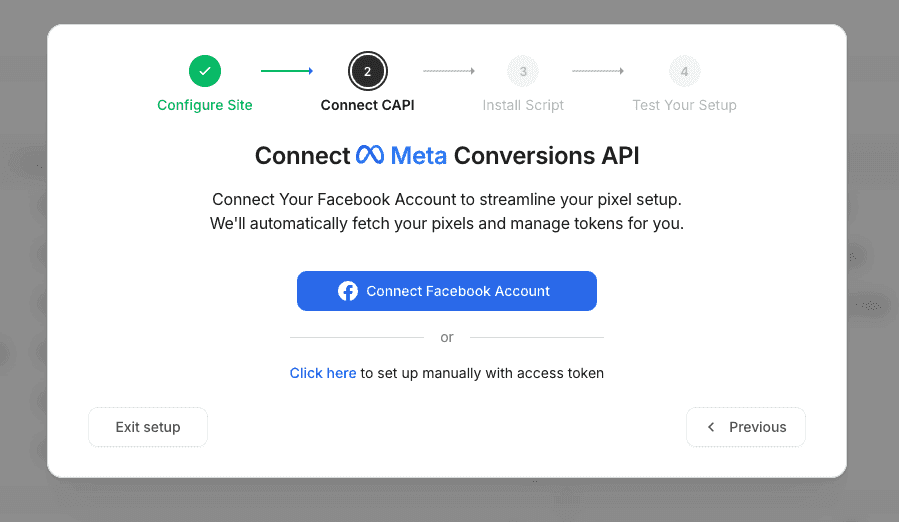
Pixelflow’s intuitive interface lets marketers setup the Facebook Pixel & Conversions API on their website in minutes.
The setup consists of:
Choose your platform
Add your site
Connect Facebook & choose pixel/dataset for Conversions API
PageView events are automatically setup
Tracking forms, pages, button clicks then takes only seconds.
Compare this to GTM’s multi-step process requiring custom HTML tags, trigger configuration, and variable setup which can take hours.
✅ Simplified Event Tracking
No need for manual “click triggers” or complex data-layer coding. PixelFlow tracking is done in one of two ways:
Choose a page URL to trigger an event - define a URL and choose the event that should be triggered on that page (eg. your /thank-you.html page could trigger a “
purchase“ event)Add a code snippet to any element - add a small code snippet to any button, link or element and when clicked, it will trigger an event (eg. “Add to Cart” button will trigger “
addtocart“ event)

✅ Server-Side Tracking with Conversions API
Pixelflow handles both browser-side (Pixel) and server-side (Conversions API) tracking simultaneously for Meta/Facebook ads. You don’t need to understand servers, data layers, or event deduplication as its all handled automatically. This means high event match quality scores in your Facebook ads manager.
Compare that with other platforms where you need to pass an eventID between browser and server events for accurate deduplication which adds huge complexity.
What is Event Match Quality? Event Match Quality (EMQ) is Facebook’s scoring system (0-10) that measures how well your conversion data matches Facebook users. Higher scores mean:
Better ad targeting
More accurate attribution
Improved campaign optimization
Lower cost per acquisition
Why Pixelflow’s 9.3 average matters:
Scores above 8.0 are considered excellent
Most browser-only setups score 4.0-6.0
Server-side tracking dramatically improves EMQ
Higher EMQ = Facebook’s AI works better for your campaigns
✅ Perfect for Marketers and Agencies
Multi-site management for agencies handling multiple client accounts
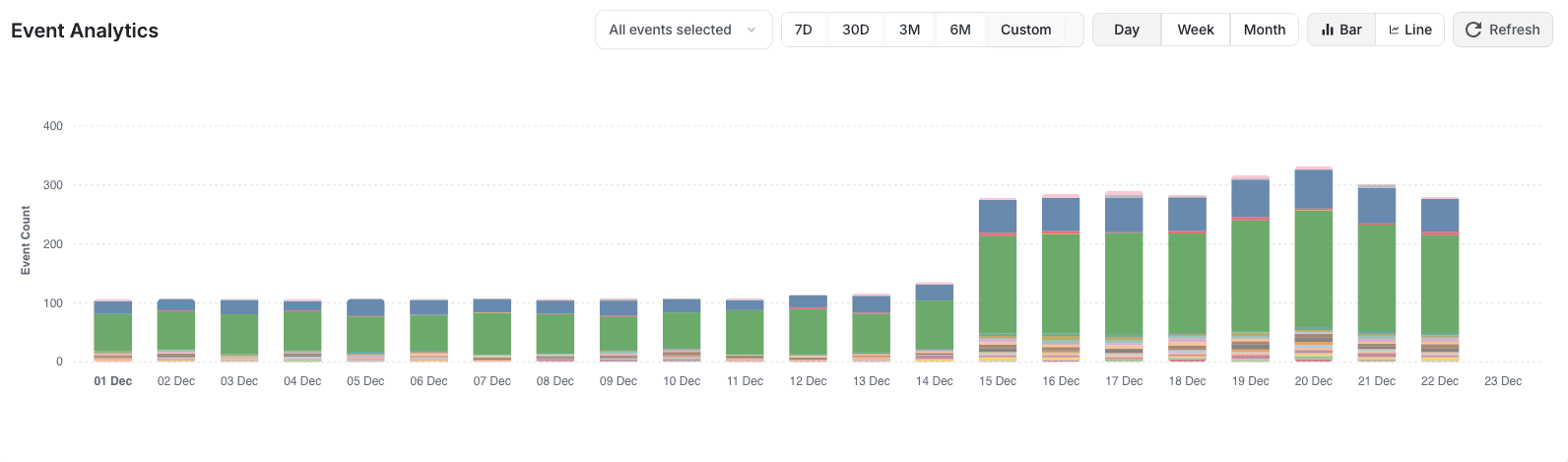
6 months of event logs with full event payloads
Unlimited events across all pricing tiers
Simple event analytics
Agency advantage: Faster client onboarding compared to GTM-based workflows, with clear performance benefits to demonstrate value.
Pixelflow vs Google Tag Manager: Direct Comparison
Feature | Pixelflow | Google Tag Manager |
|---|---|---|
Setup Time | Under 10 minutes | 1-3 hours |
Learning Curve | Beginner-friendly | Technical knowledge required |
Script Size | 20kb | Varies (typically 50kb+) |
Performance Impact | Up to 20% faster | Baseline |
Server-Side Tracking | ✅ Built-in (CAPI) | ⚠️ Complex setup required |
Event Match Quality | 9.3 average for high intent events (Lead, Purchase) | Varies (typically 4-9) |
Customer Support | Email & video calls anytime | Community forums only |
Pricing | Starting at $29/€29/mo | Free |
Data Layer Required | No | Required for advanced tracking |
Pricing
Single Site: $29/€29/month - 1 site with unlimited events
Multi-Site: $59/month - Up to 5 sites with unlimited events
Agency: $99/month - Up to 10 sites with unlimited events
All plans include:
Unlimited events per month
6-month event history
Email & video call support anytime
Free setup call
No hidden fees
👉 Try Pixelflow free for 14 days - No credit card required
Pros
✅ Easiest learning curve in the category
✅ Superior performance vs GTM (up to 20% faster)
✅ Compatible with consent plugins/ can be loaded in GTM for consent
✅ Excellent for agencies managing multiple sites
✅ Server-side Conversions API included
✅ Industry-leading Event Match Quality (9.3 avg)
✅ Responsive customer support with free setup calls
✅ Extremely lightweight (20kb)
✅ Clean, modern interface
✅ Affordable pricing for teams
Cons
❌ Paid tool (vs GTM’s free offering)
❌ Newer platform with smaller community
❌ Advanced data layer operations may still require custom code
Best For
Marketing teams wanting a simpler alternative to GTM
Relatively simple setups that require tracking of a Lead event from a form submission etc.
Sites prioritizing fast page load times and Core Web Vitals
Agencies managing multiple client sites
Companies frustrated with GTM complexity
Teams without dedicated developers
E-commerce businesses focused on conversion optimization
Facebook/Meta advertisers wanting better Event Match Quality and simple setup
No-code platforms: Webflow, Squarespace, Framer, Wordpress, WooCommerce
Who Should Avoid Pixelflow
Companies requiring advanced server-side tagging beyond Meta CAPI
Teams with extremely complex enterprise data governance needs (consider Tealium)
Businesses absolutely requiring a free solution with no budget
Real Customer Stories
“Since adding the Conversions API with PixelFlow to our website, Facebook is sending us better traffic, we have more accurate ad manager reporting and we’re now able to spend less while knowing which campaigns to scale.”
— Niall Doherty, Reviewfox.co
“Pixelflow allows us to attract new clients by outshining the competition with best-in-class Meta integrations. As Meta shifts towards AI-driven campaigns, there’s less room for agencies to stand out, so nailing the technical setup is crucial to driving results. With an average Event Match Quality of 9.3, Pixelflow puts us at the top of the paid social game.”
— Sebastien, Studio-Baguette.com
2. Segment - The Customer Data Platform
Overall Rating: 4.3/5
Segment is more than a tag manager, it’s a full customer data platform (CDP) designed for businesses that want unified data pipelines across their entire tech stack. It’s significantly more technical and expensive than traditional tag managers, but extremely powerful for organizations needing analytics data consistency across platforms.
Key Features
✅ Unified Data Collection Send data to hundreds of destinations (analytics, marketing, CRM) from a single implementation. Changes to destinations don’t require code updates. Instead of adding separate pixels for every tool, you send events to Segment once, and Segment forwards them to all your marketing and analytics tools.
✅ Data Governance & Quality
Schema validation
Data transformations
PII filtering
Replay functionality for historical data
✅ Developer-First Approach Robust APIs, SDKs for all major languages, and extensive documentation make it ideal for technical teams.
✅ Protocols Feature Enforce data quality standards across your organization with schema validation and tracking plans.
✅ Warehouse Sync Send cleaned, validated data directly to your data warehouse (Snowflake, BigQuery, Redshift).
Pricing
Free: Up to 1,000 visitors/month
Team: Starting at $120/month - Up to 10,000 visitors/month
Business: Custom pricing - Volume-based, starts at ~$1,000+/month
Note: Costs scale significantly with usage. High-traffic sites often pay $5,000-$20,000+/month.
Pros
✅ Powerful CDP capabilities beyond tagging
✅ Excellent for data engineering teams
✅ Massive integration library (400+ destinations)
✅ Strong data quality features
✅ Good for omnichannel tracking
✅ Replaces pixel sprawl with single implementation
Cons
❌ Steep learning curve
❌ Expensive for most small businesses
❌ Overkill if you just need tag management
❌ Requires technical implementation
❌ Complex pricing can surprise teams
Best For
Mid-size to enterprise companies
Data engineering teams
Businesses needing a full CDP solution
Companies with complex data workflows
SaaS products tracking user behavior across platforms
Growing companies using 5+ marketing tools
Who Should Skip Segment
Small businesses or startups (unless heavily funded)
Marketing teams without developer support
Companies just needing basic tag management
Budget-conscious organizations
3. Tealium iQ - Enterprise Tag Management
Overall Rating: 4.2/5
Tealium iQ is a robust enterprise-level tag management system offering advanced governance, data enrichment, and omnichannel tracking. It’s known for strong privacy and compliance tools, making it popular with large corporations and regulated industries.
Key Features
✅ Enterprise-Grade Governance
Approval workflows
Role-based access control
Audit trails
Version control with rollback
✅ AudienceStream CDP Real-time customer data platform for segmentation and personalization (separate product, additional cost).
✅ Data Layer Management Sophisticated UDO (Universal Data Object) system for consistent data across tags.
✅ Privacy Manager Built-in consent management and data privacy controls for GDPR, CCPA compliance.
✅ Vendor Management Central hub to manage all your tag vendors and their data access.
Pricing
Custom enterprise pricing (typically $3,000-$10,000+/month)
Pricing based on: pageviews, number of tags, features required
Annual contracts standard
Implementation services often required (additional cost)
Pros
✅ Excellent for large organizations
✅ Strong privacy/compliance features
✅ Advanced data enrichment capabilities
✅ Good vendor management tools
✅ Solid customer support
Cons
❌ Very expensive
❌ Complex setup requiring consultants
❌ Slower to deploy changes vs simpler alternatives
❌ Interface can feel dated
❌ Overkill for small-medium businesses
Best For
Fortune 500 and large enterprises
Organizations with complex compliance requirements
Companies needing advanced data governance
Multi-brand corporations
Financial services, healthcare, retail enterprises
4. Matomo Tag Manager - Open Source Privacy
Overall Rating: 4.0/5
Matomo offers an open-source tag manager integrated with its analytics platform. It’s an excellent choice for companies that prefer self-hosting or need a fully open-source stack for privacy and data sovereignty reasons.
Key Features
✅ Open Source & Self-Hosted Complete control over your data—host on your own servers, no data shared with third parties.
✅ Privacy by Design
No cookies required for basic analytics
Automatic IP anonymization
GDPR/CCPA compliant by default
Data ownership guaranteed
✅ Integrated Analytics Works seamlessly with Matomo Analytics (also open-source), though can function standalone.
✅ Custom Variables & Triggers Similar functionality to GTM with variables, triggers, and tags.
Pricing
Self-hosted: Free (open source)
Cloud: Starting at €19/month
On-premise: Recommended server specs: 4GB RAM, modern processor
Hidden costs: Self-hosting requires server maintenance, security updates, backups.
Pros
✅ Complete data ownership
✅ True privacy-first approach
✅ No data sampling
✅ Open source flexibility
✅ Cost-effective for self-hosting
✅ Strong European user base
Cons
❌ Requires technical expertise for self-hosting
❌ UI less polished than commercial alternatives
❌ Fewer integrations than enterprise tools
❌ Server maintenance overhead
Best For
Privacy-focused businesses
European companies prioritizing GDPR
Organizations requiring data sovereignty
Technical teams comfortable with self-hosting
Government agencies
Healthcare organizations
5. Adobe Launch - For the Adobe Ecosystem
Overall Rating: 3.8/5
Part of Adobe Experience Cloud, Adobe Launch is a tag manager built specifically for enterprises already invested in Adobe Analytics, Target, and related products. It’s powerful but requires significant technical setup and Adobe ecosystem knowledge.
Key Features
✅ Deep Adobe Integration Native connections to Adobe Analytics, Target, Audience Manager, and entire Experience Cloud.
✅ Rule-Based System Flexible rule builder for when/where tags fire, with extensions for added functionality.
✅ Extensions Marketplace Library of pre-built extensions for common tags and integrations.
✅ Data Elements Centralized data management reducing duplicate implementations.
✅ Publishing Workflow Structured development, staging, and production environments with approval processes.
Pricing
Part of Adobe Experience Cloud
Custom enterprise pricing (typically $4,000-$15,000+/month as part of broader Adobe contract)
Usually requires Adobe Analytics license
Implementation typically needs Adobe consultants
Pros
✅ Powerful for Adobe ecosystem users
✅ Enterprise-grade infrastructure
✅ Good documentation
✅ Strong for complex implementations
✅ Reliable uptime and performance
Cons
❌ Expensive (requires Adobe licensing)
❌ Steep learning curve
❌ Overkill if not using Adobe products
❌ Complex setup process
❌ Heavily technical
Best For
Enterprises already using Adobe Experience Cloud
Large marketing organizations using Adobe Analytics
Teams with Adobe-certified developers
Organizations requiring enterprise SLAs
Who Should Avoid Adobe Launch
Companies not using Adobe products
Small to mid-size businesses
Teams without technical resources
Budget-conscious organizations
6. Piwik PRO Tag Manager - For Regulated Industries
Overall Rating: 4.1/5
Piwik PRO offers a privacy-friendly analytics ecosystem with a built-in tag manager that works particularly well for healthcare, government, finance, and other industries with strict data protection requirements.
Key Features
✅ Compliance-First Design Built specifically to meet GDPR, HIPAA, and other regulatory requirements without compromises.
✅ Consent Management Sophisticated consent manager integrated directly with tag management, tying consent decisions to tracking at the user level.
✅ Data Residency Options Choose where your data is stored (EU, US, or on-premise).
✅ No Data Sampling All data processed, no sampling even at high volumes.
✅ Custom Reports Flexible reporting beyond standard tag management metrics.
Pricing
Core: Free for up to 500K actions/month
Enterprise: Starting at €599/month
Custom: Tailored solutions for large organizations
On-premise: Available for specific compliance needs
Pros
✅ Excellent for regulated industries
✅ Strong privacy guarantees
✅ No data sharing with third parties
✅ EU data residency
✅ Good customer support
✅ Server-side tagging available
Cons
❌ Smaller integration ecosystem vs GTM
❌ Less flexible than pure tag managers
❌ Interface learning curve
❌ Limited community resources
❌ Higher cost for advanced features
Best For
Healthcare organizations (HIPAA compliance)
Government agencies
Financial services
European businesses prioritizing GDPR
Education institutions
Any regulated industry with strict data policies
Platform-Specific Recommendations
Different website platforms have different needs when it comes to tag management. Here’s what works best for each:
For WordPress Sites
Best Choice: Pixelflow or Analytify
WordPress sites benefit from either:
Pixelflow if you need multi-channel tracking (Meta, Google, TikTok) with server-side capabilities
Analytify if you primarily need Google Analytics tracking with in-dashboard reporting
Why it works: Both integrate cleanly with WordPress without requiring theme modifications. Pixelflow offers more comprehensive tracking, while Analytify keeps everything within the WordPress dashboard.
Avoid: Complex enterprise solutions that require server access and technical configuration.
For Shopify Stores
Shopify’s checkout process has specific tracking requirements, especially for Meta/Facebook ads.
Best Choice: Elevar
Best if you want a Shopify-focused setup that covers the usual ad stack well (Meta, Google, TikTok) and you want strong ecommerce event coverage.
Shopify-specific conversion tracking with both client-side and server-side options
Strong reputation in the Shopify ecosystem for tracking reliability and onboarding/support
When it fits: You are performance marketing heavy, want robust ecommerce events and want something built around Shopify.
For Webflow, Framer, or Squarespace
Best Choice: Pixelflow
PixelFlow has direct integration with many no-code platforms including Framer, Squarespace, Webflow. Its the best choice because:
Simple setup
Automatic tracking on many platforms
One-script installation
Perfect for designers and marketers
Why not GTM? GTM’s data layer requirements don’t play nicely with no-code builders, often requiring custom code workarounds.
For Custom-Built Sites
Best Choice: Depends on your team
Have developers? GTM or Segment give maximum flexibility
Technical founder? PixelFlow has a programmatic API to trigger events
Marketing-led team? Pixelflow for simplicity with strong performance
Enterprise? Tealium or Adobe Launch for governance
Key consideration: Match the tool to who will actually maintain it long-term.
Use Case Scenarios: Which Tool Is Right for You?
For E-commerce Businesses
Recommended: Pixelflow or Segment
E-commerce sites need fast performance (every 100ms matters for conversions) and easy event tracking for product views, cart actions, and purchases.
Pixelflow if you want simplicity, speed, and accurate Facebook/Meta tracking
Segment if you need to sync purchase data to multiple platforms (CRM, email, analytics)
Avoid: Adobe Launch (unless already in Adobe ecosystem), Tealium (too expensive for most)
For SaaS Companies
Recommended: Segment or Pixelflow
SaaS companies need to track user behavior across the entire customer journey—from signup through activation and retention.
Segment for robust user tracking across web and mobile
Pixelflow for faster implementation and easier team management
Avoid: Matomo (limited SaaS-specific features), GTM (requires too much technical setup)
For Marketing Agencies
Recommended: Pixelflow
Agencies managing multiple clients need multi-site management, ease of use to minimize training time, and performance to demonstrate value.
Pixelflow offers the best agency-specific features with multi-site plans
Client onboarding is significantly faster than GTM
Clear performance improvements to show clients
Alternative: GTM only if clients specifically require it
For Enterprise Organizations
Recommended: Tealium iQ or Adobe Launch
Large enterprises need governance, compliance tools, and integration with existing enterprise systems.
Tealium for best-in-class governance and privacy
Adobe Launch if already using Adobe Experience Cloud
Piwik PRO if in a regulated industry
Avoid: Pixelflow (may lack enterprise governance features at scale)
For Privacy-Focused Businesses
Recommended: Matomo, Piwik PRO, or Pixelflow
Companies prioritizing data privacy and GDPR compliance need tools built with privacy-first architecture.
Matomo for complete data ownership (self-hosted)
Piwik PRO for regulated industries
Pixelflow for easier compliance with strong privacy features
Avoid: Standard GTM setup (requires significant customization for true privacy compliance)
For Small Businesses & Startups
Recommended: Pixelflow or GTM
Small businesses need easy setup, low cost, and minimal technical requirements.
Pixelflow for best ease of use, support, and performance at just $29/€29/month
GTM if budget is extremely tight (free)
Avoid: Segment (too expensive), Tealium (massive overkill), Adobe Launch (requires enterprise contracts)
When GTM Is Still The Right Choice
Let’s be honest: Google Tag Manager isn’t wrong for everyone. Here’s when you should stick with GTM:
You Have Technical Resources
If you have developers or analytics specialists on staff who already know GTM well, the tool’s complexity becomes an asset rather than a liability. These teams can leverage GTM’s advanced features effectively.
You Need Maximum Flexibility
GTM’s custom JavaScript capabilities and extensive trigger options make it unmatched for truly complex tracking scenarios that go beyond standard marketing needs.
You’re Already Set Up Successfully
If your GTM implementation works well and your team is comfortable maintaining it, switching carries unnecessary risk. The old saying applies: “If it ain’t broke, don’t fix it.”
Budget Is Your Primary Constraint
GTM is free. For bootstrapped startups where every dollar counts and you have time to learn, GTM’s zero cost is a genuine advantage.
You Need Google Ecosystem Integration
GTM’s native integration with Google Analytics, Google Ads, and other Google products is seamless and well-documented.
“Simplicity is the ultimate sophistication.” — Leonardo da Vinci
The key is matching the tool to your team’s capabilities and actual needs, not choosing based on features you’ll never use.
Common Mistakes To Avoid When Choosing A Tag Manager
Mistake 1: Choosing Based on Features Alone
One common mistake is picking a tag manager based only on how many features it has. Many teams choose an advanced enterprise platform when their real need is basic page and conversion tracking. This adds extra learning time, creates more room for errors, and often sends them back to hunt for other GTM alternatives months later.
Better approach: List the specific events you need to track. Choose the simplest tool that covers those needs.
Mistake 2: Ignoring Platform Compatibility
Another frequent problem is ignoring how well a tool fits your website platform. A tag manager that works nicely with custom-built sites might be awkward on Squarespace or Webflow. Before you commit, confirm there’s a simple way to install the script and that common events can be tracked without custom code.
Better approach: During free trials, actually install on your platform and test your most important events.
Mistake 3: Not Testing Support Quality
Signing a yearly plan without testing support response times can leave you stuck with unread support tickets when tracking breaks during a critical campaign.
Better approach: Contact support with a real question during your trial period. Measure response time and quality of answers.
Mistake 4: Forgetting About Performance
Adding heavy scripts without testing can slow pages and harm both user experience and search rankings. Page speed directly impacts conversion rates and SEO.
Better approach: Use tools like Google PageSpeed Insights to measure before and after implementing any tag manager.
Mistake 5: Switching Without Testing in Parallel
Immediately removing your old tag manager before validating the new one creates tracking gaps that can cost thousands in wasted ad spend.
Better approach: Run both systems simultaneously for 1-2 weeks, comparing data before fully switching.
Mistake 6: Underestimating Training Time
Someone on your team needs time to learn whichever tool you pick. Even “simple” tools require some ramp-up period.
Better approach: Budget 2-4 hours for onboarding and initial setup, even with beginner-friendly tools.
The Hidden Cost of “Free” GTM
While Google Tag Manager is free to use, there are real costs that many businesses overlook:
Developer Time
Hourly rate: $100-200 for experienced developers Average setup time: 3-8 hours for basic implementation Troubleshooting: 2-5 hours per issue
Total cost for initial setup: $500-$1,600 Annual maintenance: $2,000-$5,000 for businesses making regular tracking changes
Agency Fees
Many businesses hire agencies to manage GTM:
One-time setup: $1,000-$3,000
Monthly retainer: $500-$2,000
Opportunity Cost
Hours spent learning GTM, debugging issues, and waiting for implementation are hours not spent on:
Creative testing
Audience research
Campaign optimization
Revenue-generating activities
Risk Cost
Misconfigured tracking leads to:
Underreported conversions
Poor smart bidding performance
Wasted ad budget
Wrong strategic decisions
Real example: A $10,000/month ad budget with 30% underreported conversions means $3,000 in monthly waste due to poor optimization.
The Math
GTM “free” cost over one year: $2,500-$7,500+ due to cloud server fees, developer costs.
Pixelflow cost at $29/€29/month: $348/year
Even at the lowest end, GTM’s hidden costs exceed paid alternatives within months for non-technical teams.
Step-By-Step: Migrating From GTM To A Simpler Alternative
Moving away from GTM can feel risky, especially if it’s been running for years. The safest approach is to treat migration as a short project with clear steps, rather than a sudden switch that happens overnight.
Step 1: Audit Your Current GTM Setup (1-2 hours)
Export your GTM container and document:
All active tags (what they track)
Which platforms they send data to (Meta, Google, TikTok, etc.)
Current trigger configurations
Any custom JavaScript or variables
Pro tip: Take screenshots of your most important tags as reference.
Step 2: Prioritize What Matters (30 minutes)
Not all tracking is equally important. Identify your critical tracking:
Must have immediately:
Purchase/conversion events
Lead form submissions
Add to cart (e-commerce)
Main analytics tracking
Can wait:
Micro-conversions
Scroll depth tracking
Video engagement
Heatmaps
This prevents overwhelm and ensures revenue-critical tracking launches first.
Step 3: Install New Tag Manager in Parallel (10-30 minutes)
Add your new tag manager (like Pixelflow) while keeping GTM active. This creates a testing period where both systems run simultaneously.
For Pixelflow:
Sign up and add your domain
Copy the container script
Paste it in your site header (separate from GTM)
Verify it’s loading correctly
Important: Both tag managers can run at once without conflicts during testing. Additionally PixelFlow has the option to block duplicate Meta event tracking scripts to ensure only 1 script is generating and sending events to Meta during testing (or if you keep them both running side by side afterwards).
Step 4: Recreate Core Events (2-6 hours)
Start with your most critical tracking:
Purchases and conversions
Lead forms
Add to cart events
Key page views
For Pixelflow example:
Use visual event selector to choose elements
Map to appropriate event names
Configure which pixels should receive each event
Set up Conversions API for Meta tracking
Step 5: Compare Data for 1-2 Weeks
Run both systems and compare numbers in your analytics platforms:
Where to check:
Google Analytics (compare session and event counts)
Meta Ads Manager (compare conversion counts)
Your CRM or order system (ground truth)
What to look for:
Small differences (5-10%) are normal due to timing
Large gaps (20%+) indicate misconfiguration
Server-side tracking often shows MORE conversions than browser-only
Action items: Adjust configuration if you see significant discrepancies.
Step 6: Migrate Remaining Tags in Groups (1-3 hours)
Once core tracking is validated, move secondary tags:
Group 1: Remarketing pixels Group 2: Analytics tools Group 3: Email/CRM tracking Group 4: Optional tools (heatmaps, chat, etc.)
Test each group for 2-3 days before moving to the next.
Step 7: Remove GTM Container (15 minutes)
Once you’re confident everything runs through the new tag manager:
Disable all tags in GTM (don’t delete the container yet)
Monitor for 24-48 hours to ensure no tracking gaps
Remove GTM script from your site
Archive GTM container (keep for reference)
Pro tip: Keep the GTM container published but empty for one week in case you need to quickly revert.
Step 8: Document Your New Setup (30-60 minutes)
Create an internal guide that covers:
What events you track
Which tool handles each event
Where data is sent
How to add new tracking
Why this matters: Future team members (or future you) will thank you. Documentation prevents confusion and reduces the risk of breaking things later.
Template outline:
Overview of tracking setup
List of active events and their purposes
Step-by-step: How to add a new event
Troubleshooting common issues
Support contact information
Total Migration Timeline
Week 1:
Days 1-2: Audit and planning
Days 3-4: Install new tag manager, recreate core events
Days 5-7: Begin parallel testing
Week 2:
Days 8-14: Compare data, adjust as needed, migrate secondary tags
Week 3:
Days 15-17: Final validation
Days 18-19: Remove GTM
Day 20: Document everything
Total time commitment: 10-15 hours spread over 2-3 weeks for most businesses.
The Business Impact Of Accurate, Simple Tracking
Direct Revenue Impact
When tracking is simple and reliable, the impact on ad performance is direct and measurable:
20-40% ROAS improvement is common after fixing underreported conversions with server-side tracking, especially on Facebook and Instagram. This isn’t marketing hype—it’s the natural result of giving ad platforms complete conversion data.
Why this happens:
Ad platforms see all conversions (not just browser-tracked ones)
Smart bidding algorithms optimize toward accurate data
Lookalike audiences improve with better seed data
Event Match Quality scores above 8.0 unlock better targeting
Real example: A business spending $10,000/month on Meta ads with 3.0 ROAS improves to 4.2 ROAS after implementing Conversions API. That’s an additional $12,000 in monthly revenue from the same ad spend.
Reduced Wasted Spend
Accurate data also cuts wasted spend. If one campaign looks strong in Ads Manager but doesn’t match your store or CRM, it’s hard to know what to scale. With clean tracking, you can:
Stop funding ads that only look good on the surface
Move budget to campaigns that actually bring revenue
Identify and fix attribution issues quickly
Make confident budget decisions
Impact: Most businesses reduce wasted ad spend by 15-30% within the first month of accurate tracking.
Time & Operational Savings
When a marketer can add or adjust tags in minutes instead of waiting on developers for days:
Time saved per month:
5-10 hours previously spent on developer requests
3-5 hours debugging broken tracking
2-4 hours in meetings coordinating tracking changes
Cost savings:
Developer time at $100-200/hour: $1,000-$3,000/month saved
Faster campaign launches mean capturing opportunities sooner
Marketing team can test more ideas independently
Example: An agency managing 10 clients saves 40 hours per month on tracking tasks. At $150/hour billing rate, that’s $6,000 in recovered billable time monthly.
Competitive Advantage
Teams with simple, accurate tracking move faster than competitors:
Launch campaigns in days instead of weeks
Test new channels without technical blockers
Respond quickly to market changes
Scale what works with confidence
In competitive markets, this agility translates directly to market share gains.
Long-Term Compounding
Better tracking compounds over time:
Month 1: Fix conversion tracking, improve ROAS by 25%
Month 2: Use accurate data to identify best-performing audiences
Month 3: Scale confidently with validated attribution
Month 6: Lookalike audiences improve from better seed data
Month 12: All strategic decisions based on reliable metrics
The businesses that solve tracking early pull ahead of competitors who are still guessing at what works.
“The goal is to turn data into information, and information into insight.” — Carly Fiorina, former HP CEO
Simple, accurate tracking helps your team reach that last step without needing a specialist for every change.
Frequently Asked Questions (FAQ)
Do I really need to replace Google Tag Manager, or should I just invest time in learning it better?
For some teams, learning GTM more deeply is worth the effort, especially if you have complex tracking plans and someone on the team who enjoys technical work. However, for many small marketing teams, weeks of trying to debug tags is a clear sign that the tool doesn’t fit.
The cost-benefit analysis: Put a rough cost on the hours already spent compared with the monthly price of a simple tag manager. If you only need to track standard conversions and a few pixels, an easier tool usually gives better long-term value.
Consider GTM if: You have developers on staff, enjoy technical challenges, and need maximum customization.
Consider alternatives if: You’re a marketer-led team spending more time troubleshooting than optimizing campaigns.
Will switching tag managers disrupt my current tracking and analytics data?
Switching doesn’t have to break anything if you handle it as a careful transition instead of a sudden flip. By running your new tag manager in parallel with GTM for 1-2 weeks, you can compare numbers and fix issues before removing the old container.
Important: All your historical data stays inside tools like Google Analytics and Meta Ads Manager, since that data lives in those platforms, not in GTM itself. You won’t lose any past performance data.
Best practice: Many alternatives, including Pixelflow, offer setup or migration help so the transition feels smooth.
Are simple tag managers less accurate than Google Tag Manager?
Accuracy depends far more on how tracking is implemented than on how advanced the tool looks. In practice, simple tag managers often give better accuracy for non-technical teams because there are fewer places to make mistakes.
Server-side tracking advantage: Tools like Pixelflow that include server-side tracking (Conversions API) usually capture more conversions than browser-only GTM setups, especially with:
Ad blockers (block 20-30% of browser pixels)
iOS privacy restrictions
Cookie consent requirements
Proof: Event Match Quality scores above 9.0 are common with well-configured Conversions API tracking, even without complex GTM containers. Most browser-only setups score 4.0-6.0.
Can I use multiple tag managers at the same time?
It’s possible to run more than one tag manager, but it’s rarely the best plan. Multiple systems can:
Slow your site significantly
Increase the chance of events firing twice
Make debugging exponentially harder
Create data discrepancies
Common temporary pattern: Run a focused tool like Pixelflow for Meta Conversions API while slowly phasing out other tags from GTM. Keep any overlap short (1-2 weeks) and carefully monitored.
Best long-term approach: Pick one main tag manager and consolidate all tracking there.
What is the typical cost difference between GTM and paid alternatives?
GTM itself: Free to use
Hidden GTM costs:
Developer time: $500-$1,600 initial setup
Ongoing maintenance: $2,000-$5,000/year
Agency fees: $1,000-$3,000 setup + $500-$2,000/month
Opportunity cost: Hours not spent on revenue activities
Paid alternatives:
Pixelflow: $29-$99/month ($348-$1,188/year)
Segment: $120-$1,000+/month ($1,440-$12,000+/year)
Tealium: $3,000-$10,000/month ($36,000-$120,000/year)
The math: For most small and mid-sized businesses, paid alternatives are cheaper when you factor in developer time. Large platforms like Segment or Tealium serve different use cases with broader needs.
How long does it typically take to set up a GTM alternative?
Setup time depends on both the tool and how complex your tracking needs are:
Simple, user-friendly tag managers:
Pixelflow: 10-30 minutes for standard events
Analytify (WordPress): 15-30 minutes
Privacy-focused tools:
Matomo: 1-3 hours (including consent flows and hosting decisions)
Piwik PRO: 1-3 hours
Data platforms:
Segment: Half day to full day to plan events and configure destinations
Comparison: Even at the high end, these tools cut setup time by 50-75% compared with a fresh GTM build for the same tracking scope.
What happens to my historical data when I switch?
Your historical data remains completely safe. Analytics data lives in your analytics platforms (Google Analytics, Meta Ads Manager, etc.), not in your tag manager. The tag manager is just the delivery mechanism.
What stays:
All past Google Analytics data
All past conversion data in ad platforms
All historical reports and dashboards
What changes:
How new data is collected going forward
The tool you use to manage tracking scripts
Best practice: Export any custom reports or configurations from GTM for reference, but your actual data never leaves its destination platforms.
Do I need technical skills to use Pixelflow?
No. Pixelflow is designed specifically for marketers without coding knowledge. The visual interface, point-and-click event tracking, and plain-language setup mean most tasks require no technical skills.
What you can do without code:
Install the tracking script (copy/paste)
Set up Facebook Pixel and Conversions API
Track button clicks, forms, purchases
Configure consent management
View event logs and debug issues
When you might need a developer:
Very complex custom JavaScript requirements
Unusual website architecture
Advanced data layer manipulation
Reality: Most Pixelflow customers never need developer help after the initial script installation.
Why is Pixelflow better for Facebook and Meta ads?
Pixelflow specializes in Facebook Pixel and Conversions API implementation, with specific focus on maximizing Event Match Quality (EMQ).
What makes it better:
Automatic Conversions API: Server-side tracking included, no separate server setup needed
High EMQ scores: 9.3 average (vs 4-6 for browser-only tracking)
Event deduplication: Automatically handled to prevent double-counting
iOS-proof: Server-side tracking bypasses iOS restrictions
Ad blocker bypass: CAPI sends data even when browser pixels are blocked
Result: Better ad targeting, more accurate reporting, improved ROAS, and ability to spend more profitably on Meta ads.
How much does Pixelflow cost compared to GTM?
GTM: Free (with hidden costs in developer time) Pixelflow: Starting at $29/€29/month
Value comparison:
Scenario: Small e-commerce business
GTM approach: $1,500 one-time developer setup + $200/month ongoing = $3,900 year one
Pixelflow approach: $29/€29/month = $348 per year
Savings: $3,552 first year
Additional Pixelflow value:
Up to 20% faster site performance
Higher Event Match Quality (better ad performance)
Free setup call and support
No developer dependency
Break-even: Even one hour of saved developer time per year ($100-200) covers the annual Pixelflow cost.
Can Pixelflow work with my consent management platform?
Yes. Pixelflow is compatible with all major consent management platforms (CMPs) including:
OneTrust
Cookiebot
Osano
Termly
Cookie Script
CookieYes
How it works: Pixelflow detects consent status and only fires tags after appropriate consent is granted, ensuring GDPR/CCPA compliance.
Configuration: Usually automatic detection, with manual override options if needed.
Conclusion: Which Google Tag Manager Alternative Should You Choose?
Choosing the right GTM alternative depends on your specific needs:
Choose Pixelflow if you want:
✅ The easiest interface in the category
✅ Up to 20% faster website performance
✅ Built-in privacy compliance tools
✅ Visual event tracking without coding
✅ A tool designed for marketers first
✅ Excellent Facebook/Meta Conversions API support
✅ Industry-leading Event Match Quality (9.3 avg)
✅ Affordable pricing starting at $29/€29/month
✅ Multi-site management for agencies
✅ Free setup call and responsive support
Choose Segment if you need:
A full customer data platform, not just tag management
To sync data to dozens of destinations
Enterprise-grade data governance
Cross-platform user tracking (web, mobile, server)
Choose Tealium if you’re:
A Fortune 500 company
Operating in heavily regulated industries
Requiring advanced approval workflows and governance
Choose Matomo if you want:
Complete data ownership via self-hosting
Open-source flexibility
Zero third-party data sharing
Technical team comfortable with server management
Choose Adobe Launch if you’re:
Already invested in Adobe Experience Cloud
Using Adobe Analytics as your primary tool
Enterprise with Adobe-certified developers
Choose Piwik PRO if you’re in:
Healthcare (HIPAA compliance)
Government
Finance or other regulated industries
Stick with GTM if you:
Have developers who already know it well
Need maximum customization and flexibility
Have zero budget for tools
Are already successfully running it
Our Final Verdict: Pixelflow Is the Best GTM Alternative for Most Businesses
After extensive testing and real-world usage, Pixelflow emerges as the top Google Tag Manager alternative for 2026.
Here’s why:
It solves GTM’s biggest pain points:
❌ GTM complexity → ✅ Pixelflow simplicity
❌ GTM’s steep learning curve → ✅ Pixelflow’s intuitive interface
❌ GTM’s performance challenges → ✅ Pixelflow’s 20kb lightweight architecture
❌ GTM’s privacy setup burden → ✅ Pixelflow’s built-in compliance
❌ GTM’s support gaps → ✅ Pixelflow’s responsive team + free setup calls
❌ GTM’s developer dependency → ✅ Pixelflow’s marketer-friendly design
The numbers speak for themselves:
Up to 20% faster page load times
Setup in under 10 minutes
Only 20kb script size
1,200+ satisfied customers
Average Event Match Quality of 9.3 for Meta ads
20-40% ROAS improvements common after implementation
The hidden value:
Eliminates $2,000-$5,000/year in developer maintenance costs
Frees up 10-20 hours per month previously spent on tracking tasks
Enables faster campaign testing and optimization
Provides confidence in tracking accuracy
Whether you’re a marketer frustrated with GTM’s complexity, an agency managing multiple clients, or a business prioritizing website performance and privacy compliance, Pixelflow offers the best balance of power, simplicity, and value.
Ready to Try Pixelflow?
👉 Start your free 14-day trial - no credit card required
See why 1,200+ businesses have already made the switch from GTM to Pixelflow.
What you get:
Full access to all features
Free setup call with our team
Priority onboarding support
14-day free trial
Plans starting at just $29/€29/month
6 months of version history
Unlimited events
Questions? Our team is here to help you make the switch smoothly.