You’ve heard that server-side tracking is better than the Facebook Pixel. But what does that actually mean? And do you really need both?
If you’re confused about the difference between browser-based tracking (the Pixel) and server-side tracking (CAPI), you’re not alone. Let’s break down exactly what each one does and why you need both for complete Facebook ad tracking.
What is Pixel Tracking?
The Facebook Pixel is a piece of JavaScript code you install on your website. When someone visits your site, this code runs in their browser and sends event data back to Facebook.
Think of the Pixel like a store employee watching shoppers. The employee (the JavaScript code) sits in the customer’s browser, watches what they do, and reports back to Facebook: “This person viewed a product,” or “This person made a purchase.”
How it works:
You install the Pixel code snippet on your website
When someone visits your site, their browser loads the Pixel
The Pixel tracks actions like page views, button clicks, and purchases
Event data gets sent from the browser directly to Facebook
The Pixel has been the standard way to track Facebook ad conversions for years. It’s easy to set up — just paste code on your website and you’re done.
What is Server-Side Tracking?
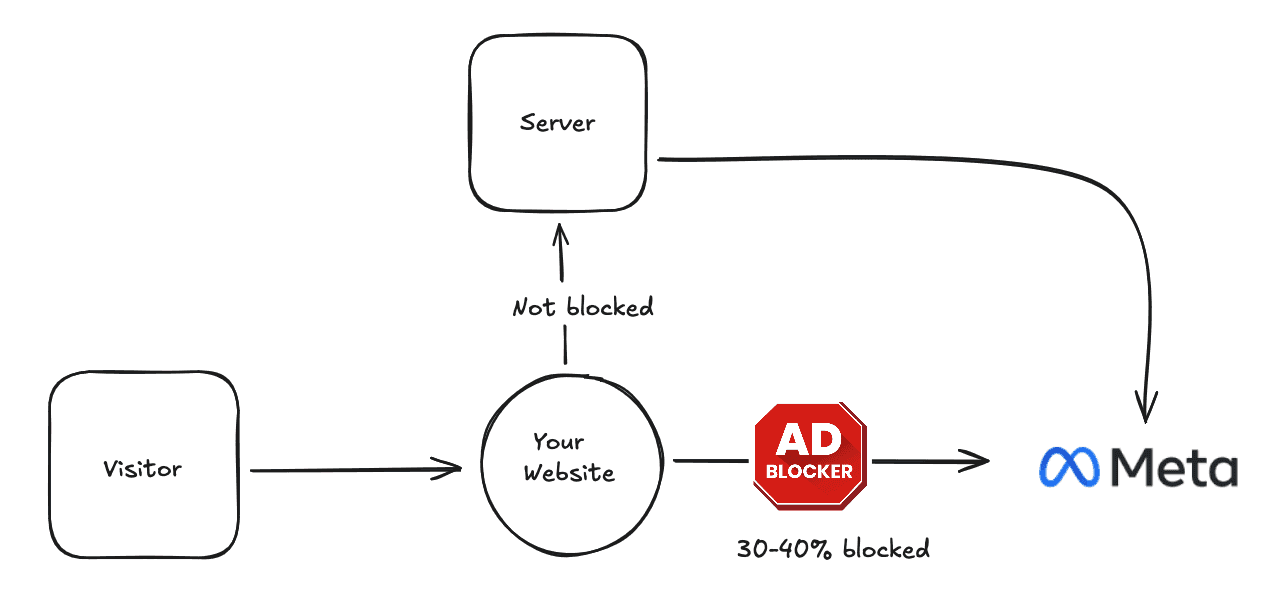
Server-side tracking (Facebook Conversions API or CAPI) sends event data from your website’s server directly to Facebook’s servers, completely bypassing the customer’s browser.
Instead of a store employee watching shoppers, imagine your cash register automatically reporting sales to headquarters. The customer’s browser isn’t involved at all, your server handles everything.
How it works:
A customer takes an action on your website (makes a purchase, fills out a form, etc.)
Your server records this action
Your server sends the event data directly to Facebook’s API
Facebook receives the conversion data without touching the customer’s browser
Server-side tracking requires more technical setup than the Pixel, but modern no-code tools like PixelFlow make implementation simple.
Key Differences Between Pixel and Server-Side Tracking
Where the Tracking Happens
Pixel: Runs in the customer’s browser (client-side) Server-Side: Runs on your website’s server (server-side)
This is the fundamental difference. Everything else flows from this.
Vulnerability to Ad Blockers
Pixel: Gets blocked by ad blockers, browser privacy settings, and tracking prevention features. If someone uses Safari with tracking prevention or has an ad blocker installed, the Pixel might not fire at all.
Server-Side: Cannot be blocked by ad blockers or browser settings. Since tracking happens on your server, the customer’s browser can’t interfere with it.
Real impact: Many businesses lose 20-40% of Pixel conversions to ad blockers and privacy settings. Server-side tracking captures these lost conversions.
Dependence on Cookies
Pixel: Relies heavily on third-party cookies, which are being phased out by browsers. Safari already blocks them, and Chrome is eliminating them.
Server-Side: Doesn’t depend on cookies. Uses server-to-server communication and can leverage first-party data like customer emails and phone numbers for matching.
Data Accuracy
Pixel: Data can be incomplete or inaccurate if JavaScript doesn’t load properly, if the page loads slowly, or if customers leave before the Pixel fires.
Server-Side: More reliable data because your server confirms the action actually happened. If someone completes a purchase, your server knows about it — no guessing.
Event Match Quality
Pixel: Limited to data available in the browser (IP address, user agent, limited customer info).
Server-Side: Can include rich customer data like hashed emails, phone numbers, addresses, and your internal customer IDs. This leads to higher Event Match Quality scores.
Higher Event Match Quality means Facebook can better match conversions to the right people, improving ad attribution and optimization.
Setup Complexity
Pixel: Very easy. Copy and paste code snippet into your website. No technical knowledge required.
Server-Side: More complex traditionally, requiring server-side coding and API integration. However, modern tools now offer no-code server-side tracking setup.
What They Track Best
Pixel: Great for upper-funnel events like page views, content views, and add-to-cart actions. Captures browsing behavior in real-time.
Server-Side: Ideal for bottom-funnel conversions like purchases, leads, and registrations. Perfect for tracking actions that happen on your server.
Server-Side vs Pixel: Which is Better?
Here’s the truth: neither is better on its own. You need both.
Think of it like wearing both a belt and suspenders. The Pixel catches events that server-side tracking might miss (like quick page views or social interactions), and server-side tracking catches conversions the Pixel misses (like purchases from users with ad blockers).
What the Pixel does well:
Captures immediate browser-based events
Tracks upper-funnel engagement
Simple to implement
Works across all pages automatically
What server-side tracking does well:
Guarantees critical conversion tracking
Works despite ad blockers and privacy settings
Provides better data quality
Future-proofs your tracking
Facebook explicitly recommends using both together. When both send the same event, Facebook’s built-in deduplication ensures you don’t double-count conversions.
How Pixel and Server-Side Tracking Work Together
When you run both simultaneously, here’s what happens:
Scenario 1: Normal user without ad blocker
Pixel fires and sends purchase event ✓
Server sends purchase event ✓
Facebook sees matching event IDs and counts it once
Result: Conversion tracked with maximum data
Scenario 2: User with ad blocker
Pixel is blocked ✗
Server sends purchase event ✓
Result: Conversion still tracked
Scenario 3: User with slow internet
Pixel might not load in time ✗
Server sends purchase event ✓
Result: Conversion still tracked
Scenario 4: Quick page view or engagement
Pixel captures browsing behavior ✓
Server might not track these micro-events
Result: Upper-funnel data captured
By using both, you capture the maximum number of events and get the most complete picture of customer behavior.
Event Deduplication: How Facebook Handles Duplicate Events
Facebook automatically deduplicates events when both the Pixel and server-side tracking send the same conversion.
How it works:
You assign each event a unique
event_id(like “order_12345”)Both Pixel and server-side tracking send the event with the same
event_idFacebook sees two events with matching IDs and knows they’re the same action
Facebook counts the event only once and prioritizes the server-side data
Important: For deduplication to work, the event_id must be identical between Pixel and CAPI. This is crucial for accurate reporting.
Real-World Example: E-Commerce Purchase Tracking
Let’s see how this works in practice for an online store:
Pixel-Only Tracking
Customer clicks your Facebook ad → visits your website → browses products → adds item to cart → checks out → makes purchase
What gets tracked: Everything, unless the customer has an ad blocker or privacy settings enabled. In that case, you might miss the purchase entirely.
Tracking coverage: ~60-80% of conversions (depending on your audience’s privacy settings)
Server-Side Only Tracking
Customer clicks your Facebook ad → visits your website → browses products → adds item to cart → checks out → makes purchase
What gets tracked: The final purchase when your server processes the order. You might miss earlier browsing signals.
Tracking coverage: ~90-95% of conversions, but limited upper-funnel data
Pixel + Server-Side Tracking Together
Customer clicks your Facebook ad → visits your website → browses products → adds item to cart → checks out → makes purchase
What gets tracked: Pixel captures browsing, product views, and add-to-cart. Server-side guarantees the purchase is tracked. Facebook deduplicates overlapping events.
Tracking coverage: ~95-98% of conversions, plus full customer journey data
The combined approach gives you the most complete tracking and best ad optimization.
When to Use Pixel vs Server-Side Tracking
Use Pixel When:
You want simple, quick implementation
You’re tracking upper-funnel engagement (page views, content views)
You need automatic tracking across all pages
You’re just getting started with Facebook ads
Use Server-Side Tracking When:
You need guaranteed conversion tracking
You’re losing conversions to ad blockers
You want higher Event Match Quality scores
You need to track server-side events (offline conversions, CRM data)
You want future-proof tracking
Use Both When:
You want the most accurate tracking possible
You’re spending serious money on Facebook ads
You need reliable data for optimization
You want complete customer journey visibility
Bottom line: If you’re running Facebook ads seriously, use both.
Common Questions About Pixel vs Server-Side Tracking
“Will server-side tracking slow down my website?”
No. Unlike the Pixel (which runs in the customer’s browser), server-side tracking happens after the page loads. It doesn’t affect your website speed at all.
“Is server-side tracking GDPR compliant?”
It can be, when implemented correctly. You need to obtain proper consent and only send data you have permission to share. Server-side tracking actually gives you more control over data privacy than browser-based tracking.
“Do I need a developer to set up server-side tracking?”
Not anymore. Traditional CAPI setup required coding, but modern tools like PixelFlow offer no-code server-side tracking that works with platforms like Webflow, Framer, WordPress, and Squarespace.
“Will I double-count conversions if I use both?”
Not if you implement event deduplication correctly. Facebook automatically handles this when you use matching event IDs. Properly configured dual tracking counts each conversion exactly once.
“Which one should I set up first?”
Start with the Pixel since it’s easiest. Then add server-side tracking to fill the gaps and improve data accuracy. Most businesses see immediate improvements in reported conversions when they add CAPI.
Making the Switch: Moving from Pixel-Only to Dual Tracking
If you’re currently using only the Facebook Pixel, here’s how to add server-side tracking:
Step 1: Keep your existing Pixel running — don’t remove it.
Step 2: Choose a server-side tracking implementation method (direct integration, partner platform, or no-code tool).
Step 3: Configure server-side tracking to send the same events your Pixel tracks.
Step 4: Implement event deduplication with matching event IDs.
Step 5: Test using Facebook’s Test Events tool to verify both are working.
Step 6: Monitor your Event Match Quality score and total event volume.
You should see an immediate increase in tracked conversions once server-side tracking is active — these are the events your Pixel was missing.
The Future: Why Server-Side Tracking Matters More Every Year
Browser-based tracking is on borrowed time. Here’s what’s happening:
Third-party cookies are disappearing: Chrome is phasing them out completely
Privacy regulations are tightening: GDPR, CCPA, and similar laws worldwide
Browser tracking prevention is standard: Safari and Firefox already block most tracking
Users are privacy-aware: More people use ad blockers and privacy tools
The Pixel alone will become less effective every year. Server-side tracking is the solution that works in this privacy-first world.
Implementing server-side tracking now means you’re ready for whatever privacy changes come next.
Key Takeaways
The Facebook Pixel and server-side tracking (CAPI) aren’t competitors — they’re complementary tools that work best together.
The Pixel runs in the customer’s browser and is great for capturing browsing behavior and upper-funnel events. But it’s vulnerable to ad blockers, privacy settings, and browser restrictions.
Server-side tracking runs on your server and guarantees your important conversions get tracked, regardless of browser limitations. It provides better data quality and higher Event Match Quality scores.
Using both together gives you maximum tracking coverage, accurate conversion reporting, and future-proof measurement for your Facebook ads.
Ready to add server-side tracking to your Pixel setup? PixelFlow makes it easy to implement Facebook Conversions API without writing code.