PixelFlow vs PixelYourSite: In-Depth Comparison (2026)

Emmett Cooke
Founder, PixelFlow.so
Last updated 19 June 2026
•
11 min read
Last updated: 29th December 2025
Whats new in this version: More info on features, pricing, comparison
If you are looking for PixelYourSite alternatives, you are likely trying to solve one core problem:
How do I get accurate Meta conversion tracking without unnecessary complexity or ongoing maintenance?
Both platforms improve tracking beyond standard browser-based pixels by using the Meta Conversions API, but they approach the problem differently and are built for different types of users.
This page explains the difference in simple terms first. A technical section is included later if you want deeper detail.
The Short Answer
The Short Answer
PixelFlow is a lightweight WordPress solution designed to send clean, reliable Meta Conversions API events for WooCommerce and common form interactions, with minimal setup and built-in event logs for visibility and debugging.
PixelYourSite is a powerful WordPress plugin that acts as a full tracking and tag management system across Meta, Google, TikTok, Pinterest, and more, but does not provide dedicated server-side event delivery logs.
If you want reliable Meta tracking on WordPress with simple defaults, fast setup, and clear visibility into which events are being sent, PixelFlow is usually the better choice.
If you want deep control over events, multi-platform tracking, and advanced WooCommerce configuration and are comfortable without delivery logs, PixelYourSite may be a better fit.
If you are looking for PixelYourSite alternatives, you are likely trying to solve one core problem:
How do I get accurate Meta conversion tracking without unnecessary complexity or ongoing maintenance?
Both platforms improve tracking beyond standard browser-based pixels by using the Meta Conversions API, but they approach the problem differently and are built for different types of users.
This page explains the difference in simple terms first. A technical section is included later if you want deeper detail.
The Short Answer
PixelFlow is the better choice for non technical users. PixelYourSite is the better fit for more advanced users. Here’s more information:
PixelFlow is a lightweight solution for WordPress & WooCommerce designed to send clean, reliable Meta Conversions API events with minimal setup and built-in event logs for visibility and debugging.
It offers a WooCommerce plugin for autotracking WooCommerce events and the Visual Tagger for easily tracking forms, button clicks and more on any Wordpress site without code.
PixelYourSite is a powerful WordPress plugin that acts as a full tracking and tag management system across Meta, Google, TikTok, Pinterest, and more, but does not provide dedicated server-side event delivery logs.
If you want reliable Meta tracking on WordPress/WooCommerce with simple defaults, fast setup, and clear visibility into which events are being sent, PixelFlow is usually the better choice.
If you want deep control over events, multi-platform tracking, and advanced WooCommerce configuration and are comfortable without delivery logs, PixelYourSite may be a better fit.
PixelFlow vs PixelYourSite: Overview
What PixelFlow is Designed For
PixelFlow focuses on one thing: making the Meta Conversions API work properly with minimal setup and minimal ongoing maintenance.
It is designed for:
Founders and marketers
Small to mid-sized businesses
No-code and modern site builders
CMS-based, WordPress, and custom websites
Teams that want fast setup and reliable tracking
PixelFlow includes an optional WordPress plugin that can automatically track WooCommerce events, while still supporting non-WordPress sites through a simple script-based setup.
PixelFlow prioritizes simplicity, speed, and consistency.
What PixelYourSite Is Designed For
PixelYourSite is a powerful WordPress tracking plugin.
It is designed to support:
Meta Conversions API and browser-based tracking
WooCommerce and WordPress-specific events
Advanced and custom event configuration
Multiple advertising and analytics platforms
PixelYourSite is commonly used by:
WordPress and WooCommerce site owners
Developers and technical marketers
Businesses that want granular control over tracking logic
Teams comfortable managing plugins, updates, and settings
PixelYourSite prioritizes flexibility and control over simplicity.
PixelFlow
Hyros
Best For
No-code sites, founders, solo operators, marketers
Info product businesses, agencies, advanced funnels
Primary Focus
Simple, accurate first-party tracking
Deep attribution and revenue analytics
Setup
Plug-and-play
Complex onboarding and configuration
Infrastructure
Fully managed
Requires custom setup and integrations
GTM Required
No
Often yes
Facebook CAPI
Native, built-in
Supported
Attribution Model
Event-level, conversion-focused
Advanced multi-touch attribution
Custom Logic
Yes via programmatic API
Yes
Time to Value
Minutes
Days to weeks
Ongoing Maintenance
None
Ongoing optimization and upkeep
PixelFlow vs PixelYourSite: Overview
What PixelFlow is Designed For
PixelFlow focuses on one thing: making the Meta Conversions API work properly with minimal setup and minimal ongoing maintenance.
It is designed for:
Wordpress & WooCommerce
Facebook only
Founders and marketers
Small to mid-sized businesses
No-code and modern site builders
CMS-based, WordPress, and custom websites
Teams that want fast setup and reliable tracking
PixelFlow includes a dedicated WooCommerce plugin that automatically tracks all standard eCommerce events server-side (Add to Cart, Initiate Checkout, Purchase). For non eCommerce WordPress sites, you add the PixelFlow script to your site header and use the Visual Tagger to track forms, buttons, or page URLs. The same script-based approach also works on Squarespace, Webflow, Framer etc. and all other platforms.
PixelFlow prioritizes simplicity, speed, and consistency.
What PixelYourSite Is Designed For
PixelYourSite is a powerful WordPress tracking plugin.
It is designed to support:
WooCommerce and WordPress-specific events
Meta, Google, Linkedin, Reddit and more
Advanced and custom event configuration
Multiple advertising and analytics platforms
PixelYourSite is commonly used by:
WordPress and WooCommerce site owners
Developers and technical marketers
Businesses that want granular control over tracking logic
Teams comfortable managing plugins, updates, and settings
PixelYourSite prioritizes flexibility and control over simplicity.
Also check out our Stape alternatives, Hyros alternatives and WeTracked alternatives pages.
PixelFlow
PixelYourSite
Best For
No-code sites, founders, solo operators, marketers
Info product businesses, agencies, advanced funnels
Primary Focus
Simple, accurate first-party tracking
Deep attribution and revenue analytics
Setup
Plug-and-play
Complex onboarding and configuration
Infrastructure
Fully managed
Requires custom setup and integrations
Logs
Yes
No
Analytics
Yes
No
Attribution Model
Event-level, conversion-focused
Advanced multi-touch attribution
Custom Logic
Yes via programmatic API
Yes
Time to Value
Minutes
Days to weeks
Ongoing Maintenance
None
Ongoing optimization and upkeep
Setup & Integrations
Setup & Integrations
Both platforms support the Meta Conversions API, but the initial setup experience and ongoing technical overhead are very different.
PixelFlow Setup (Wordpress/WooCommerce)
Setup depends on whether your site uses WooCommerce.
For WooCommerce stores:
Install the PixelFlow WooCommerce plugin
Connect your Meta Pixel
All standard eCommerce events (Add to Cart, Initiate Checkout, Purchase, Refund) start tracking server-side automatically. No further configuration required.
For WordPress sites without WooCommerce:
Add the PixelFlow script to your site header
Connect your Meta Pixel
Use the Visual Tagger to select any form, button, or page URL and assign a Meta event to it
Either path takes 5 to 10 minutes. No Google Tag Manager, no server containers, no code required.
Triggering Additional Events
After the initial setup, you can trigger additional events using two simple methods:
1. Page-based events
Trigger an event when a specific page is viewed.
For example, fire a Lead event when a user visits your /thank-you page.
2. Element or form-based events
Trigger events by using the Visual Tagger to select any form, button or element on your website and assign an event to it:

WordPress Support Scope
PixelFlow supports any WordPress site, with deeper integration available for WooCommerce via the plugin.
For WooCommerce: the dedicated WooCommerce plugin handles all standard eCommerce events automatically with zero configuration.
For non eCommerce WordPress sites: the script and Visual Tagger let you track form submissions, button clicks, and page URL events on any WordPress site, regardless of theme, hosting setup, or active plugins.
PixelFlow does not attempt to support every WordPress commerce or download plugin (such as Easy Digital Downloads) - instead the Visual Tagger can easily support tracking of any events from these plugins.
Why This Matters
This makes PixelFlow suitable for:
WooCommerce-based eCommerce stores
Lead generation sites on WordPress
Marketing pages and funnels
Teams that want reliable Meta tracking without configuration overhead
The key difference is not whether Meta Conversions API is supported, but how tracking is configured and maintained.
With PixelFlow, you install a single WordPress plugin and define events using page URLs or element classes. There is no need for Google Tag Manager containers, complex rule engines, or custom server infrastructure.
Both platforms support the Meta Conversions API, but the initial setup experience and ongoing technical overhead are very different.
PixelFlow Setup (Wordpress/WooCommerce)
PixelFlow setup on WordPress typically takes 5 to 10 minutes:
Add your site
Connect your Meta Pixel
Install the PixelFlow WordPress plugin
Events start flowing server-side automatically
No Google Tag Manager.
No server containers.
No manual event mapping.
For WooCommerce users, PixelFlow’s plugin can automatically track core eCommerce events such as Add to Cart, Initiate Checkout, and Purchase with minimal configuration.
Triggering Additional Events
After the initial setup, you can trigger additional events using two simple methods:
1. Page-based events
Trigger an event when a specific page is viewed.
For example, fire a Lead event when a user visits your /thank-you page.
2. Element or form-based events
Trigger events from button clicks or form submissions using predefined CSS classes.
For example:
Add a class to a “Sign up” button to fire a Complete Registration event
Track form submissions from popular WordPress form plugins like Contact Form 7
No custom JavaScript, tag rules, or data layers are required.
WordPress Support Scope
PixelFlow is designed specifically for WordPress + WooCommerce Meta tracking.
It supports:
WordPress websites
WooCommerce stores
Common WordPress form plugins
Custom interactions via documented CSS classes
PixelFlow does not attempt to support every WordPress commerce or download plugin (such as Easy Digital Downloads). This is a deliberate tradeoff to keep tracking simple, predictable, and easy to maintain.
Why This Matters
This makes PixelFlow suitable for:
WooCommerce-based eCommerce stores
Lead generation sites on WordPress
Marketing pages and funnels
Teams that want reliable Meta tracking without configuration overhead
The key difference is not whether Meta Conversions API is supported, but how tracking is configured and maintained.
With PixelFlow, you install a single WordPress plugin and define events using page URLs or element classes. There is no need for Google Tag Manager containers, complex rule engines, or custom server infrastructure.

PixelYourSite Setup
PixelYourSite supports the Meta Conversions API, but its setup is designed around flexibility and granular WordPress-level control rather than speed or uniform simplicity.
A typical PixelYourSite setup involves:
Installing and configuring a WordPress plugin
Enabling browser-based and server-side tracking options
Configuring WooCommerce (and optionally Easy Digital Downloads) events
Defining custom events, click rules, and trigger conditions
Managing consent, privacy, and plugin-specific settings
Because PixelYourSite offers deep configuration options, setup often requires:
Navigating multiple plugin settings panels
Understanding WordPress hooks, page structure, and plugin interactions
Manual configuration for custom buttons, forms, scroll events, or video interactions
PixelYourSite does not use a single standardized tracking model. Tracking logic is defined inside WordPress and can vary depending on theme, active plugins, and which features (free vs Pro) are enabled.
Setup time can range from quick for standard WooCommerce stores using default events to more involved for custom themes, advanced triggers, or multi-platform tracking setups.
The benefit of this approach is greater control over:
Exactly which events fire and under what conditions
Advanced WooCommerce parameters and custom event data
Integration with multiple advertising and analytics platforms beyond Meta
PixelYourSite is therefore best suited to teams that:
Operate entirely on WordPress or WooCommerce
Want detailed, fine-grained control over tracking behavior
Are comfortable managing plugins, updates, and configuration over time
Prefer flexibility and platform breadth over a standardized, minimal setup
PixelYourSite Setup
PixelYourSite supports the Meta Conversions API, but its setup is designed around flexibility and granular WordPress-level control rather than speed or uniform simplicity.
A typical PixelYourSite setup involves:
Installing and configuring a WordPress plugin
Enabling browser-based and server-side tracking options
Configuring WooCommerce (and optionally Easy Digital Downloads) events
Defining custom events, click rules, and trigger conditions
Managing consent, privacy, and plugin-specific settings
Because PixelYourSite offers deep configuration options, setup often requires:
Navigating multiple plugin settings panels
Understanding WordPress hooks, page structure, and plugin interactions
Manual configuration for custom buttons, forms, scroll events, or video interactions
PixelYourSite does not use a single standardized tracking model. Tracking logic is defined inside WordPress and can vary depending on theme, active plugins, and which features (free vs Pro) are enabled.
Setup time can range from quick for standard WooCommerce stores using default events to more involved for custom themes, advanced triggers, or multi-platform tracking setups.
The benefit of this approach is greater control over:
Exactly which events fire and under what conditions
Advanced WooCommerce parameters and custom event data
Integration with multiple advertising and analytics platforms beyond Meta
PixelYourSite is therefore best suited to teams that:
Operate entirely on WordPress or WooCommerce
Want detailed, fine-grained control over tracking behavior
Are comfortable managing plugins, updates, and configuration over time
Prefer flexibility and platform breadth over a standardized, minimal setup

Features and Capabilities
Features and Capabilities
PixelFlow Features (WordPress)
PixelFlow focuses on simplicity and outcomes, not configuration depth.
Key features include:
Server-side Meta Conversions API (CAPI)
WooCommerce plugin for automatic server-side eCommerce event tracking (Add to Cart, Initiate Checkout, Purchase, Refund)
Visual Tagger for non-Commerce WordPress sites - tag any form, button, or page URL to fire a Meta event
Lightweight first-party script that works on any platform (Squarespace, Webflow, Framer, custom HTML), not just WordPress
No Google Tag Manager required
Clean dashboard showing event status, health, and delivery
Built-in event logs with up to three months of history
Automatic handling of event forwarding, deduplication, and payload structure
PixelFlow is ideal if you want accurate Meta tracking on WordPress without becoming a tracking expert. You install one plugin, connect Meta, and core events start flowing automatically.
Tracking additional events, such as form submissions or button clicks, can usually be done in under a minute by adding a predefined class. There is no container logic, no tag sequencing, and very little risk of breaking your setup accidentally.
Most users see improved signal quality inside Meta Ads Manager within 24 to 48 hours.
PixelYourSite Features (WordPress)
PixelYourSite is a full WordPress tracking and tag management plugin rather than a lightweight Meta-focused tool.
It is designed to support a broader range of platforms, triggers, and tracking scenarios.
Key features include:
Meta Pixel and Meta Conversions API support
Google Analytics 4 and Google Tag Manager integration
TikTok, Pinterest, Bing, and Reddit tracking (Pro plans)
Advanced event triggers (clicks, scroll depth, video views, custom selectors)
Deep WooCommerce and Easy Digital Downloads parameters
Custom event data, audience tools, and remarketing support
PixelYourSite is built for teams that want to manage many tracking platforms and highly customized event logic directly inside WordPress.
Rather than using a single standardized tracking model, PixelYourSite relies on plugin-level configuration, rules, and conditions that can vary by site, theme, and enabled features.
PixelYourSite is extremely flexible when configured correctly, but it assumes you are willing to invest time into setup, testing, and ongoing maintenance. Unlike PixelFlow, it does not provide dedicated server-side event delivery logs, so troubleshooting relies more on testing tools and external platform diagnostics.
PixelFlow Features (WordPress)
PixelFlow focuses on simplicity and outcomes, not configuration depth.
Key features include:
Server-side Meta Conversions API (CAPI)
First-party event tracking via a lightweight WordPress plugin
Automatic WooCommerce event tracking (Add to Cart, Initiate Checkout, Purchase)
Simple form and interaction tracking using documented CSS classes
No Google Tag Manager required
Clean dashboard showing event status, health, and delivery
Built-in event logs with up to three months of history
Automatic handling of event forwarding, deduplication, and payload structure
PixelFlow is ideal if you want accurate Meta tracking on WordPress without becoming a tracking expert. You install one plugin, connect Meta, and core events start flowing automatically.
Tracking additional events, such as form submissions or button clicks, can usually be done in under a minute by adding a predefined class. There is no container logic, no tag sequencing, and very little risk of breaking your setup accidentally.
Most users see improved signal quality inside Meta Ads Manager within 24 to 48 hours.
PixelYourSite Features (WordPress)
PixelYourSite is a full WordPress tracking and tag management plugin rather than a lightweight Meta-focused tool.
It is designed to support a broader range of platforms, triggers, and tracking scenarios.
Key features include:
Meta Pixel and Meta Conversions API support
Google Analytics 4 and Google Tag Manager integration
TikTok, Pinterest, Bing, and Reddit tracking (Pro plans)
Advanced event triggers (clicks, scroll depth, video views, custom selectors)
Deep WooCommerce and Easy Digital Downloads parameters
Custom event data, audience tools, and remarketing support
PixelYourSite is built for teams that want to manage many tracking platforms and highly customized event logic directly inside WordPress.
Rather than using a single standardized tracking model, PixelYourSite relies on plugin-level configuration, rules, and conditions that can vary by site, theme, and enabled features.
PixelYourSite is extremely flexible when configured correctly, but it assumes you are willing to invest time into setup, testing, and ongoing maintenance. Unlike PixelFlow, it does not provide dedicated server-side event delivery logs, so troubleshooting relies more on testing tools and external platform diagnostics.
Technical Comparison
Technical Comparison
Server-Side Tracking & Script Delivery (WordPress)
Both PixelFlow and PixelYourSite send events via the Meta Conversions API, but they take very different approaches to server-side tracking and event delivery on WordPress.
PixelFlow
PixelFlow delivers server-side tracking through a single, lightweight WordPress plugin that handles both browser and server-side Meta events together.
This approach allows PixelFlow to:
Automatically generate and manage event identifiers
Ensure reliable event deduplication
Handle payload structure and forwarding automatically
Minimize configuration and setup risk
Because browser and server-side events are managed as part of the same system, there is no additional setup required to achieve clean deduplication or delivery.
PixelFlow does not currently support loading scripts via a custom tracking domain. This feature is planned on the roadmap.
PixelYourSite
PixelYourSite uses a plugin-based, rule-driven tracking model designed to support many platforms, triggers, and tracking scenarios inside WordPress.
PixelYourSite setup typically involves:
Installing and configuring a WordPress plugin
Enabling browser-based and server-side tracking options
Defining event rules and trigger conditions
Managing multiple tags and integrations from within WordPress
PixelYourSite focuses less on standardized event delivery and more on flexibility and configurability. As a result, accuracy depends on correct configuration, theme compatibility, and ongoing maintenance as site structure or plugins change.
PixelYourSite does not provide dedicated server-side event delivery logs, so validation relies on testing tools, browser helpers, and external platform diagnostics.
Event Types
PixelFlow
PixelFlow supports all standard Meta events used for campaign optimization, including Purchase, Lead, Complete Registration, Add to Cart, and others.
It does not currently support fully custom Meta events. For most WordPress advertisers, standard Meta events are sufficient and recommended for stable optimization.
Custom events are planned on the roadmap.
PixelYourSite
PixelYourSite supports both standard Meta events and custom events.
Because PixelYourSite is built around flexible rule-based tracking, events can be tied to:
Button clicks and CSS selectors
Scroll depth and interaction triggers
WooCommerce and Easy Digital Downloads actions
Custom forms and embedded content
This flexibility is useful for teams that need highly customized tracking and multi-platform event strategies.
Event Triggers
With PixelFlow, events are triggered using:
Page URLs
Predefined CSS classes for buttons and forms
This approach is simple, efficient, and easy to maintain. It covers the majority of real-world WordPress use cases without introducing complex rules or dependencies.
Additional trigger types, such as scroll depth and advanced interaction tracking, are planned for future releases.
Server-Side Tracking & Script Delivery (WordPress/WooCommerce)
Both PixelFlow and PixelYourSite send events via the Meta Conversions API, but they take very different approaches to server-side tracking and event delivery on WordPress.
PixelFlow
PixelFlow delivers server-side tracking through either the WooCommerce plugin or via a lightweight script added to your site header, that handles both browser and server-side Meta events together.
This approach allows PixelFlow to:
Automatically generate and manage event identifiers
Ensure reliable event deduplication
Handle payload structure and forwarding automatically
Minimize configuration and setup risk
Because browser and server-side events are managed as part of the same system, there is no additional setup required to achieve clean deduplication or delivery.
PixelFlow does not currently support loading scripts via a custom tracking domain. This feature is planned on the roadmap.
PixelYourSite
PixelYourSite uses a plugin-based, rule-driven tracking model designed to support many platforms, triggers, and tracking scenarios inside WordPress.
PixelYourSite setup typically involves:
Installing and configuring a WordPress plugin
Enabling browser-based and server-side tracking options
Defining event rules and trigger conditions
Managing multiple tags and integrations from within WordPress
PixelYourSite focuses less on standardized event delivery and more on flexibility and configurability. As a result, accuracy depends on correct configuration, theme compatibility, and ongoing maintenance as site structure or plugins change.
PixelYourSite does not provide dedicated server-side event delivery logs, so validation relies on testing tools, browser helpers, and external platform diagnostics.
Event Types
PixelFlow
PixelFlow supports all standard Meta events used for campaign optimization, including Purchase, Lead, Complete Registration, Add to Cart, and others.
It does not currently support fully custom Meta events. For most WordPress advertisers, standard Meta events are sufficient and recommended for stable optimization.
Custom events are planned on the roadmap.
PixelYourSite
PixelYourSite supports both standard Meta events and custom events.
Because PixelYourSite is built around flexible rule-based tracking, events can be tied to:
Button clicks and CSS selectors
Scroll depth and interaction triggers
WooCommerce and Easy Digital Downloads actions
Custom forms and embedded content
This flexibility is useful for teams that need highly customized tracking and multi-platform event strategies.
Event Triggers
With PixelFlow, events are triggered using:
Page URLs
Predefined CSS classes for buttons and forms
This approach is simple, efficient, and easy to maintain. It covers the majority of real-world WordPress use cases without introducing complex rules or dependencies.
Additional trigger types, such as scroll depth and advanced interaction tracking, are planned for future releases.

PixelYourSite supports a wider range of trigger types out of the box, including scroll depth, video interactions, and advanced selectors, but these require more configuration and testing to maintain accuracy.
PixelYourSite supports a wider range of trigger types out of the box, including scroll depth, video interactions, and advanced selectors, but these require more configuration and testing to maintain accuracy.
User Data and Match Quality
Strong match quality is critical for Meta optimization. Both PixelFlow and PixelYourSite improve match rates compared to browser-only tracking, but they approach user data and identity very differently.
PixelFlow
PixelFlow automatically sends all Meta-supported identifiers where available, including:
fbp
fbc
IP address
User agent
Location data such as country, city, and postal code
In addition, PixelFlow allows customers to enrich events with user data captured directly from the WordPress page or URL.
This includes:
Email
Phone number
First name and last name
User data can be captured in two simple ways:
By tagging page elements or form inputs using documented CSS classes
By extracting values from dynamic URLs
Current limitations
No direct CRM integrations
No external_id support at this time
PixelFlow is optimized for WordPress setups where user data exists in forms, page markup, or URLs. This covers the majority of WooCommerce stores, lead generation sites, and marketing funnels built on WordPress.
PixelYourSite
PixelYourSite approaches user data from a configuration-first, plugin-driven perspective.
It supports:
Standard Meta user parameters
Advanced WooCommerce customer data
Custom parameters and event-level enrichment
Additional identifiers through plugin configuration and integrations
PixelYourSite typically captures user data through:
WooCommerce and Easy Digital Downloads events
Plugin-defined event rules and triggers
Optional integrations with analytics and marketing platforms
Because PixelYourSite supports many platforms and event types, match quality depends on correct configuration, enabled features (free vs Pro), and compatibility with the active WordPress theme and plugins.
PixelYourSite does not provide persistent identity resolution across sessions or devices, and does not offer CRM-backed attribution. Its focus is on flexible event enrichment rather than long-term user identity tracking.
Deduplication
PixelFlow
PixelFlow loads browser and server-side Meta events as part of the same system and generates a single internal event identifier.
This enables:
Automatic event deduplication
No dataLayer setup
No manual event_id handling
No additional configuration
Because both browser and server events are managed together, deduplication works reliably out of the box.
PixelYourSite
PixelYourSite deduplication depends on correct plugin configuration and event setup.
Because tracking logic is rule-based and configurable, deduplication typically requires:
Correct event rules
Consistent parameter mapping
Validation using Meta diagnostics and testing tools
When configured correctly, PixelYourSite can deduplicate events effectively, but it requires more setup, testing, and ongoing maintenance than PixelFlow.
Unique PixelFlow Capabilities (WordPress)
PixelFlow includes several features designed specifically for WordPress users who want better match quality without complex integrations.
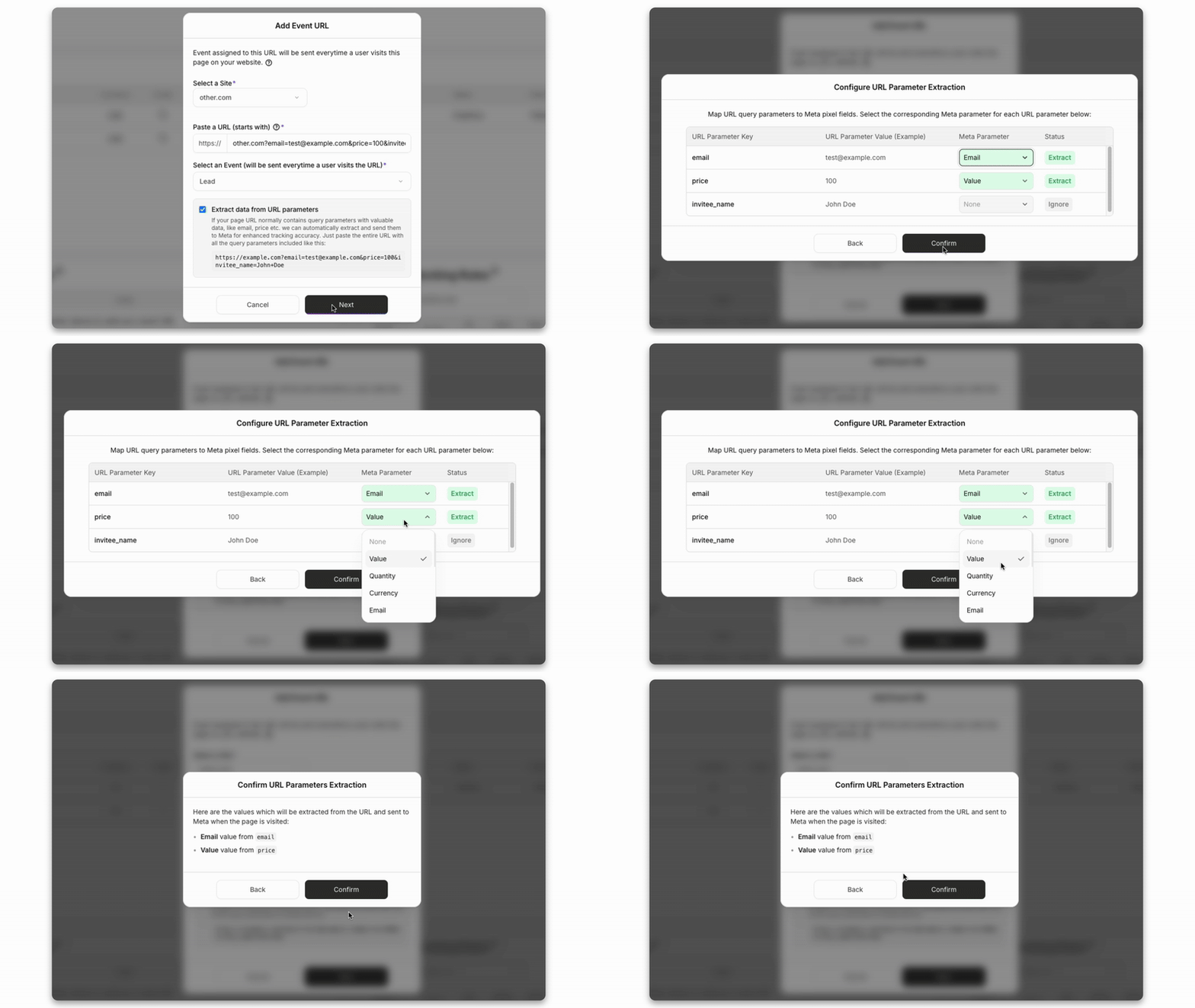
One notable example is URL-based user data extraction.
If a third-party tool redirects users to a WordPress thank-you page with parameters such as email or phone number, PixelFlow can automatically extract and attach that data to Meta events.
This is particularly useful for:
Booking tools like Calendly
Form tools that do not expose data layers
Funnel-style setups built on WordPress pages
These capabilities allow PixelFlow users to improve match quality and tracking accuracy without CRM access, backend integrations, or advanced plugin configuration.
User Data and Match Quality
Strong match quality is critical for Meta optimization. Both PixelFlow and PixelYourSite improve match rates compared to browser-only tracking, but they approach user data and identity very differently.
PixelFlow
PixelFlow automatically sends all Meta-supported identifiers where available, including:
fbp
fbc
IP address
User agent
Location data such as country, city, and postal code
In addition, PixelFlow allows customers to enrich events with user data captured directly from the WordPress page or URL.
This includes:
Email
Phone number
First name and last name
User data can be captured in two simple ways:
By tagging page elements or form inputs using documented CSS classes
By extracting values from dynamic URLs
Current limitations
No direct CRM integrations
No external_id support at this time
PixelFlow is optimized for WordPress setups where user data exists in forms, page markup, or URLs. This covers the majority of WooCommerce stores, lead generation sites, and marketing funnels built on WordPress.
PixelYourSite
PixelYourSite approaches user data from a configuration-first, plugin-driven perspective.
It supports:
Standard Meta user parameters
Advanced WooCommerce customer data
Custom parameters and event-level enrichment
Additional identifiers through plugin configuration and integrations
PixelYourSite typically captures user data through:
WooCommerce and Easy Digital Downloads events
Plugin-defined event rules and triggers
Optional integrations with analytics and marketing platforms
Because PixelYourSite supports many platforms and event types, match quality depends on correct configuration, enabled features (free vs Pro), and compatibility with the active WordPress theme and plugins.
PixelYourSite does not provide persistent identity resolution across sessions or devices, and does not offer CRM-backed attribution. Its focus is on flexible event enrichment rather than long-term user identity tracking.
Deduplication
PixelFlow
PixelFlow loads browser and server-side Meta events as part of the same system and generates a single internal event identifier.
This enables:
Automatic event deduplication
No dataLayer setup
No manual event_id handling
No additional configuration
Because both browser and server events are managed together, deduplication works reliably out of the box.
PixelYourSite
PixelYourSite deduplication depends on correct plugin configuration and event setup.
Because tracking logic is rule-based and configurable, deduplication typically requires:
Correct event rules
Consistent parameter mapping
Validation using Meta diagnostics and testing tools
When configured correctly, PixelYourSite can deduplicate events effectively, but it requires more setup, testing, and ongoing maintenance than PixelFlow.
Unique PixelFlow Capabilities (WordPress)
PixelFlow includes several features designed specifically for WordPress users who want better match quality without complex integrations.
One notable example is URL-based user data extraction.
If a third-party tool redirects users to a WordPress thank-you page with parameters such as email or phone number, PixelFlow can automatically extract and attach that data to Meta events.
This is particularly useful for:
Booking tools like Calendly
Form tools that do not expose data layers
Funnel-style setups built on WordPress pages
These capabilities allow PixelFlow users to improve match quality and tracking accuracy without CRM access, backend integrations, or advanced plugin configuration.
Additionally PixelFlow offers a set of simple blocking rules to easily define when to block events from being triggered like if someone refreshes a page or if they came from a specific location etc.
Additionally PixelFlow offers a set of simple blocking rules to easily define when to block events from being triggered like if someone refreshes a page or if they came from a specific location etc.
Data Accuracy and Reliability
Data Accuracy and Reliability
Tracking Accuracy and Reliability
Both PixelFlow and PixelYourSite significantly improve tracking accuracy compared to browser-only pixels. However, they optimize for accuracy in different ways.
PixelFlow
PixelFlow is designed to deliver clean, reliable conversion signals to Meta with minimal setup and minimal opportunity for misconfiguration.
It achieves this by:
Using server-side event delivery via the Meta Conversions API
Automatically formatting Meta CAPI payloads correctly
Loading browser and server-side events as part of the same system
Generating a single internal event identifier for automatic deduplication
Reducing configuration options that commonly introduce tracking errors
PixelFlow focuses on conversion delivery quality, not attribution complexity.
Because there are fewer moving parts and no dependency on Google Tag Manager, rule engines, or deeply nested plugin settings, there is less that can break over time. For most WordPress advertisers, this results in more consistent and predictable data inside Meta Ads Manager.
PixelYourSite
PixelYourSite focuses on flexibility and configurability, allowing users to define detailed tracking logic inside WordPress.
It is designed to:
Support browser-based and server-side Meta tracking
Capture a wide range of events and interaction types
Enrich events with advanced WooCommerce and custom parameters
Integrate multiple advertising and analytics platforms
Correct plugin configuration
Proper event rules and trigger conditions
Compatibility with themes and other WordPress plugins
Ongoing validation as site structure or tracking requirements change
When configured and maintained correctly, PixelYourSite can deliver accurate event data. However, because the setup is more flexible and rule-driven, there is more room for human error as settings evolve over time.
PixelYourSite does not provide dedicated server-side delivery logs, which can make long-term reliability harder to validate compared to a logged delivery model.
In Summary
PixelFlow prioritizes consistency, reliability, and ease of use for Meta optimization on WordPress
PixelYourSite prioritizes flexibility, customization, and multi-platform support inside WordPress
For teams focused on improving Meta performance with minimal technical overhead and clear visibility into event delivery, PixelFlow is often the safer and more predictable choice.
For teams that need deep customization, advanced triggers, and multi-platform tracking and are comfortable managing ongoing configuration, PixelYourSite can provide more control, at the cost of added complexity.
Tracking Accuracy and Reliability
Both PixelFlow and PixelYourSite significantly improve tracking accuracy compared to browser-only pixels. However, they optimize for accuracy in different ways.
PixelFlow
PixelFlow is designed to deliver clean, reliable conversion signals to Meta with minimal setup and minimal opportunity for misconfiguration.
It achieves this by:
Using server-side event delivery via the Meta Conversions API
Automatically formatting Meta CAPI payloads correctly
Loading browser and server-side events as part of the same system
Generating a single internal event identifier for automatic deduplication
Reducing configuration options that commonly introduce tracking errors
PixelFlow focuses on conversion delivery quality, not attribution complexity.
Because there are fewer moving parts and no dependency on Google Tag Manager, rule engines, or deeply nested plugin settings, there is less that can break over time. For most WordPress advertisers, this results in more consistent and predictable data inside Meta Ads Manager.
PixelYourSite
PixelYourSite focuses on flexibility and configurability, allowing users to define detailed tracking logic inside WordPress.
It is designed to:
Support browser-based and server-side Meta tracking
Capture a wide range of events and interaction types
Enrich events with advanced WooCommerce and custom parameters
Integrate multiple advertising and analytics platforms
Accuracy in PixelYourSite depends heavily on:
Correct plugin configuration
Proper event rules and trigger conditions
Compatibility with themes and other WordPress plugins
Ongoing validation as site structure or tracking requirements change
When configured and maintained correctly, PixelYourSite can deliver accurate event data. However, because the setup is more flexible and rule-driven, there is more room for human error as settings evolve over time.
PixelYourSite does not provide dedicated server-side delivery logs, which can make long-term reliability harder to validate compared to a logged delivery model.
In Summary
PixelFlow prioritizes consistency, reliability, and ease of use for Meta optimization on WordPress
PixelYourSite prioritizes flexibility, customization, and multi-platform support inside WordPress
For teams focused on improving Meta performance with minimal technical overhead and clear visibility into event delivery, PixelFlow is often the safer and more predictable choice.
For teams that need deep customization, advanced triggers, and multi-platform tracking and are comfortable managing ongoing configuration, PixelYourSite can provide more control, at the cost of added complexity.
Integrations & Compatibility
Integrations and Compatibility
Integrations and Platform Focus
PixelFlow Integrations (WordPress)
PixelFlow is purpose-built for teams that primarily advertise on Meta and want reliable server-side tracking on WordPress without unnecessary complexity.
PixelFlow focuses on:
Meta Ads, including Facebook and Instagram
WordPress and WooCommerce websites
Simple event verification and delivery monitoring
Clean, consistent conversion signals sent to Meta
PixelFlow intentionally limits its integration scope. The goal is not to become a full analytics or tag management platform, but to ensure Meta receives high-quality, reliable data with minimal setup and maintenance.
This approach works well for founders and marketers who care more about improving Meta ad performance than managing multiple tracking tools, tags, or platforms inside WordPress.
PixelYourSite Integrations (WordPress)
PixelYourSite is built as a multi-platform tracking and tag management plugin for WordPress.
PixelYourSite integrates with:
Meta Ads
Google Analytics 4 and Google Ads
TikTok, Pinterest, Bing, and Reddit (Pro plans)
WooCommerce and Easy Digital Downloads
Google Tag Manager and additional scripts
These integrations allow PixelYourSite to manage many tags, platforms, and event types from within a single WordPress plugin.
This flexibility is valuable for businesses running multi-platform advertising strategies or needing advanced event triggers and audience building across multiple tools.
However, for smaller teams or Meta-first advertisers, this breadth of integration can be more than is needed and may increase setup time, configuration effort, and long-term maintenance.
Pricing & Value
Integrations and Platform Focus
PixelFlow Integrations (WordPress)
PixelFlow is purpose-built for teams that primarily advertise on Meta and want reliable server-side tracking on WordPress without unnecessary complexity.
PixelFlow focuses on:
Meta Ads, including Facebook and Instagram
WordPress and WooCommerce websites
Simple event verification and delivery monitoring
Clean, consistent conversion signals sent to Meta
PixelFlow intentionally limits its integration scope. The goal is not to become a full analytics or tag management platform, but to ensure Meta receives high-quality, reliable data with minimal setup and maintenance.
This approach works well for founders and marketers who care more about improving Meta ad performance than managing multiple tracking tools, tags, or platforms inside WordPress.
PixelYourSite Integrations (WordPress)
PixelYourSite is built as a multi-platform tracking and tag management plugin for WordPress.
PixelYourSite integrates with:
Meta Ads
Google Analytics 4 and Google Ads
TikTok, Pinterest, Bing, and Reddit (Pro plans)
WooCommerce and Easy Digital Downloads
Google Tag Manager and additional scripts
These integrations allow PixelYourSite to manage many tags, platforms, and event types from within a single WordPress plugin.
This flexibility is valuable for businesses running multi-platform advertising strategies or needing advanced event triggers and audience building across multiple tools.
However, for smaller teams or Meta-first advertisers, this breadth of integration can be more than is needed and may increase setup time, configuration effort, and long-term maintenance.
PixelFlow Pricing
PixelFlow offers transparent, simple pricing with a free trial.
Pricing is $29/€29 per month or $190 per year for:
One WordPress site
Unlimited Meta pixels
Unlimited subdomains
You pay for:
Reliable server-side Meta Conversions API tracking
Automatic event deduplication
Built-in event logs for visibility and debugging
Zero server or infrastructure maintenance
A minimal learning curve
There are no usage-based limits. Pricing does not depend on traffic volume, number of events, or funnel complexity.
For most founders and marketers, this translates into:
Faster setup
Fewer tracking errors
Less time spent troubleshooting
Predictable monthly or yearly costs
PixelFlow is priced as a focused Meta tracking tool rather than a full analytics or tag management platform.
PixelYourSite Pricing
PixelYourSite uses a freemium model with a more advanced paid tier.
Free Version
The free version allows you to:
Install the Meta Pixel and Meta Conversions API
Add GA4 and Google Tag Manager
Track basic page and WooCommerce events
Inject scripts into the site header and footer
This is suitable for simple WordPress setups with basic tracking needs.
Pro Version
PixelYourSite Pro is priced at $199 per year and unlocks:
Advanced event triggers (clicks, scroll depth, video, selectors)
Deep WooCommerce and Easy Digital Downloads parameters
Multi-platform tracking (TikTok, Pinterest, Bing, Reddit)
Custom event data, audience tools, and remarketing features
Priority support and additional site licenses on higher plans
While powerful, the Pro version introduces more configuration and ongoing maintenance compared to lightweight Meta-only tools.
Cost Considerations in Practice
If your primary goal is to improve Meta ad optimization on WordPress using clean, server-side conversion signals, PixelFlow offers a lower-cost and lower-risk option with less setup and fewer failure points.
If your goal is to manage tracking across multiple ad platforms, advanced triggers, and deep WooCommerce data from within WordPress, PixelYourSite Pro may justify its higher price, especially for technical teams or agencies.
The real cost difference is not just subscription price, but time spent configuring, validating, and maintaining tracking over time.
Pricing & Value
PixelFlow vs PixelYourSite: Which Should You Choose?
PixelFlow Pricing
PixelFlow offers transparent, simple pricing with a free trial.
Pricing is $29/€29 per month or $190 per year for:
One WordPress site
Unlimited Meta pixels
Unlimited subdomains
You pay for:
Reliable server-side Meta Conversions API tracking
Automatic event deduplication
Built-in event logs for visibility and debugging
Zero server or infrastructure maintenance
A minimal learning curve
There are no usage-based limits. Pricing does not depend on traffic volume, number of events, or funnel complexity.
For most founders and marketers, this translates into:
Faster setup
Fewer tracking errors
Less time spent troubleshooting
Predictable monthly or yearly costs
PixelFlow is priced as a focused Meta tracking tool rather than a full analytics or tag management platform.
PixelYourSite Pricing
PixelYourSite uses a freemium model with a more advanced paid tier.
Free Version
The free version allows you to:
Install the Meta Pixel and Meta Conversions API
Add GA4 and Google Tag Manager
Track basic page and WooCommerce events
Inject scripts into the site header and footer
This is suitable for simple WordPress setups with basic tracking needs.
Pro Version
PixelYourSite Pro is priced at $199 per year and unlocks:
Advanced event triggers (clicks, scroll depth, video, selectors)
Deep WooCommerce and Easy Digital Downloads parameters
Multi-platform tracking (TikTok, Pinterest, Bing, Reddit)
Custom event data, audience tools, and remarketing features
Priority support and additional site licenses on higher plans
While powerful, the Pro version introduces more configuration and ongoing maintenance compared to lightweight Meta-only tools.
Cost Considerations in Practice
If your primary goal is to improve Meta ad optimization on WordPress using clean, server-side conversion signals, PixelFlow offers a lower-cost and lower-risk option with less setup and fewer failure points.
If your goal is to manage tracking across multiple ad platforms, advanced triggers, and deep WooCommerce data from within WordPress, PixelYourSite Pro may justify its higher price, especially for technical teams or agencies.
The real cost difference is not just subscription price, but time spent configuring, validating, and maintaining tracking over time.
PixelFlow is designed for:
WooCommerce-focused Meta tracking
Fast setup with minimal configuration
Simple form and interaction tracking via CSS classes
Built-in event logs for debugging and confidence
Low ongoing maintenance
PixelYourSite is designed for:
WordPress-based tag and event management
Multi-platform advertising and analytics tracking
Advanced event triggers and WooCommerce parameters
Maximum flexibility at the cost of added complexity
No dedicated server-side event delivery logs
Final Verdict
If your goal is to make Meta tracking work reliably on WordPress with the least friction and clear visibility into what is being sent, PixelFlow is the simpler and more predictable option.
If your goal is to manage many platforms, tags, and advanced event logic inside WordPress, PixelYourSite offers more control, but with higher setup effort and less observability.
PixelFlow vs PixelYourSite: Which Should You Choose?
Both PixelFlow and PixelYourSite improve Meta tracking on WordPress/WooCommerce by using the Meta Conversions API, but they are built with very different priorities.
PixelFlow is designed for:
WooCommerce-focused Meta tracking
Fast setup with minimal configuration
Simple form and interaction tracking via CSS classes
Built-in event logs for debugging and confidence
Low ongoing maintenance
PixelYourSite is designed for:
WordPress-based tag and event management
Multi-platform advertising and analytics tracking
Advanced event triggers and WooCommerce parameters
Maximum flexibility at the cost of added complexity
No dedicated server-side event delivery logs
Final Verdict
If your goal is to make Meta tracking work reliably on WordPress with the least friction and clear visibility into what is being sent, PixelFlow is the simpler and more predictable option.
If your goal is to manage many platforms, tags, and advanced event logic inside WordPress, PixelYourSite offers more control, but with higher setup effort and less observability.