Most businesses running Facebook ads never actually track their purchases.
They track button clicks. Thank-you page views. Form submissions. But when someone completes a real payment through Stripe, that conversion disappears into a gap between platforms, and Facebook never sees it.
That means Facebook’s algorithm is optimizing your ad spend based on incomplete data. And you have no idea which campaigns are actually making you money.
PixelFlow’s Stripe integration closes that gap by helping you automatically trigger events to Meta directly from your Stripe account.
Why Stripe Payments Don’t Automatically Reach Facebook
When a customer clicks your ad and lands on your site, the Meta Pixel fires a PageView. If they click a button, maybe you’ve tracked that too. But when they hit your Stripe checkout, they leave your website entirely.
The payment completes on Stripe’s hosted page. By the time the customer is done, the browser tracking chain has broken. The Pixel never fired a Purchase event. Facebook recorded a click, not a conversion.
This creates two problems:
Your attribution is wrong. You can’t see which ads drove real revenue. You’re looking at click data and making budget decisions from it.
Facebook’s purchase optimization has nothing to optimize toward. Facebook finds more buyers by looking at who has already bought from you. No purchase events means no signal, which means worse targeting and higher costs over time.
Server-side tracking fixes this. Instead of relying on a browser script that can break, PixelFlow sends the Purchase event directly from your backend to Facebook’s Conversions API (CAPI) the moment Stripe confirms the payment.
What PixelFlow Tracks from Every Stripe Payment
When a Stripe payment completes, PixelFlow automatically captures and sends the following to Facebook CAPI:
Purchase value - the exact amount paid. This is what Facebook uses to calculate your real ROAS, not an estimated value.
Currency - works with every currency Stripe supports.
Customer email and name - hashed before being sent to Facebook, so the raw data never leaves your server. Facebook uses the hashed values to match the purchase back to a Facebook profile, which is what drives Event Match Quality.
Product details - line item data where available, useful for dynamic product ads and catalog campaigns.
Every field is sent automatically. You don’t configure anything beyond the initial connection.
Why Event Match Quality Matters for Your Results
Event Match Quality (EMQ) is Facebook’s score from 0 to 10 that measures how well it can match your conversions to real user profiles.
A Purchase event with no customer data might score a 5/10. Facebook received the event but couldn’t tie it to anyone specific.
A Purchase event with a matched email address can score 7, 8, or higher. Facebook knows exactly who bought, which ad they saw, and what audience they belong to.
Higher EMQ means better attribution accuracy, better lookalike audiences, and better purchase campaign performance over time. It’s one of the highest-leverage things you can improve in your Facebook ads setup, and most businesses have never touched it.
PixelFlow’s Stripe integration sends email and name with every purchase event automatically, which is the single biggest driver of EMQ improvement for most accounts, along with whatever other information was collected at your Stripe checkout like the user’s phone number, address etc. increasing EMQ scores even further.
The Reliability Advantage of Server-Side Purchase Tracking
Browser-based Purchase tracking has several failure modes that most businesses don’t account for:
Ad blockers - a significant portion of your customers run them. Browser events from these users never reach Facebook.
iOS privacy settings - Apple’s App Tracking Transparency and Intelligent Tracking Prevention limit cookie-based tracking significantly. Server-side tracking is unaffected.
Tab closures - if a customer closes the tab before your thank-you page fully loads, the Pixel event never fires. The Stripe webhook fires regardless.
Redirect failures - if your post-payment redirect breaks, the thank-you page event never fires. The Stripe integration fires on payment confirmation, not on page load.
The result is a materially higher event capture rate. Businesses that switch from thank-you page tracking to server-side Stripe integration typically recover a meaningful percentage of purchases that were previously going untracked.
Three Ways to Track Stripe Purchases in PixelFlow (And Why One Wins)
PixelFlow gives you multiple ways to track a purchase conversion. It’s worth understanding the difference so you can choose the right approach, or understand why the Stripe integration is the default recommendation.
Option 1: Stripe Server-to-Server Integration (Recommended)
The PixelFlow Stripe to Meta integration bypasses the browser entirely. PixelFlow connects directly to Stripe via webhooks, and when Stripe confirms a payment, it notifies PixelFlow immediately. The Purchase event fires regardless of what happens in the customer’s browser.
This method also has access to more data than either browser-based approach. Stripe collects detailed customer information at checkout, including billing address, zip code, phone number, and the complete order details. All of that gets passed through to Facebook CAPI with the Purchase event, which directly improves your Event Match Quality score.
There’s no dependency on page load, no risk from ad blockers or iOS restrictions, and no reliance on URL parameters being present and correctly formatted. It’s the most complete and reliable purchase tracking method available.
Option 2: Track Button Clicks to the Checkout
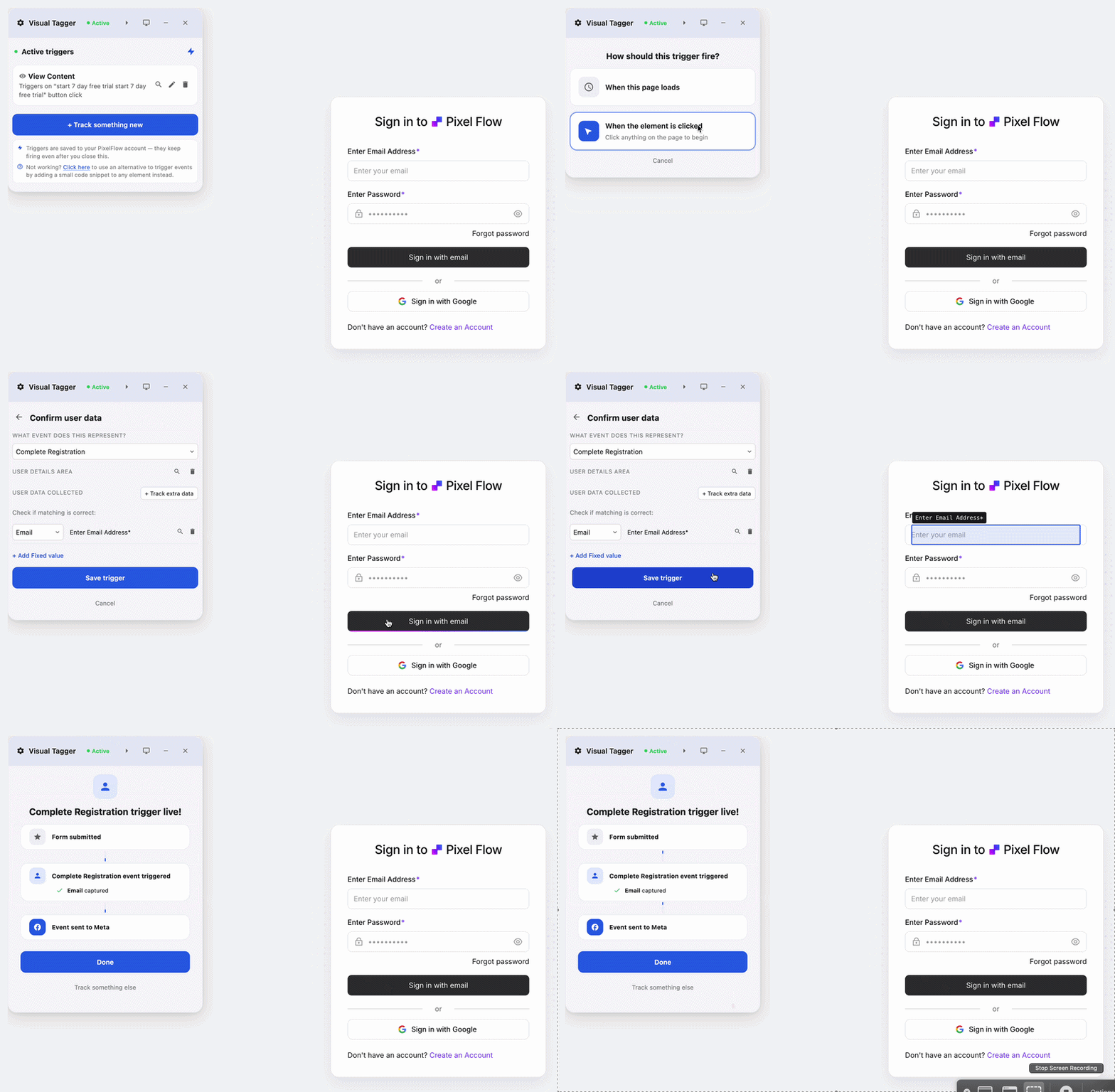
PixelFlow can fire a Purchase event the moment a customer clicks your checkout button. You setup this tracking by adding “classes” (code snippets) to the button or by using the PixelFlow Visual Tagger (point and click to setup tracking) and PixelFlow picks it up automatically along with any customer data present on the checkout page, such as email, name, and location fields the user has already filled in.
This is a reasonable approach for many use cases, but it has a fundamental limitation: the event fires on click, not on payment confirmation. A customer can click the button and then fail the payment, close the tab, or abandon the flow entirely. Every one of those fires as a Purchase event in Facebook.
Option 3: URL Trigger Tracking on the Order Confirmation Page
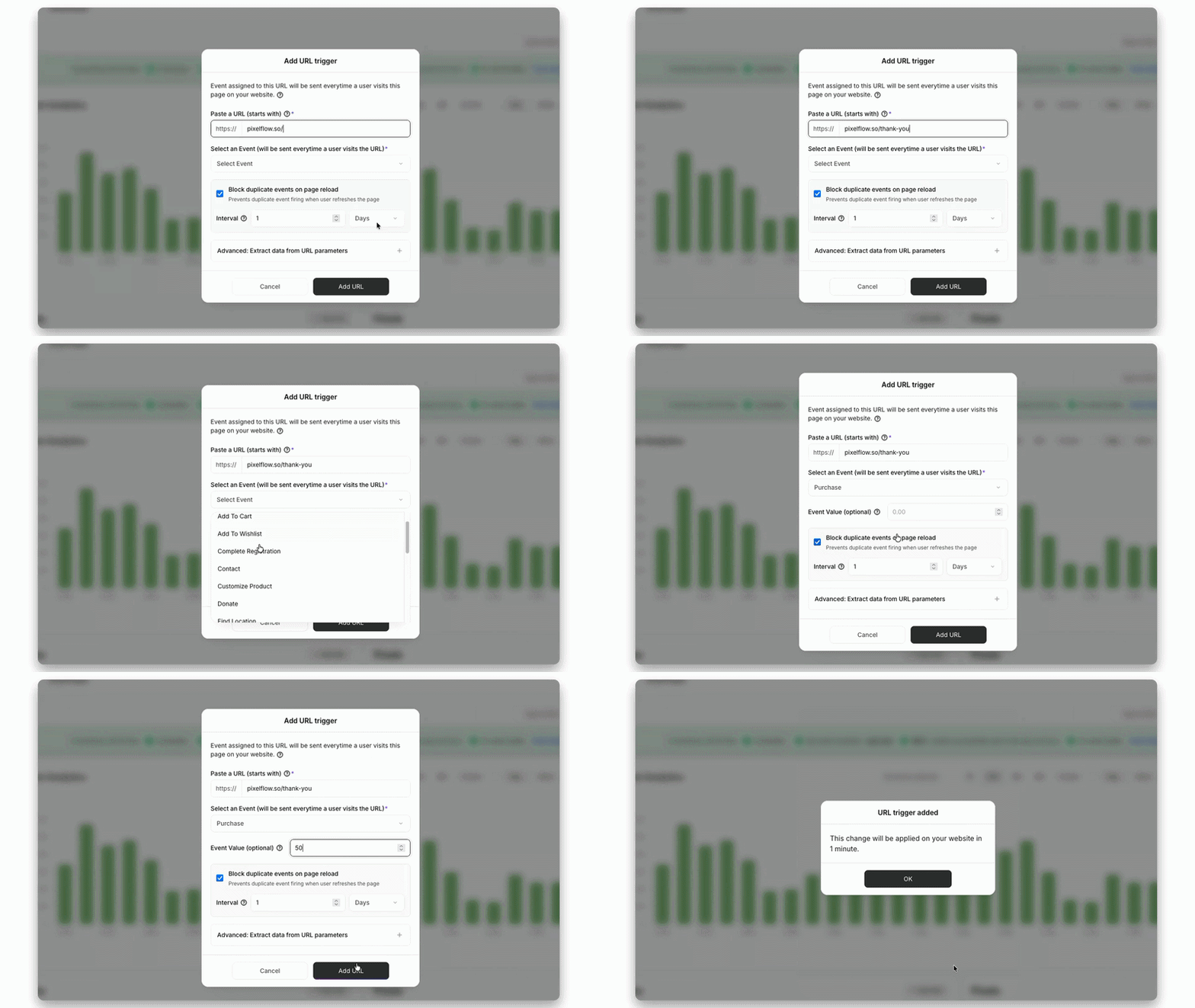
PixelFlow’s URL triggers let you fire a Purchase event when a customer lands on a specific URL, such as your order confirmation page. PixelFlow can extract data from the URL parameters (order value, product ID, and similar fields that many platforms pass in the confirmation URL) and automatically enriches the event with the customer’s location and other available data.
This is more accurate than button click tracking because the customer has actually completed the payment to reach that page. PixelFlow also has blocking rules that prevent the same URL from triggering duplicate events if the customer refreshes the page.
The limitation is that it still depends on the browser. If the post-payment redirect fails, if the customer closes the tab before the confirmation page loads, or if they’re on iOS with tracking restrictions, the event may not fire.
How to Setup Stripe to Trigger Meta Events Automatically
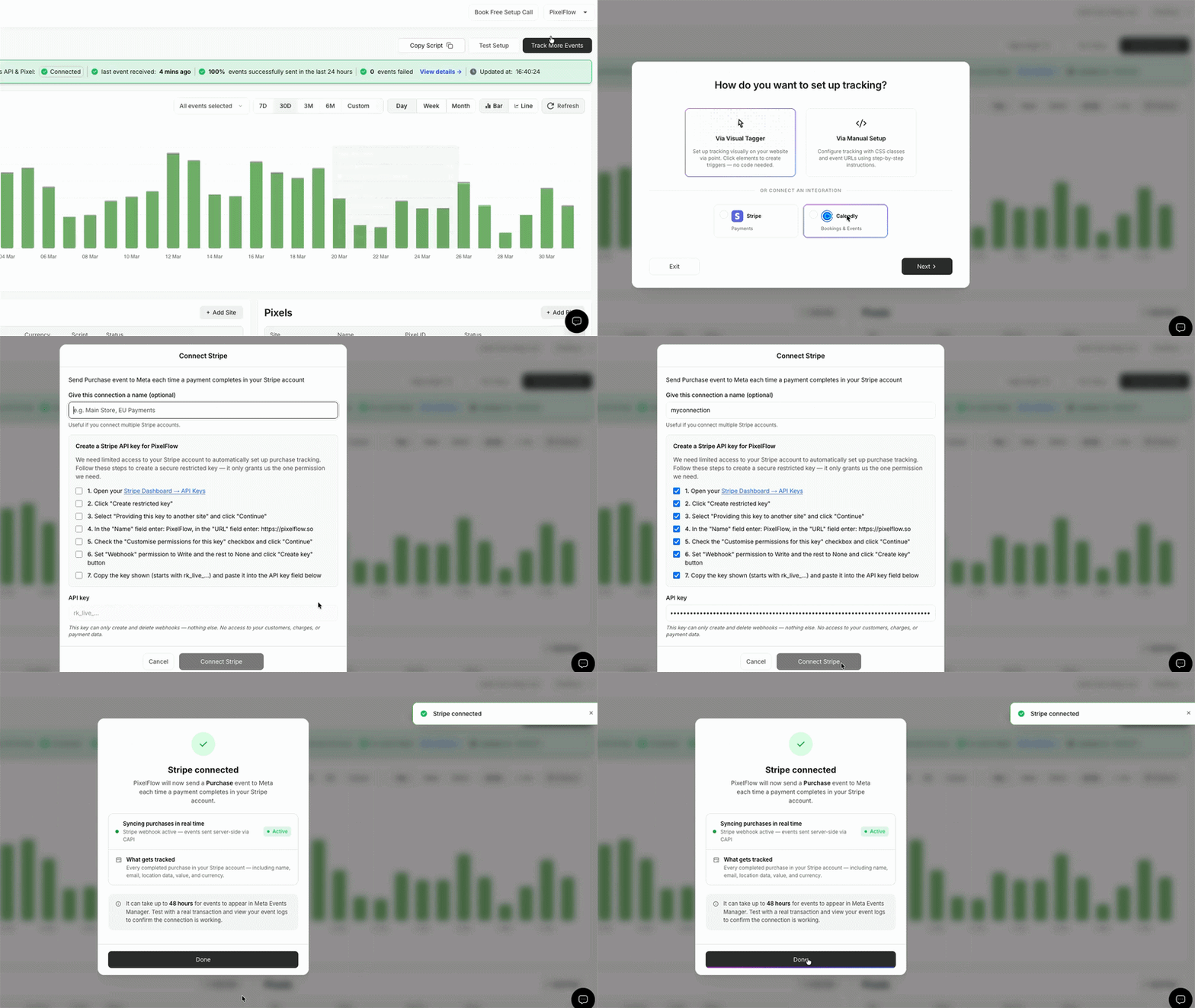
It takes less than 2 minutes to automatically trigger events from your Stripe account to Meta using PixelFlow:
In your PixelFlow dashboard click on “Track More Events”
Select “Connect Stripe”
Complete the on screen steps that take around 60 seconds. The connection uses Stripe’s webhook system, so PixelFlow receives a notification every time a payment completes.
Once connected, every successful Stripe charge is automatically queued and sent to Facebook CAPI. No additional code, no Zapier workflows, no manual event configuration.
The whole setup takes about two minutes.
Frequently Asked Questions
Do I need a developer to set this up?
No. The connection is made entirely through the PixelFlow dashboard. You authorize the Stripe integration and PixelFlow handles the rest.
Will this create duplicate Purchase events?
No the best part of this is there will be no duplicate events at all. Just ensure you don’t have any other tracking or triggers setup that could fire before/afterwards for the same event (ie. triggering the Purchase event on “purchase” button click or on confirmation page load)
Does this work for subscriptions as well as one-time payments?
Yes. The integration works for any completed Stripe charge, including one-time purchases, subscription payments, and checkout sessions.
Is customer data sent securely?
Yes. Email and name are hashed using SHA-256 before being sent to Facebook. Raw personally identifiable information never leaves your server unencrypted. This is the same approach used by all server-side tracking tools and is consistent with Meta’s data handling requirements.
What plan do I need?
The Stripe integration is available on all paid PixelFlow plans. You can connect it from the integrations page in your dashboard.
Get Started
If you’re taking payments through Stripe and running Facebook ads, every day without this connected is a day of purchase data that Facebook never sees.
PixelFlow takes about two minutes to connect to Stripe and starts sending Purchase events immediately.