A WordPress plugin you configure yourself, or one script that works on WordPress and beyond?
Prices and features were checked on both vendors’ sites on 16 November 2026. Where PixelYourSite is the better choice, this page says so.


The short answer
PixelYourSite is a WordPress plugin that manages your tracking tags and server-side APIs, with deep WooCommerce events built in. PixelFlow is a no-code tracking tool that works on WordPress and other site builders, sends server-side events to six ad platforms and reports on the results too.
PixelFlow is usually the better choice if you want server-side tracking for Meta, TikTok, Snapchat, Pinterest, Reddit or ChatGPT Ads without pasting API tokens, want attribution and an event log in one dashboard, or run sites beyond WordPress.
PixelYourSite may be the better fit if you only run WordPress or WooCommerce, want Meta’s Conversions API for free, need Google Ads, GA4 or Bing as well, or want deep WooCommerce events such as subscriptions.
PixelFlow vs PixelYourSite at a glance
PixelFlow Standard against PixelYourSite Pro Starter. Green means it is handled for you, amber means it is partial or you configure it, grey means it is not available.
 PixelFlow
 PixelYourSite
What each tool is
Both tools send your conversions to ad platforms from the browser and a server. PixelYourSite does it inside WordPress. PixelFlow does it from its own servers, on any site.
PixelYourSite
PixelYourSite is a WordPress plugin, first released in 2015, with more than 400,000 active installs on WordPress.org. The free version handles the Meta Pixel and Conversions API, GA4, Google Tag Manager and the OpenAI pixel, with WooCommerce and Easy Digital Downloads events built in.

Pro adds Google Ads, server-side GA4, TikTok and custom events with 16 trigger types, and paid add-ons cover Pinterest, Bing and Reddit. Everything runs inside your WordPress install, so its settings, updates and API tokens are yours to manage.
PixelFlow
PixelFlow is a no-code tracking tool. Add one script, choose the events to send, and it sends each one through both the browser pixel and the server-side API of every ad platform you connect: Meta, TikTok, ChatGPT Ads, Snapchat, Pinterest and Reddit.
Deduplication, bot filtering and consent are handled for you, and one dashboard shows attribution, customer journeys and a full event log.
In short: PixelYourSite is a powerful tracking plugin for WordPress that you configure yourself. PixelFlow is a finished server-side tracking setup that works on any site, plus the reporting to check it.
Setup
Both tools can be installed in minutes. The difference is how much you configure afterwards.
PixelYourSite
Step 1: Install the plugin from WordPress.org, plus the Pro licence or add-ons if you need them.
Step 2: Paste your Meta Pixel ID, generate a Conversions API access token in Events Manager, paste it in and turn on the API. TikTok needs its own token too.
Step 3: Choose your events, clear your page cache, and check them with a test event code in Events Manager.
You own the setup. Pixel IDs, API tokens, caching and plugin updates all live in your WordPress install. That gives you full control, and it means checking them yourself when something changes.
PixelFlow
Step 1: Add your site and connect your ad accounts in the dashboard.
Step 2: Add one script, or install the plugin for Webflow, Framer, WordPress or WooCommerce.
Step 3: Point and click the buttons, links and forms you want to track with the Visual Tagger, or fire events on page load with a URL trigger, then watch them arrive in the event log.

Pro tip: PixelFlow has an MCP server, so you can ask Claude, Cursor or ChatGPT to install the script and set up your events for you.
Verdict: Both are quick to install. PixelFlow wins if you would rather connect ad accounts than paste API tokens, or run sites outside WordPress. PixelYourSite wins if you want everything inside WordPress.
Ad platforms and integrations
This is the section where PixelYourSite is broader, at least on Google and Bing.
PixelYourSite
The free plugin sends Meta and OpenAI events server-side and adds GA4 and Google Tag Manager in the browser. Pro adds Google Ads with enhanced conversions, GA4 through the Measurement Protocol and TikTok’s Events API. Pinterest, Bing and Reddit are paid add-ons, included in the Advanced and Agency licences. Snapchat is not supported.
PixelFlow
PixelFlow sends to six ad platforms. Plans include one, three or five of them, and extra platforms cost $10 a month each.
Google Ads, GA4 and Bing: PixelFlow does not send to any of them. If they are must-haves on a WordPress site, PixelYourSite covers them and PixelFlow does not.
Where PixelFlow goes further is beyond WordPress: one-script installs for Webflow, Framer, Squarespace, Kajabi, ClickFunnels, GoHighLevel and plain HTML, plus built-in Stripe and Calendly integrations that send payments and bookings from a webhook, matched back to the ad click.
Verdict: PixelYourSite wins on Google, Bing and WooCommerce depth. PixelFlow wins on Snapchat, server-side delivery to every platform it supports, and every site that is not WordPress.
Attribution and customer journeys
Sending better data is half the job. The other half is knowing which ads actually drove your sales.
PixelYourSite
The free plugin saves the UTM parameters, traffic source and landing page on each WooCommerce order. Pro adds reports on revenue, orders and ROAS by source, campaign and date, with CSV export.
These reports cover WooCommerce and Easy Digital Downloads orders. PixelYourSite’s pages do not show a journey view of every visit before a lead or sale.
PixelFlow
PixelFlow uses the same events it sends to the ad platforms to build its own attribution. The attribution table lists every source, campaign and ad with visitors, sessions, leads, purchases and revenue, so you can check Ads Manager against what actually happened on your site.
Open any purchase or lead and you get the journey behind it: the ad they clicked first, every page they viewed, the days between visits and the event that converted them.

One limit: PixelFlow's attribution covers traffic to sites running its script. It does not reconcile ad spend across channels the way a dedicated attribution platform does.
Verdict: PixelFlow wins on depth: journeys for every lead and sale, on any site. PixelYourSite’s reports suit you if ROAS by source inside WooCommerce is all you need.
Data quality
Both tools recover events a browser pixel misses. The differences are in what you set up and how easy it is to check.
Deduplication
PixelYourSite gives the browser and server copy of each event the same event_id, so platforms count it once. PixelFlow does the same with one event ID per event, with nothing to configure.
Mind your cache: PixelYourSite’s own setup guide tells you to clear your page cache after turning on the Conversions API. Check again whenever you change caching or optimisation plugins.
Bot filtering and blocking rules
PixelYourSite blocks known bots and crawlers in both the free and Pro versions.
PixelFlow drops crawlers, scrapers and other automated traffic before anything reaches an ad platform, and blocking rules let you stop a repeat of the same event within a set time, block events with no click ID, or block by URL or referrer.
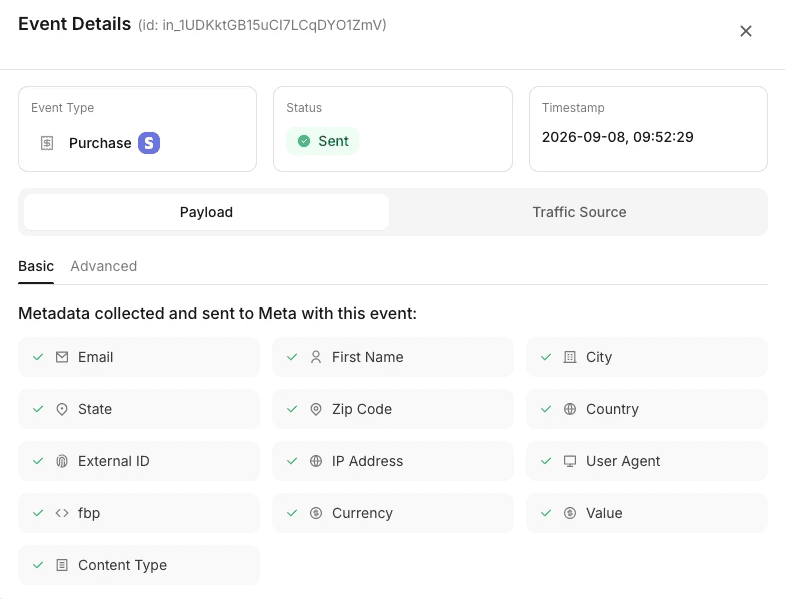
Event logs
Match quality
PixelFlow attaches the browser and click identifiers, IP address, user agent, a hashed location and an anonymous external ID to every event automatically, and captures email, phone and name from tagged forms or URL parameters. PixelYourSite uses the customer details WooCommerce already holds for its order events.
Verdict: Close. Both deduplicate and filter bots. PixelFlow shows you more: a full payload for every event, always on, with whether each platform accepted it.
Consent and privacy
PixelYourSite
PixelYourSite can hold each pixel back until consent is given, supports Google Consent Mode v2, works with popular WordPress consent plugins and offers its own, ConsentMagic. It also supports Meta’s Limited Data Use setting.
PixelFlow
PixelFlow reads the choice from the banner you already use, including CookieYes, Cookiebot, Complianz, OneTrust and any banner that supports Consent Mode v2. Tracking runs when a visitor accepts and stays off when they decline.
Global Privacy Control and Do Not Track are honoured, even over an Accept click
Custom banners connect with one line of code
Consent mode is on by default for every site
Either way: making sure your site complies with the law is still your responsibility. The tools help you respect choices; they do not make the site compliant on their own.
Verdict: A draw. Both respect consent well. PixelYourSite has more WordPress consent options. PixelFlow honours Global Privacy Control by default, on any site.
Pricing
PixelYourSite is cheaper, and its Meta Conversions API is free. Pro is billed yearly per licence. PixelFlow charges a flat monthly price per site with unlimited events. Prices checked on each vendor’s site on 16 November 2026.
PixelFlow
PixelYourSite
Per site, PixelYourSite costs far less, and its free plugin may be all a Meta-only WordPress store needs. The gap narrows once you count the time to set up and maintain tokens, add-ons and caching yourself.
Verdict: PixelYourSite wins on price, especially for Meta-only WordPress sites. PixelFlow is worth the extra if you want it managed, on any platform, with attribution included.
Which should you choose?
There is no universal winner. It comes down to your platform, and whether you want to configure tracking or have it done for you.
Choose PixelFlow if
You run Webflow, Framer, Squarespace or more than just WordPress
You want Snapchat, Pinterest, Reddit or TikTok server-side without add-ons
You want attribution and customer journeys in one dashboard
You would rather connect ad accounts than paste API tokens
You want deduplication, bot filtering and consent handled for you
Choose PixelYourSite if
You only run WordPress or WooCommerce
You want Meta’s Conversions API for free
You need Google Ads, GA4 or Bing as well
You want deep WooCommerce events and custom triggers
You are happy to manage settings and tokens in WordPress
Final verdict: PixelYourSite is the most complete tracking plugin for WordPress, and hard to beat on price. PixelFlow is a finished tracking and attribution tool for any site. If you want server-side tracking across platforms with less to configure, PixelFlow is usually the better choice.
SWITCHING
Switch from PixelYourSite in three steps
Run PixelFlow next to PixelYourSite, check the events in the log, then turn off the pixels you have moved over. Most sites are done in under fifteen minutes.
“After implementing PixelFlow with CAPI, we started seeing significantly more conversion events registered in Meta than we got with the pixel alone. Our TrialStarted event match quality jumped almost immediately from 4/10 to 8.5/10.”

Mike Flieder
Founder & CEO, SimpleCheck

Smarter, server-side tracking
Start sending accurate conversions today - no tag manager, no code, no developer required.
Compatible with


