
The Best Meta Conversions API (CAPI) Tools in 2026

Last updated 3 August 2026
•
12 min read
There is no single best Meta CAPI tool, because the right pick depends on your stack. Where you land comes down to three things:
Pixel-only and after free server-side redundancy: Meta’s own one-click Conversions API is the correct starting point.
On any platform where you do not want to write code: a no-code CAPI tool is usually the better choice (PixelFlow is our pick here, and it is our product, disclosed below).
Already living in Google Tag Manager and want maximum control: Stape with server-side GTM is the strongest option.
This guide covers eight tools and names the best fit for each situation.
Meta shipping a free one-click CAPI in 2026 reset the baseline. Every paid tool now has to justify itself against “free and built-in”, so this guide starts from that baseline and is honest about when the free option is genuinely enough.
Disclosure: PixelFlow is our product. It appears below as one of eight evaluated tools, held to the same criteria as the rest, and it is not ranked first overall. If you only track standard browser events on Shopify, you probably do not need us, and we say so below.
Meta CAPI tools at a glance
Seven tools, what each is genuinely best at, and what it costs to start. Full write-ups, including honest limits, are further down.
Prices are representative starting points. Confirm the current figure on each vendor’s site before buying.
Tool
Best for
Starting price
Key differentiator
Meta one-click CAPI
Pixel-only advertisers wanting free redundancy
Free
Native, one click, Meta-hosted
PixelFlow (our product)
Any platform, no code
From $19/mo
No-code CAPI with server-side and webhook events
Stape (server-side GTM)
Technical teams and agencies wanting full control
From ~$10/mo per container
Hosted sGTM, multi-platform
AnyTrack
Affiliates and attribution-focused advertisers
Confirm on site
Cross-network conversion attribution
Elevar
Shopify stores
Confirm on site
Shopify data layer and server-side events
PixelYourSite
WordPress and WooCommerce sites
Confirm on site
Popular WordPress pixel and CAPI plugin
Conversios
Shopify and WooCommerce, Google plus Meta
Confirm on site
eCommerce-focused multi-tag tracking
Quick verdict
For most no-code site builders running Meta ads, we would start with PixelFlow, because it sets up CAPI on any platform in minutes and sends server-side events the browser Pixel misses. That is our product, and this is a disclosed house pick for a named use case, not a claim to be the best overall.
If you are Pixel-only and cost-sensitive, Meta’s one-click CAPI remains an excellent, free starting point, and you may not need anything else yet. Enable it first, see whether your match quality and event coverage are good enough, and only add a paid tool when a real gap appears.
The rest of this guide is about spotting that gap early, and picking the tool that closes it with the least work.
Why people compare Meta CAPI tools in the first place
Browser tracking leaks. Ad blockers, iOS privacy changes and third-party cookie restrictions mean a meaningful share of conversions never reach Meta from the browser alone. The Conversions API sends events server-side to close that gap, and the tools below are the different ways to do it.
The free option changed the calculus. With Meta’s one-click CAPI now available, the question shifted from “which tool do I buy” to “do I need a tool at all, and if so, which”. That is a healthier question, and the honest answer for a lot of small advertisers is that the free option is fine for now.
Match quality and server-side events are where money is won or lost. The advertisers who care most are the ones with subscriptions, trials, refunds, bookings or offline sales, and the ones whose Event Match Quality is dragging down optimisation. Those needs are what separate the tools below.
Conversions API (CAPI): Meta’s server-to-server event channel. Your server sends conversions straight to Meta rather than relying on the browser Pixel alone. Background: what the Conversions API is. Deep dive: how the Conversions API works.
How we evaluated these tools, and our disclosure
How we tested. I evaluated each tool on setup effort, the events it can actually send (browser-only versus true server-side and webhook events), match-quality enrichment, platform fit, data and GDPR posture, and price relative to what you get. Where I could enable a tool on a live site, I did, and recorded delivered events and Event Match Quality in Meta Events Manager. We prioritised what a tool can actually send to Meta over marketing claims.
Our disclosure, up front: PixelFlow is our product. We have an obvious interest here. We have tried to be honest about where PixelFlow is not the right choice, and we have named the situations where a free or competing tool is the better call. PixelFlow appears in this list as one evaluated tool among eight, held to the same criteria as the rest, and it is not ranked first overall.
STANDOUT DIFFERENTIATOR
Standout difference: PixelFlow’s MCP server runs your tracking.
Of the tools on this list, only Stape and PixelYourSite publish an MCP server. Stape’s manages GTM containers and tags; PixelYourSite’s edits plugin settings on WordPress. PixelFlow’s works on any platform and reaches the live site and your conversion data.
The rest of this list
PixelFlow
MCP server
Stape (GTM infrastructure) and PixelYourSite (WordPress settings). None from the others
Hosted, any platform, every plan
Sets up conversions for you
No. Stape builds tags you validate; PixelYourSite toggles settings
Proposes the events you are missing, adds the triggers you approve, verifies the live site
Answers from your conversion data
GA4 data through Stape; order attribution through PixelYourSite Pro
Overview, attribution, journeys, event logs and blocked events
Works in
Claude Desktop with Node.js (Stape); Claude, ChatGPT, Gemini (PixelYourSite)
Any MCP client, chat or IDE, from one URL
If an assistant setting up and explaining your tracking matters to you, PixelFlow is the only tool here built for it. See the PixelFlow MCP server
The 8 best Meta CAPI tools in 2026
1. Meta one-click Conversions API
Best free and native option
Best for: Pixel-only advertisers who want free server-side redundancy.
Meta’s own one-click setup, available in Events Manager, creates a server-side connection that re-sends your browser Pixel’s events and deduplicates them automatically. No developer, no server, no cost. For a Pixel-only advertiser it is the obvious first move and a real upgrade over browser-only tracking.
The limit is mechanical: it can only forward what the Pixel already fires. Events that never happen in the browser (subscription renewals, refunds, offline sales, bookings on an external page) are not captured, and it does not add match quality beyond the existing Pixel payload. Meta’s documentation also restricts it to standard web events, so offline and custom-logic scenarios still need a direct or partner integration.
Pros: Free. Instant setup. Native, so no third party in the data path.
Cons: Only forwards existing browser events. No server-native events. No enrichment beyond the Pixel payload. Meta-hosted.
Pricing: Free.
2. PixelFlow
Best for improved data and setups that require additional tools
Only tool on this list with an MCP server, so an AI assistant can set it up and audit it for you. Best for: sites on any platform that want clean CAPI and server-side events without GTM. Especially those who use a tool like Typeform, Calendly, Stripe etc. where the Facebook pixel can’t see the conversion happening.
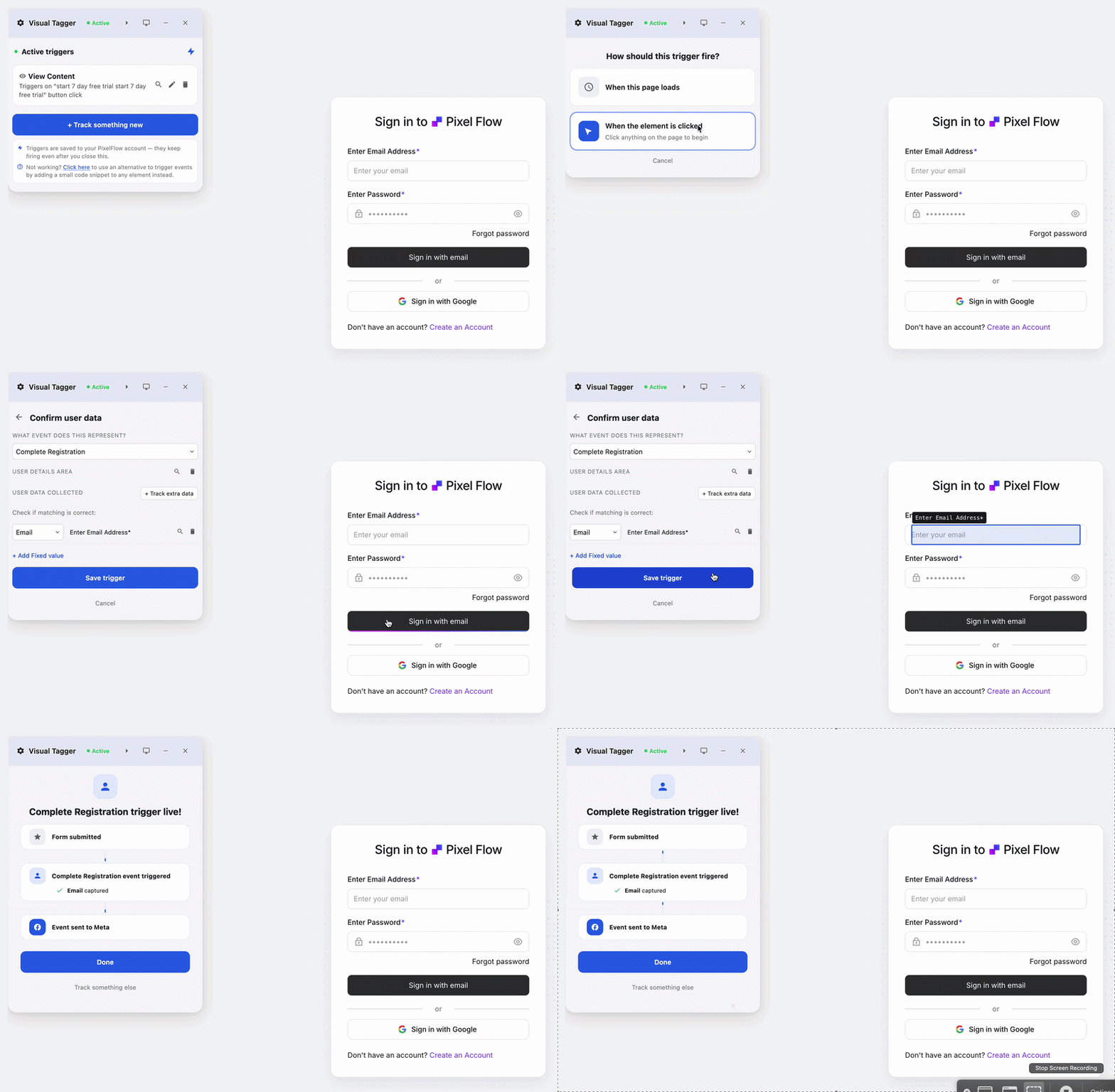
PixelFlow is a no-code server-side tracking tool for Meta, TikTok and more that runs on any platform, and it sends both browser events and server-side events without Google Tag Manager or a server container. Set it up manually in under 5 minutes or let your AI agent do it through PixelFlow’s MCP server.
Where it differs from a plain Pixel copy: it fires server-side events the browser cannot, including Stripe Purchase, Subscribe and StartTrial through Stripe webhooks (with browser attribution merged back in) and Calendly bookings through a native webhook. It also sends a richer identifier set on every event by default (fbp, fbc, hashed IP-inferred location, user agent and an anonymous hashed external_id), which is what lifts Event Match Quality. It is consent-aware, which matters for its large European user base.
Pros: Fast no-code setup on any platform, or AI-agent setup over MCP. Server-side and webhook events. Match-quality enrichment on every event. EU-friendly data handling. Event logs and a health view.
Cons: PixelFlow sends to Meta and TikTok only (no Google Ads or GA4 dispatch), it is not a general tag manager like GTM, it does not tag cross-origin iframes, and its automatic store tracking covers cart, checkout and purchase rather than every event. If you need Google Ads, GA4 or a full tag container, look elsewhere on this list.
Pricing: From $19/mo, with a 7-day free trial and no credit card required.
3. Stape (server-side Google Tag Manager)
Best for technical teams
Best for: Agencies and technical in-house teams tracking multiple platforms.
Stape hosts server-side GTM containers and is the best-known path for teams that already work in Google Tag Manager. It is powerful and flexible: you can route Meta, Google, TikTok and other platforms through one server container, control cookies and first-party subdomains, and enrich events. That flexibility is also its cost, because it assumes comfort with server-side GTM. We compare the two directly in our PixelFlow vs Stape head-to-head.
Pros: Maximum control. Multi-platform through one container. First-party cookie and consent tooling.
Cons: Requires GTM and server-side GTM knowledge. More setup and ongoing maintenance than a no-code tool.
Pricing: From roughly $10/mo per container at entry tiers, scaling with usage. Confirm on Stape’s site.
4. AnyTrack
Best for attribution-focused advertisers
Best for: Affiliates and advertisers who need multi-network attribution.
AnyTrack focuses on conversion attribution across ad networks and affiliate platforms, and it can feed Meta’s Conversions API as part of that. If your priority is understanding cross-network attribution rather than delivery to Meta and TikTok, it fits that job better than a delivery-focused tool.
Pros: Cross-network attribution. Affiliate-friendly. Feeds multiple ad platforms.
Cons: Broader attribution focus means Meta CAPI is one feature among many, not the whole product.
Pricing: Confirm on AnyTrack’s site.
5. Elevar
Best for Shopify stores
Best for: Shopify stores investing in accurate server-side eCommerce tracking.
Elevar is built around Shopify, with a well-developed data layer and server-side event delivery to Meta and other platforms. For a serious Shopify store that wants strong eCommerce event coverage, it is a natural fit and is more Shopify-native than a general site-builder tool.
Pros: Deep Shopify integration. Strong eCommerce event coverage. Multi-destination.
Cons: Shopify-centric, so less relevant off Shopify.
Pricing: Confirm on Elevar’s site.
6. PixelYourSite
Best for WordPress and WooCommerce
Best for: WordPress and WooCommerce sites.
PixelYourSite is a widely used WordPress plugin for managing pixels and Conversions API, with good coverage of WooCommerce and Easy Digital Downloads events. If your site is WordPress-first, it is a familiar, plugin-based path. We cover the trade-offs in detail in our PixelYourSite comparison.
Pros: Popular and well-supported on WordPress. WooCommerce event coverage. Plugin-based, no separate service to host.
Cons: WordPress-focused. Less relevant for no-code builders or custom stacks.
Pricing: Confirm on PixelYourSite’s site.
7. Conversios
Best for eCommerce running Google plus Meta
Best for: Shopify and WooCommerce stores running both Google and Meta ads.
Conversios targets Shopify and WooCommerce stores that want Google and Meta tracking together, including CAPI. For a store that treats Google and Meta as equally important, having both in one eCommerce-focused tool is convenient.
Pros: Google and Meta together. eCommerce focus. Store-friendly setup.
Cons: eCommerce-oriented, so less suited to lead-gen or content sites.
Pricing: Confirm on Conversios’ site.
Start scaling your ads with better data
No credit card required
5-minute setup
Best for, by situation
Best free option: Meta one-click CAPI.
Best for any platform without code: PixelFlow (our product, disclosed).
Best for technical teams wanting full control: Stape with server-side GTM.
Best for multi-platform managed tracking: SignalBridge.
Best for attribution across networks: AnyTrack.
Best for Shopify: Elevar.
Best for WordPress and WooCommerce: PixelYourSite.
Best for GDPR-strict EU brands wanting no-code CAPI: PixelFlow, for its consent-aware, EU-friendly delivery.
What to look for in a Meta CAPI tool
Six things separate a tool that genuinely closes your tracking gap from one that just re-sends what you already have.
Server-side event coverage. The single most important question is whether the tool can send events the browser never fires. A tool that only mirrors browser Pixel events (including Meta’s free one-click) leaves subscriptions, refunds, bookings and offline sales on the table.
Match-quality enrichment. Higher Event Match Quality comes from sending more hashed identifiers with each event. Check what a tool attaches by default rather than assuming server-side automatically means higher quality.
Platform fit. A tool that is first-class on your platform (Shopify, WordPress, Webflow, Framer, Squarespace) will handle its quirks — single-page navigation, checkout URLs, form submissions — better than a generic one.
Data and GDPR posture. Where events are processed and how consent is handled matters, especially for EU traffic. This is a real differentiator, not a formality.
Deduplication. Whatever you run alongside the browser Pixel must deduplicate on a shared event ID, or you risk double-counting.
Total cost, not just the subscription. A cheap tool that takes days of GTM configuration can cost more than a pricier no-code tool that sets up in minutes. Weigh setup and maintenance time, not only the monthly fee.
Final verdict
Meta shipping a free one-click CAPI in 2026 raised the floor, and for a lot of Pixel-only advertisers it is genuinely all they need. What it did not do is remove the reasons dedicated tools exist: events the browser never sees, match-quality enrichment, and setup that understands your platform. Enable the free option first, watch your event coverage and Event Match Quality, and add a paid tool when a real gap appears. Pick by your stack and your events, not by a ranking.
Key takeaways
Meta’s free one-click CAPI is the right starting point for Pixel-only advertisers. It costs nothing, sets up in Events Manager and deduplicates against the Pixel automatically.
Its limit is mechanical: it only forwards events the browser already fired, so subscription renewals, refunds, bookings and offline sales stay invisible.
Dedicated tools earn their place on server-native events, match-quality enrichment and setup that understands your platform — not on being server-side per se.
Fit beats ranking. Any platform without code is where PixelFlow pulls ahead; GTM-fluent teams get more out of Stape; Shopify and WordPress each have a native-feeling option.
Deduplication is non-negotiable. Anything running alongside the browser Pixel must share an event ID, or you will double-count conversions.
Related reading: Meta one-click CAPI vs a dedicated tool · PixelFlow vs GTM and Stape · Facebook Event Setup Tool alternatives · Meta Conversions API for Webflow · PixelFlow pricing.
A note on prices: free tiers and entry plans change often. Every figure here was checked on 3 August 2026 — confirm the current number on each vendor’s site before you buy.
Frequently Asked Questions
What is the best Meta Conversions API tool in 2026?
There is no single best tool, because the right choice depends on your platform and your events. Meta's free one-click CAPI is the best starting point for Pixel-only advertisers. For no-code site builders, a no-code CAPI tool such as PixelFlow (our product) is usually the better choice. For technical teams wanting full control, Stape with server-side GTM leads. Pick by your stack and your event needs, not by a single ranking.
Is there a free Meta CAPI tool?
Yes. Meta's own one-click Conversions API, enabled in Events Manager, is free and Meta-hosted. It re-sends your existing browser Pixel events server-side and deduplicates them, and it is genuinely useful for Pixel-only advertisers. Its limit is that it only forwards events the browser already fired, so it does not capture server-native events like subscription renewals, refunds or offline sales, and it does not enrich match quality beyond the existing Pixel payload.
Do I still need a paid CAPI tool now that Meta has one-click CAPI?
If you are Pixel-only and track only standard browser events, often no, and you should start with the free option. You need a dedicated tool when you have events the browser cannot see (subscriptions, trials, refunds, bookings, offline sales), when your Event Match Quality needs the lift that server-side enrichment provides, or when you are on a no-code builder that needs builder-aware CAPI. The free option raised the floor; it did not remove those reasons.
Which Meta CAPI tool works on any platform without code?
Any platform without a developer on hand is where PixelFlow pulls ahead, because purchase and lead events, single-page navigation and form handling each have platform quirks that it handles for you. It is our product, so treat that as a disclosed recommendation and test it against your own site. Stape can also serve these sites if you are comfortable with server-side GTM, and Meta's one-click will run on them but without platform-specific handling.
How much do Meta CAPI tools cost?
They range from free (Meta's one-click CAPI) to entry subscriptions around $10 to $20 per month for hosted or no-code tools, up to usage-based pricing for higher volumes and multi-platform setups. Prices change, so confirm the current figure on each vendor's site. Remember to weigh setup and maintenance time alongside the subscription, because a tool that takes days to configure has a real cost even if the monthly fee is low.
Will running a CAPI tool alongside the Meta Pixel double-count my conversions?
Only if deduplication is not set up. The recommended setup runs the browser Pixel and CAPI together, sending the same event with a matching event_id so Meta counts it once, and dedicated tools handle this automatically. The risk appears when you enable a second CAPI pipeline — for example turning on Meta's one-click while a dedicated tool is already running — without verifying that event IDs match. Always confirm deduplication in Meta Events Manager.
See how PixelFlow can help your business
 Ask ChatGPT
 Ask Gemini
 Ask Claude
 Ask Perplexity