
PixelFlow vs PixelYourSite: An In-Depth Comparison (2026)

Last updated 11 September 2026
•
17 min read
What’s new in this update: rebuilt as a head-to-head comparison with a 16-row table, added attribution, customer journeys, consent, bot filtering, blocking rules, event logs, team roles and cross-domain tracking, and re-checked PixelYourSite’s free and Pro features and licence prices on 11 September 2026.
If you are comparing PixelFlow vs PixelYourSite for Meta Conversions API tracking on WordPress, you are really choosing between two approaches. PixelYourSite is a WordPress plugin that installs pixels and tags for many ad platforms and leaves the settings to you. PixelFlow is a no-code server-side tracking tool for Meta, TikTok and more that sets tracking up for you on any platform, reports on the results, and has an MCP server so your AI agent can do the setup.
“Is there a simpler way to get accurate Facebook conversions from my WooCommerce store, and see which ads actually made the sales?”
PixelFlow was built for that question. Below, the two tools are compared on setup, features, attribution, data quality, consent, WordPress integrations and price, and the points where PixelYourSite comes out ahead are called out plainly. For a wider list of options, see our roundup of the best PixelYourSite alternatives for WordPress. If Stape is also on your shortlist, read PixelFlow vs Stape.
The short answer
PixelFlow is usually the better choice if Meta is your main ad platform and you want Pixel and Conversions API tracking, bot filtering, consent handling and attribution working without configuring a plugin, on WordPress or any other site you run.
PixelYourSite may be a better fit if your sites are WordPress or WooCommerce only, you advertise on Google Ads, Pinterest or Bing as well as Meta, and you want the lowest cost with every event setting in your own hands.
PixelFlow vs PixelYourSite: Overview
Both tools send Meta events from the browser and the server. PixelYourSite is a multi-platform tracking plugin you configure yourself in WordPress. PixelFlow runs on WordPress and every other platform as a managed service: it handles the configuration for you, adds attribution and event logs on top, and your AI agent can set it up through its MCP server. It sends to Meta and TikTok rather than every platform.
PixelFlow at a glance
PixelFlow is a managed Pixel and Conversions API service for founders, marketers and agencies. Install the WordPress plugin, or paste one script on a site built elsewhere, connect your account, and every event goes to Meta and TikTok from both the browser and PixelFlow’s servers. The same dashboard shows attribution, customer journeys and a log of every event, and it works the same way on Webflow, Framer, Squarespace and custom sites.
PixelYourSite at a glance
PixelYourSite is a WordPress plugin with a free version on WordPress.org and a paid Professional version. The free plugin adds the Meta Pixel with the Conversions API, GA4 and Google Tag Manager, and Pro adds Google Ads, TikTok, more triggers and order reports. It is built around WooCommerce and Easy Digital Downloads stores and runs entirely inside your WordPress site.
PixelFlow
PixelYourSite
Best fit
Meta advertisers who want tracking and attribution handled for them, on WordPress or other builders
WordPress and WooCommerce stores on several ad platforms that want control inside WP admin
Type of tool
Managed Meta Pixel and Conversions API service with attribution and logs
WordPress tracking plugin, free and Pro, for many ad platforms
Where it works
WordPress, WooCommerce, Webflow, Framer, Squarespace and custom sites
WordPress only, with WooCommerce and Easy Digital Downloads support
Setup on WordPress
Plugin or one script, connect Facebook, about 10 minutes
Install the plugin, paste a pixel ID and access token, then configure events
Ad platforms supported
Meta and TikTok
Meta and GA4 free; Google Ads and TikTok in Pro; Pinterest, Bing and Reddit add-ons
WooCommerce events
AddToCart, InitiateCheckout and Purchase with one toggle
Full store funnel free, including product, category and cart views; subscription events in Pro
Ways to fire events
Point-and-click Visual Tagger, URL triggers, Stripe and Calendly webhooks, API
Automatic form, search, download and scroll events; 15 trigger types in Pro
Custom event names
No, standard Meta events only
Yes, and Pro can send one event to several platforms
Customer data sent
external_id, fbp, fbc, IP, user agent and hashed location on every event; email, phone and name from forms or URLs
external_id, fbp, fbc, IP and user agent; order and logged-in user details; form and URL data in Pro
Bot and crawler traffic
Filtered out automatically before events reach Meta
Known crawlers excluded by default; exclude IPs and user roles
Cookie consent
Follows your cookie banner, GPC and Do Not Track by default
Works with consent plugins such as Cookiebot and ConsentMagic, plus Google Consent Mode v2
Attribution reporting
Revenue by source, campaign and ad, plus the journey behind each sale or lead
UTM and source saved on each order; revenue and ROAS reports in Pro
Event logs and debugging
Full payload for every event (30 days) and event history for 6 months
General and per-API log files you switch on while debugging
Sites and team access
1, 5 or 10 sites plus $10/mo extras; owner, admin and viewer roles on Growth (5 members) and Agency (20)
Pro licences for 1, 10 or 100 WordPress sites
Price
Standard $29/mo or $21/mo billed annually; Growth $58/mo and Agency $107/mo billed annually
Free plugin; Pro $199/year for 1 site or $249/year for 10 sites
Upkeep
Tracking managed by PixelFlow
You configure and maintain the plugin settings on each site yourself
Features, prices and limits checked on pixelyoursite.com, WordPress.org and pixelflow.so on 11 September 2026. Confirm current figures on each vendor’s site before you buy.
Is PixelFlow Easier to Set Up Than PixelYourSite?
Usually, yes. PixelFlow connects to Meta or TikTok with a login and is tracking in under 5 minutes, or your AI agent sets it up through PixelFlow’s MCP server. PixelYourSite installs just as quickly, but you generate a Conversions API access token yourself and decide which events and triggers to configure.
Setting up PixelFlow on WordPress
Most WordPress sites are set up in 5 to 10 minutes:
Add your site in PixelFlow and connect your Facebook account. PixelFlow fetches your pixels and manages the access token for you.
Install the PixelFlow WordPress plugin, or add the script if the site is not WordPress.
On WooCommerce, switch on automatic eCommerce events for AddToCart, InitiateCheckout and Purchase.
Tag forms and buttons with the Visual Tagger, then watch each event arrive in the event log.
There is no tag manager and no token to copy. On Growth and Agency plans, the PixelFlow team can do the whole setup for you.
Setting up PixelYourSite
PixelYourSite is configured inside WP admin:
Install the free plugin, or upload PixelYourSite Professional and activate its licence
Paste your Meta pixel ID, then generate a Conversions API access token in Events Manager and paste that in too
Review the automatic WooCommerce and form events, and add custom events with triggers
Check events with a test event code, then repeat the setup on each WordPress site
If you are comfortable in WordPress settings this is routine work. It grows with every platform, event and site you add.
PixelFlow: connecting Meta takes one Facebook login

PixelYourSite: the Conversions API needs an access token

PixelFlow and PixelYourSite Features Compared
PixelYourSite covers more ad platforms and more ways to fire events. PixelFlow covers Meta and TikTok, but adds attribution, customer journeys, team access and a stored log of every event on top of the tracking.
What PixelFlow offers
Pixel and Conversions API events sent as a pair, with deduplication handled automatically
Visual Tagger: point and click on buttons, links and forms to track them
URL triggers that fire on page load and can read customer details from the URL
Automatic purchase funnel events on WooCommerce, Webflow and Squarespace
Stripe and Calendly connections for payments and bookings that happen off your site
Consent-aware tracking that follows your cookie banner
Event logs with the full payload of every event
Cross-domain cookies, plus unlimited subdomains, pixels and events
Team roles for owners, admins and viewers on Growth and Agency
What PixelYourSite offers
Meta Pixel and Conversions API, GA4 and Google Tag Manager in the free plugin
Google Ads with enhanced conversions, and TikTok with its Events API, in Pro
Pinterest, Bing and Reddit tags as paid add-ons
Automatic WooCommerce and Easy Digital Downloads events, ready for dynamic product ads
Automatic events for forms, searches, downloads, comments and scroll depth
Custom events with 15 trigger types and a point-and-click Event Setup Tool in Pro
Multiple pixels per platform with the Super Pack
WooCommerce and EDD reports by source and campaign in Pro
Head and footer scripts, plus an MCP server for managing settings with an AI assistant
If you want one plugin to run tags for several ad platforms on WordPress, PixelYourSite is the broader toolkit. If Meta and TikTok are where your budget goes, PixelFlow does more with them, on any platform.
Attribution and Customer Journeys
PixelFlow shows which sources, campaigns and ads drove each sale or lead, and the journey behind it. PixelYourSite saves the traffic source with each WooCommerce order, and Pro turns that into order and ROAS reports inside WordPress.
Revenue attribution in PixelFlow
The attribution table lists every traffic source, such as Facebook, Google, organic search, direct visits, YouTube and AI tools, with visitors, leads, purchases, revenue and revenue per session. Each source splits into campaigns and ads using the UTM parameters and click IDs PixelFlow already captures, so you can compare creatives and check Ads Manager’s numbers against what happened on your site. Standard plans keep 30 days of attribution, and Growth and Agency plans keep 90 days.
Following a customer journey
Click any purchase or lead to see the journey behind it: the ad or search that brought the visitor, each page they viewed, the days between visits and the event that finally converted them. Return visits are tied to the same person through PixelFlow’s first-party cookie, so a WordPress lead form and a WooCommerce order both show the full path.
If your checkout runs on another domain, cross-domain cookies carry the visitor from your WordPress site to the checkout, so the purchase keeps its original source. Stripe payments are also matched back to the visitor’s session on the server.
One limit to know: attribution only covers visits to sites where the PixelFlow script runs, and it does not import ad spend across channels like a dedicated multi-touch attribution platform.
What PixelYourSite reports instead
Both the free plugin and Pro save the UTM parameters, traffic source and landing page with each WooCommerce and EDD order, so you can see where an order came from. Pro adds a reports dashboard with revenue, orders and ROAS by source, campaign and date range. That suits stores that want order reporting inside WordPress. For lead generation sites, or to follow one customer across several visits, PixelFlow’s journeys show more.
PixelFlow vs PixelYourSite: Technical Differences
Both tools send a browser event and a matching server event to Meta. They differ in where the server event comes from, how events are triggered and how much customer data is attached by default.
Where server events are sent from
PixelYourSite sends Conversions API events from your own WordPress server, using the access token you paste into the plugin. PixelFlow sends them from its own servers, so the work happens outside your hosting and runs the same way on sites that are not WordPress. Understand the difference between the Facebook Pixel and the Conversions API.
Standard and custom events
PixelFlow sends Meta’s standard events, including Purchase, Lead, AddToCart and CompleteRegistration. It does not send custom event names. PixelYourSite handles both standard and custom events, and Pro can fire one custom event to Meta, GA4, Google Ads, TikTok and Pinterest together.
How events are triggered
PixelFlow gives you four ways to fire an event:
Clicks and form submits tagged with the Visual Tagger
URL triggers when a page loads
Stripe and Calendly webhooks for payments and bookings that happen off your site
Automatic eCommerce events on WooCommerce
Developers can also send events through the programmatic API. PixelYourSite fires many events on its own, including forms, searches, downloads and scroll depth, and Pro adds 15 trigger types for custom events, such as CSS selector clicks, video views and specific form fields, with conditions like landing page, traffic source and device. That is more flexible, with more to configure.
The PixelFlow Visual Tagger tracking a button click

Adding a URL trigger in the PixelFlow dashboard

Customer data and Event Match Quality
PixelFlow attaches fbp, fbc (kept for 90 days), IP address, user agent, a hashed location and an anonymous external_id to every event without any setup. Email, phone and name can be captured from tagged forms, or read from URL parameters such as a booking redirect, to raise your Event Match Quality.
PixelYourSite sends fbp, fbc, IP address, user agent and a hashed external_id, and adds hashed customer details from WooCommerce and EDD orders and from logged-in users. Pro can also pull customer data from forms and URL parameters. Meta explains how these parameters feed the score in its Business Help Center article on Event Match Quality.
A PixelFlow URL trigger reading email and price from URL parameters
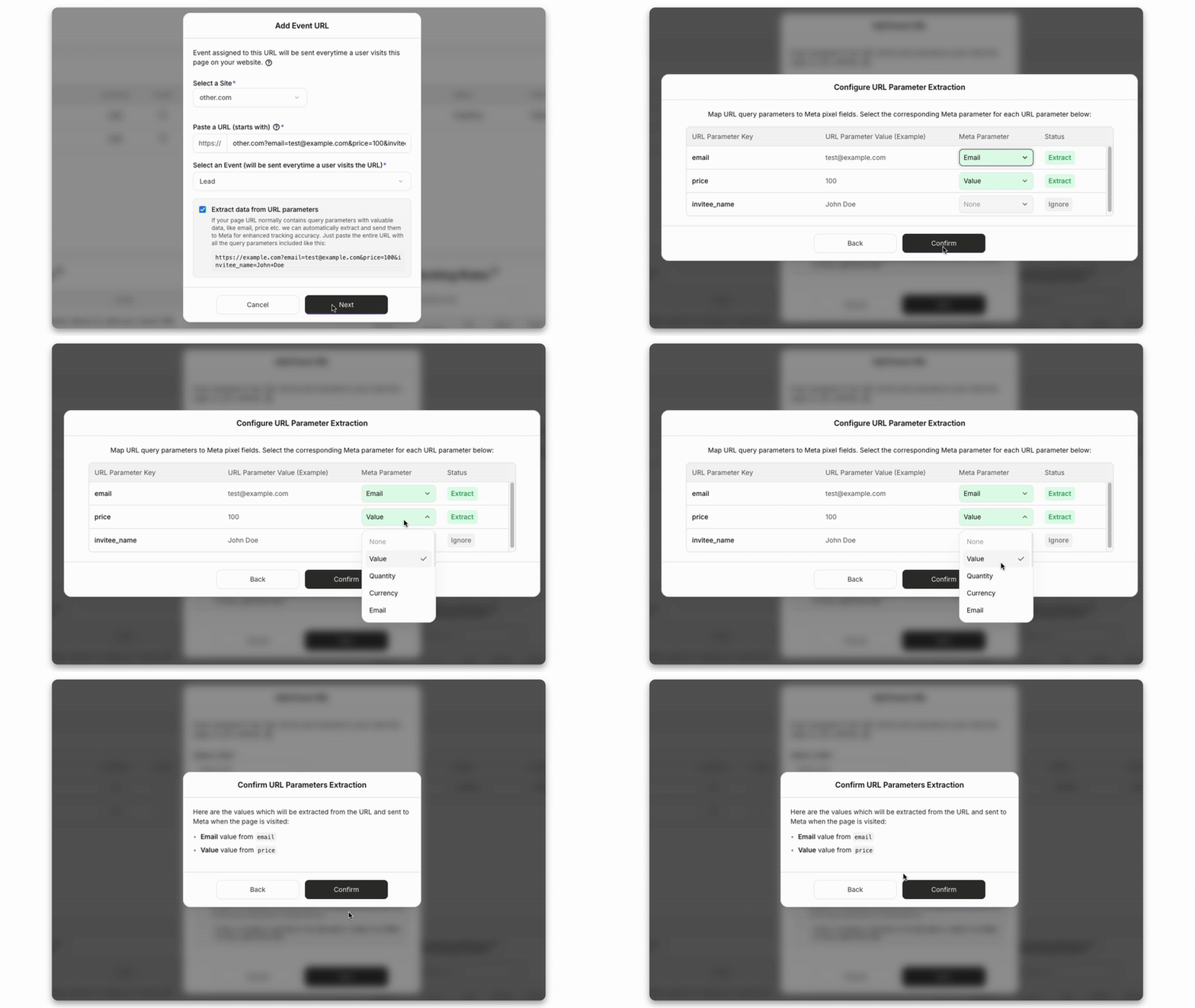
Avoiding double-counted events
Both tools send each event twice, once from the browser and once from the server, with a shared event ID so Meta keeps one copy. PixelFlow creates that ID for every event with nothing to configure, and PixelYourSite does the same inside the plugin. Problems usually start when a theme or a second plugin also fires the Meta pixel, so make sure only one tool sends events to each pixel. Meta’s deduplication documentation explains how the two copies are matched by event ID and event name, and our guide covers how deduplication works.
Which Gives You More Accurate Meta Data?
Both tools recover events a browser pixel alone would miss. The differences are what they filter out before Meta sees it, and how easy it is to check exactly what was sent.
Filtering out bots
PixelFlow spots crawlers, scrapers and other non-human visits and keeps them out of your pixel, so they never reach Meta or your attribution numbers. There is nothing to switch on. PixelYourSite turns the plugin off for known web crawlers by default, and lets you exclude your own IP addresses and logged-in roles such as admins and shop managers.
Rules for events that should not count
PixelFlow blocking rules decide when an event should not fire. You can block an event that already fired in the same session, repeats within a set number of seconds, events without a Facebook click ID, or events from the same URL or referrer, and each rule applies to the browser and server event together. Refreshing a thank-you page does not create a second purchase. In PixelYourSite Pro, you shape this with custom event conditions and by choosing which order statuses fire a purchase.
Checking what was sent to Meta
PixelFlow’s event log records every event as it arrives, shows whether Meta processed, deduplicated or rejected it, and opens the full payload that was sent. You can filter by event, source or campaign and export the rows you need. Payloads are kept for 30 days and event records for 6 months, so last week’s sale can be checked without switching anything on.
PixelYourSite has a general log and a log for each API, including the Meta Conversions API, showing event names, matching fields, values and the API response. Its docs recommend turning logs on only while debugging, because the files can grow large.
How reliable is each in practice?
PixelYourSite is dependable on a well-maintained WordPress site, and the free plugin has more than 500,000 active installs. Its accuracy depends on your settings and on other plugins that touch the same pages, which its own FAQ lists as a common cause of tracking problems. PixelFlow has fewer settings to get wrong, which suits teams without a tracking specialist.
Consent and Privacy
PixelFlow reads your cookie banner and browser privacy signals automatically. PixelYourSite connects to WordPress consent plugins and gives you settings and filters to decide what fires.
PixelFlow follows the visitor’s choice automatically
Whatever cookie banner you already run, such as CookieYes, Cookiebot, Complianz, OneTrust or any banner that supports Google Consent Mode v2, PixelFlow picks up the visitor’s choice. Accept and tracking runs; decline and it stays off.
Global Privacy Control and Do Not Track signals are respected
In countries that require opt-in, events wait until the visitor accepts
Declining removes PixelFlow’s identifiers for that visitor
Consent mode is switched on by default for each site
PixelFlow helps you respect visitors’ choices, but your site’s legal compliance is still your responsibility. See how consent-aware tracking works.
PixelYourSite works through consent plugins
PixelYourSite works with popular WordPress consent plugins, including Cookiebot, Cookie Notice, Real Cookie Banner and its own ConsentMagic plugin. It can block each pixel until consent is given, supports Google Consent Mode v2, and a filter enables Meta’s Limited Data Use. You choose and configure the rules in WordPress. Google’s consent mode overview describes how those consent signals work.
WordPress, WooCommerce and Other Integrations
PixelYourSite goes deeper into WordPress and reaches more ad platforms. PixelFlow goes deeper on Meta and TikTok and works the same way on every platform you run.
Where PixelFlow connects
Meta Pixel and Conversions API events for Facebook and Instagram campaigns
Plugins for WordPress and WooCommerce, plus Webflow, Framer, Squarespace, Kajabi, ClickFunnels and custom sites
WordPress forms such as Contact Form 7, WPForms and Gravity Forms, tracked as leads
Stripe and Calendly for server-side purchases and bookings
A programmatic API for developers
PixelFlow sends to Meta and TikTok. If you also need Google Ads, Pinterest or Bing tracking, you will need another tool alongside it.
Where PixelYourSite connects
Meta, GA4 and Google Tag Manager free; Google Ads and TikTok in Pro; Pinterest, Bing and Reddit add-ons; an OpenAI pixel for ChatGPT ads
WooCommerce and Easy Digital Downloads, with product IDs matched to your catalog for dynamic ads
WordPress form plugins and Elementor forms as custom event triggers in Pro
Companion plugins for product catalog feeds, cost of goods and consent
That breadth suits stores and agencies running several ad platforms on WordPress. It only works on WordPress, so a landing page built elsewhere needs a separate setup.
PixelFlow vs PixelYourSite Pricing
PixelYourSite costs less: the free plugin includes the Meta Conversions API, and Pro starts at $199 a year. PixelFlow costs more per site but includes attribution, customer journeys and stored event logs, plus team roles and a done-for-you setup on Growth and Agency.
PixelFlow plans
Standard: 1 site, $29 a month or $21 a month billed annually
Growth: 5 sites and up to 5 team members, $58 a month billed annually, with done-for-you setup
Agency: 10 sites and up to 20 team members, $107 a month billed annually, with done-for-you setup
Every plan: unlimited events, extra sites for $10 a month and a 7-day free trial
PixelYourSite licences
Free: Meta Pixel and Conversions API, GA4 and Google Tag Manager
Pro Starter: $199 a year, 1 site
Pro Advanced: $249 a year, up to 10 sites
Pro Agency: $699 a year, up to 100 sites
All Access: every PixelYourSite plugin, from $359 a year for 1 site
Advanced and Agency licences include the Pinterest and Bing add-ons and the Super Pack.
For one WooCommerce store advertising on Meta, PixelYourSite Pro costs $199 a year against roughly $250 a year for PixelFlow Standard billed annually, and across 10 sites the gap widens. The better question is whether you want to configure and maintain tracking yourself, and whether attribution and journeys would replace another tool you pay for.
PixelFlow vs PixelYourSite: Which Should You Choose?
It depends on where you advertise and how much setup you want to own. PixelYourSite suits WordPress stores that want many ad platforms for a low price, and PixelFlow suits Meta and TikTok advertisers on any platform who want tracking and attribution handled for them, or by their AI agent.
PixelFlow is the better fit if
Most of your ad budget goes to Facebook and Instagram
You want attribution and customer journeys without paying for a separate tool
You run sites on WordPress and on other builders such as Webflow or Framer
You want bot filtering, consent and deduplication handled automatically
You manage client sites and want viewers who can see results without touching the setup
PixelYourSite is the better fit if
Your sites are WordPress or WooCommerce only
You advertise on Google Ads, TikTok, Pinterest or Bing as well as Meta
You want Meta Conversions API tracking for free, or the lowest yearly cost
You need custom events, scroll or video triggers, or subscription events
You want order reports and product catalog feeds inside WordPress
Our verdict
PixelYourSite is a capable, affordable WordPress plugin for store owners who want to run tags for many platforms and are happy to configure them. PixelFlow is a focused Meta tracking and attribution tool for founders, marketers and agencies who want accurate Meta data with less setup and upkeep. If Meta ads drive your revenue and you want to see which ads made each sale, PixelFlow is usually the better choice.
Comparing more tools? Read PixelFlow vs Stape, or see our PixelYourSite alternatives roundup for more WordPress options.
PixelFlow vs PixelYourSite: MCP servers compared
STANDOUT DIFFERENTIATOR
PixelYourSite’s MCP can audit your plugin setup and, on the Pro licence, change settings with your confirmation. It stays inside WordPress and inside the plugin’s own data. PixelFlow’s MCP server works on any platform and reaches the live site and your conversion data.
PixelYourSite
PixelFlow
Where it works
WordPress and WooCommerce only. Writes need the Pro licence
Any platform, included on every plan
Creating triggers
Custom events by ID. Anything tied to a page element still means the Event Setup Tool in WordPress admin
Page, click and form triggers, with the selector checked on the live page first
Verification
Audits the plugin’s settings
Checks the published site, the pixel token, consent and the last accepted event
Answers from your data
Attribution reports, once ‘Save data to orders’ and a historical sync are switched on
Overview, attribution, journeys, event logs and blocked events, matching the dashboard
Ad platforms
Meta, with separate add-ons per extra platform
Meta and TikTok from one setup
If you want an assistant that can set up and check tracking on the live site, not just toggle plugin settings, PixelFlow is the only option here. See the PixelFlow MCP server
PixelFlow vs PixelYourSite FAQs
Is PixelFlow a good alternative to PixelYourSite?
It is if Meta or TikTok is your main ad platform. PixelFlow replaces PixelYourSite’s pixel and Conversions API setup, handles deduplication, bot filtering and consent automatically, and adds attribution and customer journeys. If you also rely on PixelYourSite for Google Ads, TikTok or Pinterest tags, PixelFlow will not replace that part.
Is the Conversions API free in PixelYourSite?
Yes. The free PixelYourSite plugin on WordPress.org includes the Meta Pixel with Conversions API support, along with GA4 and Google Tag Manager. You generate an access token in Meta Events Manager and paste it into the plugin. Google Ads, TikTok, extra triggers and WooCommerce reports need PixelYourSite Professional, from $199 a year (checked 11 September 2026).
Which is cheaper, PixelFlow or PixelYourSite?
PixelYourSite is cheaper. Its free plugin covers Meta CAPI, and Pro costs $199 a year for one site or $249 a year for up to 10. PixelFlow costs $29/mo, or $21/mo billed annually, for one site with unlimited events. PixelFlow’s price includes attribution, customer journeys and stored event logs, so weigh it against what you would otherwise pay for reporting. All prices were checked on 11 September 2026.
Can I run PixelFlow and PixelYourSite on the same WordPress site?
Yes, as long as they do not both send events to the same Meta pixel. Each tool creates its own event IDs, so Meta cannot deduplicate one tool’s events against the other’s and may count a purchase twice. Turn off the Meta pixel in PixelYourSite when PixelFlow goes live. You can keep PixelYourSite running for GA4, Google Ads or TikTok.
Does PixelFlow track WooCommerce purchases automatically?
Yes. Once PixelFlow is set up, manually in under 5 minutes or by your AI agent through its MCP server, one toggle tracks AddToCart, InitiateCheckout and Purchase through both the Pixel and the Conversions API. Other events, such as leads from forms or ViewContent on product pages, are set up with the Visual Tagger or URL triggers. PixelYourSite tracks a wider set of WooCommerce events automatically, including product, category and cart views.
Can PixelFlow send events to Google Ads or Pinterest?
No. PixelFlow sends events to Meta and TikTok, so Facebook, Instagram and TikTok ads are covered, but Google Ads, GA4, Pinterest, Bing and Reddit are not. PixelYourSite covers GA4 in its free plugin, Google Ads in Pro, and Pinterest, Bing and Reddit through add-ons. If you advertise across those platforms, PixelYourSite or another multi-platform tool is the better fit, and PixelFlow can still handle Meta and TikTok alongside it.
Is PixelFlow or PixelYourSite better for GDPR and cookie consent?
They take different routes. PixelFlow reads the choice from your existing cookie banner, honours Global Privacy Control and Do Not Track, and has consent mode switched on for every site by default. PixelYourSite connects to WordPress consent plugins such as Cookiebot and its own ConsentMagic, supports Google Consent Mode and can enable Meta Limited Data Use, with the rules set by you. Either way, your site’s legal compliance remains your responsibility.
Start scaling your ads with better data
No credit card required
5-minute setup