
PixelFlow vs WeTracked: An In-Depth Comparison (2026)

Last updated 11 September 2026
•
16 min read
What’s new in this update: rebuilt the comparison around Shopify and WooCommerce stores, added attribution, customer journeys, consent, bot filtering and event payload logs, and re-checked both tools’ pricing, trials and supported platforms on 11 September 2026.
If you are looking for a WeTracked alternative, you probably run an online store or a lead-generation site and want Meta and TikTok to see every conversion. WeTracked is a server-side ad tracking app for Shopify and WooCommerce stores that sends orders to several ad platforms. PixelFlow is a no-code server-side tracking tool for Meta, TikTok and more that runs on any platform, with an MCP server so your AI agent can set it up.
“I mostly run Meta ads. Do I need to pay per order for multi-platform tracking, and can I see what is actually being sent?”
That is the trade-off this guide covers. We compare both tools on setup, supported platforms, attribution, data quality, consent and price, and we are clear about where WeTracked is the better pick, starting with Shopify. For a similar comparison with a tool built on Google Tag Manager, see PixelFlow vs Stape.
The short answer
PixelFlow is usually the better choice if Meta is your main ad channel, you sell on WooCommerce, Squarespace or Webflow or collect leads and bookings, and you want flat pricing with unlimited events, attribution and a full event log.
WeTracked may be a better fit if you run a Shopify store, advertise on Google, TikTok, Pinterest or Snapchat as well as Meta, or want order reporting across your ad accounts in one app.
PixelFlow vs WeTracked: Overview
Both tools send store conversions to Meta from a server, so fewer sales go missing. WeTracked spreads that tracking across several ad platforms. PixelFlow goes deeper on Meta and also works on sites that are not stores.
What PixelFlow is
PixelFlow is a managed Meta Pixel and Conversions API tool. You install the WordPress and WooCommerce plugin, or one script on any other platform, PixelFlow sends every event from the browser and the server with a shared event ID, and one dashboard shows attribution, customer journeys and an event log with full payloads. It works on stores and on lead-generation, booking and SaaS sites.
What WeTracked is
WeTracked is an ad tracking app for Shopify and WooCommerce stores. It captures page views, add to carts, orders and revenue, enriches them with its own first-party data, and sends them to Meta, Google Ads, TikTok, Snapchat, Pinterest and X. It says more than 9,000 merchants use it, and it prices by monthly order volume.
PixelFlow
WeTracked
Best for
Meta advertisers on WooCommerce, Squarespace, Webflow or WordPress, plus lead-generation and booking sites
Shopify and WooCommerce stores advertising on several ad platforms
What it is
No-code Meta Pixel and Conversions API tool with attribution and journeys built in
Server-side ad tracking and reporting app for ecommerce stores
Setup
WordPress and WooCommerce plugin, or one script, about 10 minutes, no tag manager
Store app or WooCommerce plugin, then pixel details for each platform; about 5 minutes, per WeTracked
Ad platforms
Meta and TikTok
Meta, Google Ads, TikTok, Snapchat, Pinterest and X, plus Klaviyo
Store and site platforms
WooCommerce, Squarespace, Webflow, Framer, WordPress, GoHighLevel, ClickFunnels, Kajabi and custom sites; no Shopify app
Shopify, WooCommerce and checkout tools such as Funnelish and CheckoutChamp
Events tracked
Store events, Visual Tagger clicks and forms, URL triggers, Stripe payments and Calendly bookings
Page views, add to carts, orders and revenue, captured automatically
Leads and bookings
Yes: forms, bookings, sign-ups and Stripe payments
No documented support for lead forms or bookings
Deduplication
Built in: browser and server copies share one event ID
Handled by WeTracked; remove the same pixel from other tracking apps
Match quality data
fbp, fbc, IP, user agent, hashed location and external_id sent automatically, plus form and URL fields
“360° data enrichment” with a first-party fingerprint; parameters not published
Bot filtering
Automatic; bot traffic is dropped before Meta and noted in the log
Not documented
Consent
Reads your cookie banner and honours GPC and Do Not Track, on by default
Says its fingerprinting is GDPR compliant; no public cookie banner guide
Attribution and reporting
Sources, campaigns, ad sets and ads, plus the journey behind every purchase or lead
Last-click order reporting, Pulse Dashboard and Creative Analytics (beta)
Event logs
Each event with its payload and Meta’s status; payloads 30 days, events 6 months
No event-level log in its help centre
Team access
Owner, admin and viewer roles; 5 members on Growth, 20 on Agency
Team members with roles
Pricing
$29/mo, or $21/mo billed annually, per site; unlimited events
From $49/mo for 500 orders a month and 3 stores; 20% off annually
Free trial
7 days
14 days, plus a 60-day money-back guarantee
Pricing, trials and platform lists checked on wetracked.io, help.wetracked.io and pixelflow.so on 11 September 2026. WeTracked details are as published by WeTracked; confirm current figures on each vendor’s site.
Is PixelFlow Easier to Set Up Than WeTracked?
Both are quick to install and neither needs Google Tag Manager. WeTracked connects a store and your ad pixels in minutes. PixelFlow takes about 10 minutes, with extra steps only when you track forms, bookings or other conversions beyond the checkout.
Setting up PixelFlow
Most stores are live in 5 to 10 minutes:
Add your store or site and connect your Meta pixel.
Install the WordPress plugin, which covers WooCommerce too, or add one script to Squarespace, Webflow, Framer or a custom site.
Switch on automatic eCommerce events, then tag forms and buttons with the Visual Tagger or fire events from a URL trigger.
Check each event as it lands in the event log.
There is no tag manager or server container to maintain. On Growth and Agency plans, the PixelFlow team can do the setup for you.
Setting up WeTracked
WeTracked connects to your store first, then to each ad platform:
Connect a Shopify store, or install the WooCommerce plugin and paste in your WeTracked API key
Switch on each ad platform and add its pixel details, such as a Meta Pixel ID and a Conversions API access token
Remove the same pixels from other tracking apps so conversions are not counted twice
Store events then flow automatically, with no coding
WeTracked says setup takes about 5 minutes. The step to plan for is removing overlapping pixel apps, which its own help centre recommends to avoid over-reporting.
PixelFlow’s WooCommerce plugin with cart, checkout and purchase tracking switched on

Features and Capabilities Compared
WeTracked focuses on store revenue across many ad platforms. PixelFlow focuses on Meta, and adds the tools to check and control exactly what Meta receives.
What PixelFlow includes
Browser Pixel and Conversions API in one install, with event deduplication
Automatic AddToCart, InitiateCheckout and Purchase on WooCommerce, Squarespace and Webflow
Point-and-click Visual Tagger and URL triggers for forms, bookings and sign-ups
Stripe and Calendly conversions sent server-side, carrying the source of the visit
Revenue attribution by source, campaign, ad set and ad, next to what Meta reports
Customer journeys, shareable report links and exports of up to 100,000 events
Automatic bot filtering, plus blocking rules for repeat or unpaid events
Consent-aware tracking that follows your cookie banner
Unlimited events, pixels and subdomains, whatever the plan
Invite your team as owners, admins or viewers, with client workspaces on Agency
What WeTracked includes
Server-side tracking for Meta, Google Ads, TikTok, Snapchat, Pinterest and X
Automatic capture of page views, add to carts, orders and revenue
First-party tracking with a “360° data enrichment” engine that WeTracked says works around ad blockers
Order reporting and a Pulse Dashboard with campaign, ad set and ad views across ad accounts
Creative Analytics (beta) on Business plans and up, showing which ads bring in revenue
Klaviyo integration, and support for checkout tools such as Funnelish, Checkify and CheckoutChamp
24/7 live chat support
If you sell on Shopify and advertise across several networks, WeTracked covers more of your stack in one app.
Attribution and Customer Journeys
Both tools report on which ads drive sales, in different ways. WeTracked reports last-click orders against your campaigns and ad accounts. PixelFlow attributes every visit, lead and purchase on your site to its source, campaign and ad, and shows the journey behind each one.
PixelFlow attribution
The attribution page groups visitors, sessions, conversions and revenue by where they came from: Facebook, Google, organic search, email, AI tools or direct. Drill into campaign, ad set and ad to compare creatives, and set the result next to what Meta reports.
Stripe payments and Calendly bookings carry the UTM parameters and first and last touch of the visit that led to them. Revenue attribution covers 30 days on Standard and 90 days on Growth and Agency.
PixelFlow customer journeys
Open any purchase or lead to see the journey behind it: the ad clicked first, each page viewed, the days between visits and the event that converted. Cross domain cookies keep the path together when checkout runs on a separate domain, such as a funnel or checkout tool.
Journeys are kept for 7 days on Standard and 90 days on Growth and Agency, and any view can be shared with a teammate or client by link.
PixelFlow’s reporting covers traffic to sites running its script. It does not pull ad spend from your ad accounts or calculate ROAS across channels.
How reporting works in WeTracked
WeTracked’s reports assign orders to ad campaigns on a last-click basis using UTM parameters, and its help centre says they are meant to be used alongside your ads manager. The Pulse Dashboard connects your Facebook ad accounts and switches between campaign, ad set and ad views, and Creative Analytics (beta) highlights which ads bring in revenue. That suits a store that wants order reporting across ad accounts in one app. To follow one customer from first click to purchase, PixelFlow’s journeys show more.
PixelFlow vs WeTracked: Technical Differences
Under the hood, both tools deliver events through Meta’s Conversions API. They differ on which events you can send, what customer data travels with them and how much of the process you can inspect.
Server-side delivery
PixelFlow runs the Meta Pixel and the Conversions API side by side, so each event leaves the browser and the server with the same event ID. Here is how the Pixel and the Conversions API work together.
WeTracked connects to Meta with your Pixel ID and a Conversions API access token, and describes its tracking as first-party and resistant to ad blockers. It does not publish how browser and server events are combined, so check Events Manager after setup.
Event types and triggers
PixelFlow supports every standard Meta event, such as Purchase, AddToCart, Lead, Schedule and CompleteRegistration, fired from:
Automatic store events on WooCommerce, Squarespace and Webflow
Clicks and form submits tagged with the Visual Tagger
URL triggers when a thank-you or confirmation page loads
Stripe and Calendly webhooks for payments and bookings that happen away from your site
On Growth and Agency plans, developers can also send events from their own code with the programmatic API. PixelFlow does not support custom, non-standard event names yet.
WeTracked captures page views, add to carts, orders and revenue from your store and checkout automatically. Its documentation is built around store events, and we found no documented way to track lead forms, bookings or custom events.
Customer data and match quality
Every PixelFlow event carries fbp, fbc (kept for 90 days), IP address, user agent, a hashed location and an anonymous external_id. Email, phone and name can be added from tagged forms or mapped from URL parameters to raise Event Match Quality, a score Meta explains in its Business Help Center.
WeTracked describes a “360° data enrichment engine” that builds a first-party fingerprint to link visits and sales to the ad behind them. It does not list which customer parameters it sends to each platform.
Deduplication
PixelFlow gives the browser and server copy of every event one shared ID, so Meta counts each conversion once with nothing to configure. Meta’s deduplication documentation confirms it matches the two copies by event ID and event name.
WeTracked’s help centre tells you to remove the same pixel from other tracking apps to prevent over-reporting in Ads Manager. The same rule applies when you move to PixelFlow: one tool per pixel.
Data Accuracy: Bots, Duplicates and Event Logs
Either tool recovers conversions a browser pixel misses. The difference is how much control you have over what reaches Meta, and how easily you can check it.
Bot filtering
PixelFlow spots crawlers, scrapers, link previewers and uptime monitors and drops those events before anything reaches Meta, and records each blocked hit with its reason. WeTracked does not document bot filtering in its public help centre.
Blocking rules
PixelFlow blocking rules stop events that should not count: a repeat within a set time, an event with no Meta click ID, or one from the same URL or referrer, combined with AND and OR. A refreshed order confirmation page stays one purchase. WeTracked does not document equivalent rules; its help articles instead cover fixing duplicate orders from specific checkout setups, such as Funnelish upsells.
Event logs and payload checks
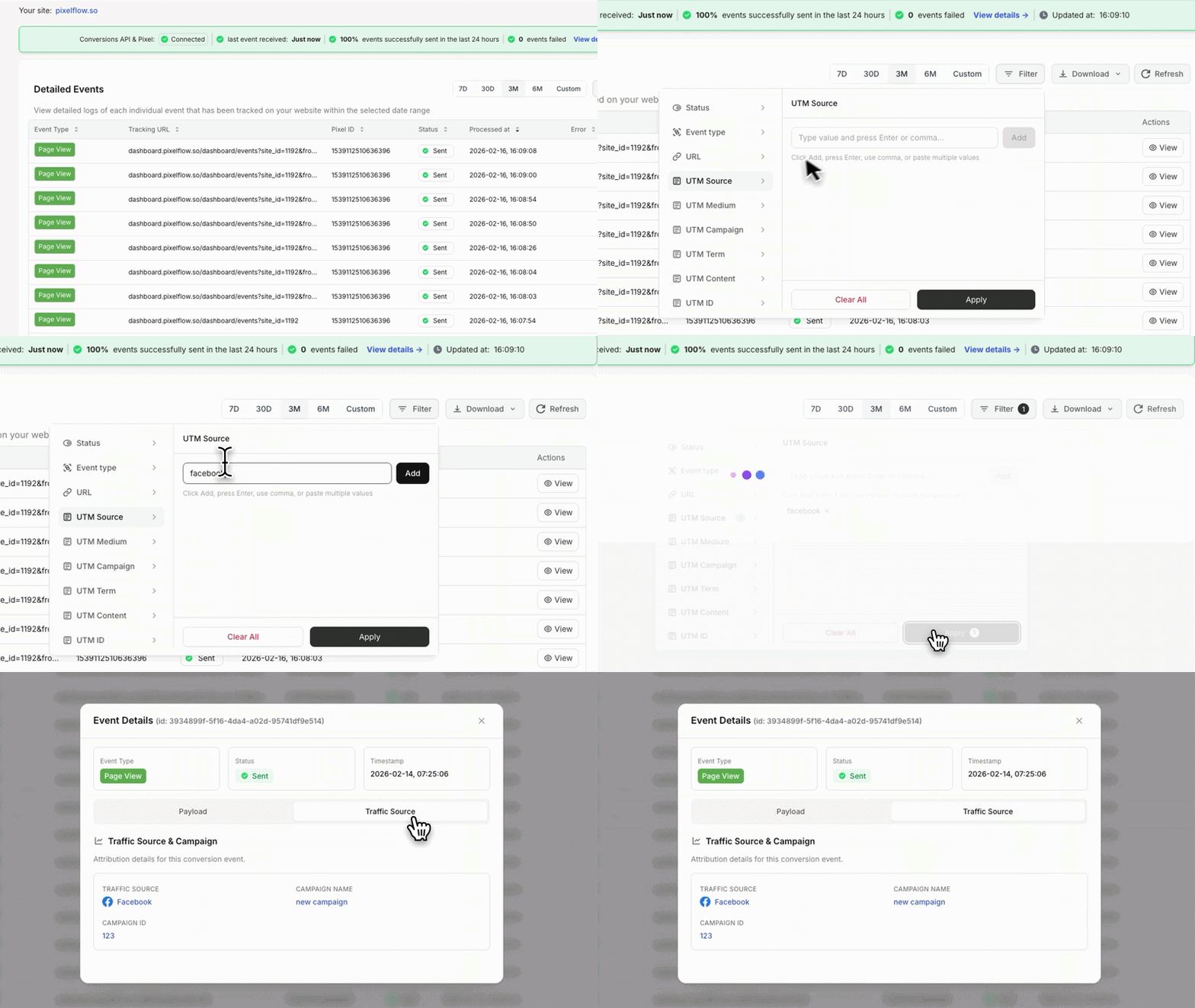
PixelFlow’s event log lists every event as it arrives, whether Meta accepted it and the full payload sent with it. Filter by status, event, source, campaign, ad set or ad, open the journey behind an event, and export up to 100,000 events at a time. Payloads are kept for 30 days and event records for 6 months.
WeTracked’s help centre covers its reporting, Pulse Dashboard and pixel checks, but we could not find an event-level log where you can inspect individual payloads. To check what Meta received, you would use Meta’s Events Manager.
PixelFlow’s event log filtered by UTM source
Which approach is more reliable?
WeTracked’s automatic approach suits store owners who want to connect it and leave it. PixelFlow suits teams who want to see and control each event, especially when Meta is the channel they optimise hardest.
Consent and Privacy
PixelFlow follows your visitors’ cookie choices automatically. WeTracked says its first-party fingerprinting is GDPR compliant, but it does not publish how it responds to a cookie banner, so ask before you install it on an EU store.
PixelFlow: follows your cookie banner
PixelFlow reads the accept or decline from the banner you already run, including CookieYes, Cookiebot, Complianz, OneTrust and banners that send Google Consent Mode v2. Events flow when a visitor accepts and stop when they decline.
Global Privacy Control and Do Not Track signals are treated as a decline
In ask-first countries, events wait until the visitor answers; elsewhere tracking runs until they decline
A custom banner connects with one line of code, and each choice is remembered for about six months
Consent mode is on for every new site and can be switched off per site
PixelFlow helps you respect visitors’ choices, but making your store compliant with privacy law is still your responsibility. See how consent-aware tracking works.
WeTracked: fingerprinting and GDPR
WeTracked describes its tracking as a first-party digital fingerprint that follows visitors across sessions and devices, and says it is GDPR compliant. Its public help centre does not cover cookie banners, Consent Mode or what happens when a visitor declines tracking.
Under EU privacy rules, techniques like fingerprinting can still need consent, so confirm with WeTracked how it handles a declined banner. Google’s consent mode overview explains the consent signals most banners now send.
Which Platforms Do PixelFlow and WeTracked Support?
WeTracked covers more ad platforms and has a Shopify app. PixelFlow runs on any website platform, including sites that do not sell through a store checkout, and adds an MCP server so your AI agent can set it up and query it.
Where PixelFlow works
Meta Pixel and Conversions API, for Facebook and Instagram ads
The WooCommerce plugin, with automatic cart, checkout and purchase events
Squarespace, Webflow, Framer, WordPress, GoHighLevel, ClickFunnels, Kajabi, Unbounce and custom HTML sites
Stripe and Calendly, for payments and bookings tracked server-side
A programmatic API for developers on Growth and Agency plans
PixelFlow sends to Meta and TikTok and has no Shopify app. If you run on Shopify, or need Google Ads, Snapchat or Pinterest events as well, you will need another tool. See all integrations.
Where WeTracked works
Meta, Google Ads, TikTok, Snapchat, Pinterest and X
Klaviyo, for email
Shopify and WooCommerce stores
Checkout and funnel tools including Funnelish, Checkify, CheckoutChamp, BetterCart, UnifyCheckout and Sticky.io
That breadth suits ecommerce brands running several ad channels. It is built around store orders, so it fits lead-generation, booking or SaaS sites less well.
PixelFlow vs WeTracked Pricing
PixelFlow charges a flat price per site with unlimited events. WeTracked charges by monthly order volume, with several stores included on each plan, so its price rises as your store grows.
PixelFlow plans
Standard: 1 site for $29/mo, or $21/mo billed annually
Growth: 5 sites for $58/mo billed annually, with up to 5 team members and done for you setup
Agency: 10 sites for $107/mo billed annually, with up to 20 team members and client workspaces
Every plan: unlimited events, extra sites at $10/mo and a 7-day free trial
Compare every plan on the pricing page.
WeTracked plans
Starter: $49/mo for up to 500 orders a month and 3 stores
Business: $149/mo for up to 3,000 orders a month and 5 stores
Scale-up: $249/mo for up to 7,500 orders a month and 10 stores
Enterprise: custom pricing above 7,500 orders a month
Annual billing takes 20% off ($39.20, $119.20 and $199.20 a month). Every plan includes a 14-day free trial and a 60-day money-back guarantee.
For a store doing 1,000 orders a month and advertising on Meta and TikTok, that is $29 a month on PixelFlow’s Standard plan against $149 on WeTracked’s Business plan. If you also need Google or Shopify covered, WeTracked’s higher price buys that breadth.
PixelFlow vs WeTracked: Which Should You Choose?
There is no universal winner. Pick the tool that matches your store platform and the number of ad channels you run.
Choose PixelFlow if
Facebook and Instagram get most of your ad budget
You sell on WooCommerce, Squarespace or Webflow, or collect leads and bookings
You want to see the payload of every event Meta receives
You would rather pay per site than per order as sales grow
You want consent, bot filtering and deduplication handled for you
Choose WeTracked if
Your store runs on Shopify
You also advertise on Google, TikTok, Pinterest, Snapchat or X
You want one app reporting orders across several ad accounts
You run up to 3 stores and want them on one plan
You want a longer free trial and a money-back guarantee
Our verdict
WeTracked is a multi-platform tracking app for ecommerce brands, and on Shopify it is the obvious choice of the two. PixelFlow is a focused Meta tracking and attribution tool that costs less for a single store at every WeTracked order tier and shows exactly what it sends. For a WooCommerce store or website that grows mainly through Meta ads, PixelFlow is usually the better choice.
Comparing more tools? See PixelFlow vs Stape or our PixelYourSite alternative guide.
PixelFlow vs WeTracked: MCP servers compared
STANDOUT DIFFERENTIATOR
WeTracked does not publish an MCP server. PixelFlow ships one, so Claude, ChatGPT, Cursor, Codex or any MCP client can run your tracking for you.
WeTracked
PixelFlow
MCP server
None published
Official, hosted at one URL, included on every plan
Set up tracking from a chat
No
Yes. It proposes the events you are missing and adds the triggers you approve
Verify the live site
By hand
The assistant checks the published page, the pixel token, consent and the last accepted event
Ask about your data
No
Overview, attribution by campaign, ad set and ad, journeys, event logs and blocked events
Audit and weekly report
No
One prompt audits a site, another writes the weekly report
WeTracked offers nothing comparable. If you want an assistant to set up, check and explain your tracking, PixelFlow is the only option here. See the PixelFlow MCP server
PixelFlow vs WeTracked FAQs
Is PixelFlow a good WeTracked alternative?
For stores and websites on any platform that advertise on Meta or TikTok, usually yes. PixelFlow sends browser and server-side events to Meta and TikTok together with automatic deduplication, adds attribution, customer journeys and a full event log, and charges per site rather than per order. If your store runs on Shopify, or you need server-side events for Google Ads or Pinterest as well, WeTracked is the better fit.
Does PixelFlow work with Shopify like WeTracked?
No. PixelFlow has no Shopify app, while WeTracked supports both Shopify and WooCommerce. PixelFlow runs on any other platform from one script, with automatic store events where the platform supports them, and your AI agent can do the setup through PixelFlow’s MCP server.
Which is cheaper, PixelFlow or WeTracked?
For a single store, PixelFlow. Its Standard plan is $29/mo, or $21/mo billed annually, with unlimited events. WeTracked starts at $49/mo for up to 500 orders a month and rises to $149/mo for 3,000 orders and $249/mo for 7,500, with 20% off annual billing. WeTracked plans include several stores and more ad platforms, so compare both at your own order volume. Prices checked on 11 September 2026.
Can PixelFlow send events to Google Ads, TikTok or Pinterest like WeTracked?
No. PixelFlow sends events to Meta and TikTok, so Facebook, Instagram and TikTok ads are covered. WeTracked also sends to Google Ads, Snapchat, Pinterest and X. If you advertise heavily on those networks, WeTracked covers them in one app, or you can use PixelFlow for Meta and TikTok alongside another tool for the rest.
Can I run WeTracked and PixelFlow at the same time while switching?
Yes, but do not send the same conversions to the same Meta pixel from both. Each tool creates its own event IDs, so Meta cannot match one tool’s events against the other’s and may count a sale twice. WeTracked’s own help centre gives the same advice about other pixel apps. Test PixelFlow on a separate pixel first, or disconnect Meta in WeTracked when PixelFlow goes live on your main pixel.
Can I see exactly which events are sent to Meta?
In PixelFlow, yes. The event log shows every event, whether Meta accepted it and the full payload, with payloads kept for 30 days and event records for 6 months. WeTracked’s help centre documents order reporting, the Pulse Dashboard and pixel checks, but we could not find an event-level log, so you would check individual events in Meta’s Events Manager.
Will I lose my WeTracked reporting if I switch?
The conversions WeTracked already sent to Meta stay in your Events Manager and Ads Manager history. WeTracked’s own reports stay inside WeTracked, so save any figures you need before you cancel. PixelFlow’s attribution and customer journeys start from the day its script is installed.
Start scaling your ads with better data
No credit card required
5-minute setup