
PixelFlow vs Hyros: An In-Depth Comparison (2026)

Last updated 11 September 2026
•
15 min read
What’s new in this update: rebuilt as a side-by-side comparison, with PixelFlow’s newer attribution, customer journeys, consent-aware tracking and bot filtering added, a 16-row comparison table, and Hyros pricing re-checked on 11 September 2026.
If you are weighing up PixelFlow vs Hyros, you are comparing two tools built for different jobs. Hyros is an ad attribution platform: it follows buyers across ad platforms, calls and offline sales, and prices its plan on the revenue it tracks. PixelFlow is a no-code server-side tracking tool that sends accurate events to Meta, TikTok and more from any platform, with attribution and customer journeys built in and an MCP server so your AI agent can set it all up.
“Do I need Hyros, or is there a simpler way to get accurate ad tracking and see which ads drive my sales?”
It depends on how many channels you need to measure. This guide compares both tools on setup, features, attribution, data quality, consent, integrations and price, including where Hyros is the better choice. If you are looking at other attribution tools too, see our roundup of Hyros alternatives.
The short answer: PixelFlow or Hyros?
PixelFlow is usually the better choice if most of your ad budget goes to Meta, you want tracking live today without a sales call, and source, campaign and ad attribution for your website is enough.
Hyros may be a better fit if you spend heavily across Meta, Google, TikTok and YouTube, close sales on the phone or offline, and need multi-touch attribution and lifetime value reporting across all of it.
PixelFlow vs Hyros: Overview
Both tools send server-side conversions to Meta. Hyros measures every channel and sale you connect to it, while PixelFlow focuses on getting Meta tracking right with far less setup.
What PixelFlow does
PixelFlow is a managed server-side tracking tool for founders, marketers and agencies. One script sends every event from both the browser and the server, and the same dashboard shows which sources and ads drove each sale, the journey behind it and a log of every event each ad platform received. Plans are a flat price per site with unlimited events.
What Hyros does
Hyros is an ad tracking and attribution platform for businesses with significant ad spend, such as info products, coaching, SaaS and ecommerce brands. It tracks buyers across ad platforms, email, calls and offline sales, reports revenue, ROAS and lifetime value per ad, and sends conversions back to the ad platforms. Its plan is priced on tracked monthly revenue and starts with a demo.
PixelFlow
Hyros
Best suited to
Meta and TikTok advertisers on any platform who want accurate tracking without a setup project
High-spend info product, coaching, SaaS and ecommerce businesses measuring several channels
Type of tool
No-code Meta Pixel and Conversions API tool with built-in attribution
Ad tracking and multi-touch attribution platform with AI reporting
Getting started
Self-serve: plugin or one script, 5 to 10 minutes
Demo first, then a custom setup with the Hyros setup team
Ad platforms tracked
Meta and TikTok
Meta, Google, YouTube, TikTok, Snapchat and email
Attribution
Last touch over 90 days by source, campaign and ad, plus a journey for every purchase or lead
Multi-touch across channels, sessions and devices, with ROAS and lifetime value
Calls and offline sales
No call tracking; Stripe and Calendly conversions matched back to the visitor’s session
Call tracking, plus offline sales logged through CRM or payment integrations
Conversions sent back
Meta Pixel and Conversions API
Meta Conversions API, Google offline conversions and TikTok
How events fire
Point-and-click Visual Tagger, URL triggers, Stripe and Calendly webhooks, automatic eCommerce events and a programmatic API
Universal tracking script, URL rules and platform integrations
Matching data
fbp, fbc, IP address, user agent, hashed location and an anonymous external_id on every event, plus email, phone and name from forms or URLs
Deterministic matching on email, phone, IP, device and cookies
Payment and CRM connections
Stripe and Calendly, with product and minimum value filters for Stripe; no CRM sync
Stripe, PayPal, Shopify, WooCommerce, HubSpot, Pipedrive, Zapier and more
AI features
No AI reporting features
AI attribution, an account AI analyst and a Claude MCP interface
Cookie consent
Built in and on by default: follows your cookie banner, GPC and Do Not Track, and holds events in ask-first regions until a visitor accepts
Consent passed to the Hyros script with a code snippet, or through CookieBot or CookiePro
Reporting
Attribution table, customer journeys and an event log with full payloads, filters and CSV export
Dashboards for revenue, ROAS, LTV, leads and calls per platform, plus stats inside Ads Manager
Hands-on help
Done for you setup and video support on Growth and Agency plans
Setup team, account AI analyst and weekly training on every account
Price
$29/mo, or $21/mo billed annually, per site with unlimited events; the price does not rise with revenue
Priced on tracked monthly revenue: from $69/mo up to $5k, higher tiers quoted in a demo
Trial or guarantee
7-day free trial, no credit card required
ROI guarantee: if you are not satisfied, you do not pay
Pricing and features checked on hyros.com and pixelflow.so on 11 September 2026. Confirm current figures on each vendor’s site before you buy.
Is PixelFlow Easier to Set Up Than Hyros?
Yes. PixelFlow is self-serve and usually live in about 10 minutes. Hyros starts with a demo and a custom setup run with its team, which suits businesses with many funnels, channels and integrations to connect.
Setting up PixelFlow
Most sites are tracking in under 5 minutes, or you connect your AI agent to PixelFlow’s MCP server and it does all of this for you:
Add your site and connect Meta or TikTok.
Add one script to any platform.
Tag purchases, leads and bookings with the Visual Tagger, or fire them when a thank-you page loads with a URL trigger.
Confirm each event in the event log and in each platform’s test events.
There is no demo to book and no funnel map to build. A Getting Started guide walks you through each step, and on Growth and Agency plans the PixelFlow team can do the setup for you and verify it end to end.
Setting up Hyros
Hyros is sold through a demo, and every account comes with a setup team. A typical setup covers:
Installing the Hyros tracking script across your site, funnels and checkout
Connecting ad accounts such as Meta, Google and TikTok
Connecting payment, CRM and call tools so sales can be matched to leads
Setting up tracking rules for funnels, calls and offline sales
Hyros’s team makes that manageable, but expect more to connect and check than with a delivery-focused tool.
PixelFlow setup: connecting Meta with your Facebook account
Features and Capabilities Compared
Hyros is a broad measurement platform for every channel you advertise on. PixelFlow is a focused Meta tracking tool that now includes the attribution and reporting most Meta advertisers need.
What PixelFlow includes
MCP server, so Claude, ChatGPT, Cursor or Codex can set everything up and answer questions about your data
Browser pixel and server-side API for Meta and TikTok on every event, with automatic deduplication
Visual Tagger for buttons, links and forms, picking up name, email and phone from tagged forms
URL triggers for thank-you pages, with customer details mapped from the URL
Automatic eCommerce events on supported store platforms
Stripe and Calendly conversions sent server-side, with product and minimum value filters for Stripe
Attribution by source, campaign and ad, plus a customer journey for every purchase or lead
Bot filtering on every site, plus blocking rules for repeat or unwanted events
Consent-aware tracking that follows your cookie banner
An event log with the full payload of every event, plus CSV export
Team roles for owners, admins and viewers, with client workspaces on Agency plans
No caps on events, pixels or subdomains, whichever plan you choose
What Hyros includes
Multi-touch attribution across ad platforms and email
Call tracking and offline sale attribution
Lifetime value reporting back to the first ad
Conversions sent back to Meta, Google and TikTok
AI attribution and AI remarketing
An account AI analyst and weekly training
A Claude MCP interface for using Hyros data in AI tools
Hyros stats inside Ads Manager
If you need to measure revenue across several channels and a sales team, Hyros is the more complete toolkit. If Meta is where your budget goes, PixelFlow covers tracking and reporting with far less to run.
Attribution and Customer Journeys
PixelFlow shows which sources, campaigns and ads drove each sale on your website, and the journey behind it. Hyros goes much further, with multi-touch attribution across channels, calls, offline sales and lifetime value.
PixelFlow’s attribution table
The attribution table puts every traffic source side by side, including Facebook, Google, organic search, direct, YouTube and AI tools, with visitors, leads, purchases, revenue and revenue per session. Each source splits into campaigns and ads using the UTM parameters and click IDs PixelFlow already captures, so you can compare what Ads Manager reports with what your site actually recorded.
PixelFlow credits each conversion to the last known source before the visitor converted, looking back up to 90 days. Stripe and Calendly conversions are matched back to the visitor’s session, so a payment taken off your site still shows the ad that earned it. Standard plans keep 30 days of attribution data, and Growth and Agency plans keep 90.
PixelFlow’s customer journeys
Click any purchase or lead to open its customer journey: the ad or search that brought the visitor in, each page they viewed, the days between visits and the event that converted them. Return visits are tied to the same person with a first-party cookie, and cross domain cookies keep the path intact when checkout runs on another domain. Journeys are kept for 7 days on Standard and 90 days on Growth and Agency.
Where Hyros goes further
This is Hyros’s core strength, and PixelFlow does not try to match it. Hyros matches buyers across sessions and devices using email, phone, IP and cookies, credits every touchpoint from first click to last, and ties phone calls, offline sales and repeat purchases back to the original ad. Its dashboards put revenue, ROAS, lifetime value and calls for Meta, Google and TikTok side by side. PixelFlow’s attribution covers visits to sites running its script, uses a last touch model, and does not track calls or reconcile ad spend across channels.
Hyros: revenue, ROAS, lifetime value and calls by ad platform

PixelFlow vs Hyros: Technical Differences
Both tools send server-side events through the Meta Conversions API. The differences are in how events are triggered, how people are identified and how much each tool tracks beyond Meta.
Server-side delivery
PixelFlow sends every event twice, once from the Meta Pixel in the browser and once from its server through the Conversions API, with nothing extra to set up. Hyros sends the conversions it has matched to a buyer back to the ad platforms: through the Conversions API for Meta, as offline conversions for Google, and to TikTok. How the Facebook Pixel and the Conversions API differ.
Events each tool tracks
PixelFlow supports every standard Meta event, such as Purchase, Lead, Schedule, StartTrial and CompleteRegistration, but not custom, non-standard events yet. Hyros tracks leads, calls, sales and revenue across your funnels and reports them per ad, including sales that close weeks after the first click.
How events are triggered
PixelFlow gives you four ways to fire an event:
Visual Tagger clicks and form submits, tracked on every page where the element appears
URL triggers when a page, such as a thank-you page, loads
Stripe and Calendly webhooks for payments and bookings that happen off your site
Automatic eCommerce events on supported store platforms
Developers can also send events from their own code with the programmatic API, and an AI agent can set any of this up through PixelFlow’s MCP server. Hyros relies on its universal tracking script plus rules you set in its tracking settings, such as a URL rule that tags a lead when they reach a page, alongside call tracking and platform integrations.
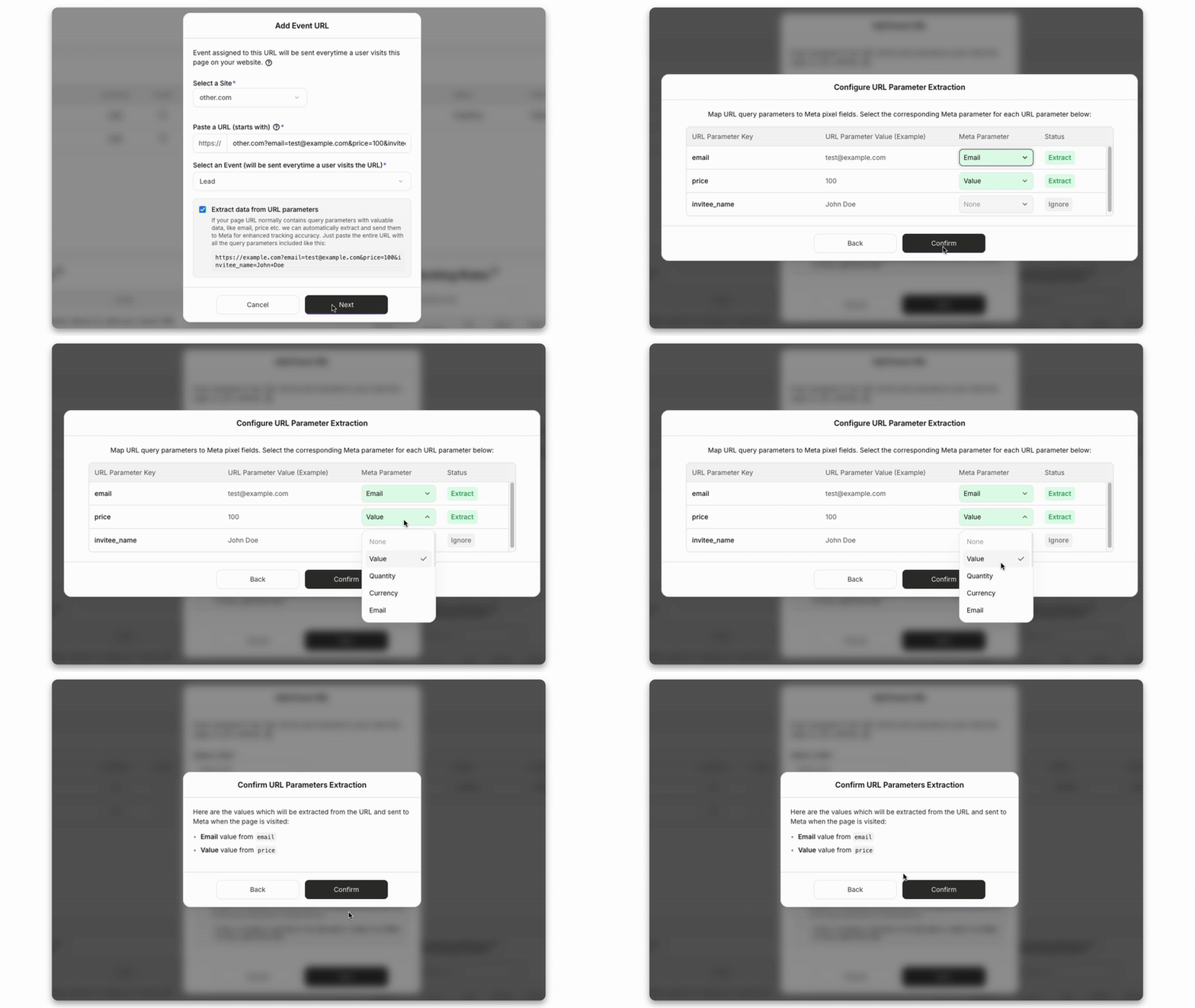
PixelFlow: the Add Event URL dialog for a URL trigger

Hyros: creating a URL rule for call qualification

Matching events to people
PixelFlow attaches fbp, fbc (kept for 90 days), IP address, user agent, a hashed location and an anonymous external_id to every event automatically. Tag a form and it picks up email, phone and name as well, or map them from URL parameters such as a Calendly redirect, to raise Event Match Quality. Meta explains how the score works in its Business Help Center.
Hyros identifies buyers with deterministic matching on email, phone, IP, device and cookies, drawing on your CRM and payment data as well as its script. That is how it connects one person’s clicks, calls and purchases.
PixelFlow: reading customer details from URL parameters
Counting each conversion once
PixelFlow gives the browser and server copies of each event the same event ID, so Meta keeps one and discards the other. Meta’s deduplication documentation explains how it matches the two copies on event ID and event name. If you run Hyros and PixelFlow on the same pixel, each tool creates its own IDs, so Meta cannot deduplicate one tool’s events against the other’s.
How Accurate Is Each Tool’s Data?
Both tools recover conversions a browser pixel misses. PixelFlow concentrates on keeping the events Meta receives clean and easy to check, while Hyros concentrates on matching every sale to the right buyer and ad.
Filtering out bots
PixelFlow recognises search crawlers, link previewers, uptime monitors and scrapers and drops their events before anything reaches Meta. It is on for every site, and blocked traffic still shows in the event log with the reason, so you can see how much was filtered without it inflating your results.
Blocking rules and purchase filters
Blocking rules stop events that should not count: a repeat within a set time, an event that already fired this session, a visit without a Facebook click ID, or the same URL or referrer. Stripe purchases can also be limited to chosen products or skipped below a minimum value, and a refreshed thank-you page stays one purchase.
Checking what Meta received
Every event appears in PixelFlow’s event log moments after it fires, with its source, value and whether Meta accepted it. Open one to see the full payload, including the hashed customer data, and filter by campaign, ad set or ad when you need to trace a sale. Payloads are kept for 30 days and event records for 6 months.
Where each tool’s accuracy comes from
Hyros’s accuracy comes from connecting more data: its script, payment tools, CRMs and call systems all feed its matching, and its setup team helps get that right. The trade is more to connect and keep in sync as funnels change. PixelFlow has fewer moving parts and a narrower scope, Meta and TikTok, which suits teams without a tracking specialist. Why the Conversions API matters for Meta ads.
Consent and Privacy
PixelFlow applies your visitors’ cookie choices for you. With Hyros, you pass consent to its tracking script yourself, through a supported cookie banner or a short code snippet.
PixelFlow: consent built in
PixelFlow reads the decision from the banner you already run, including CookieYes, Cookiebot, Complianz, OneTrust, platform-native banners and any banner that sends Google Consent Mode v2 signals. An accept turns tracking on and a decline keeps it off.
Global Privacy Control and Do Not Track signals are respected
In ask-first regions such as the EU, the UK and Brazil, events wait in memory until the visitor accepts, and are deleted if no answer comes
A custom banner needs just one line of code to connect
Consent mode is on by default and can be switched off per site
PixelFlow helps you respect visitors’ choices, but making sure your site complies with the law is still your responsibility. See how consent-aware tracking works.
Hyros: consent through its script
Hyros’s documentation asks businesses with visitors in the EU to pass consent to its script with a short code snippet that marks each lead’s consent as granted or denied. Sites already running CookieBot or CookiePro do not need that extra step. Check how your banner, Google’s consent requirements and the Hyros script work together before launch. Google’s consent mode overview explains the signals involved.
Integrations: What Each Tool Connects To
Hyros connects to far more ad platforms, payment tools and CRMs. PixelFlow goes deep on Meta and on the website builders, payment and booking tools smaller teams already use.
What PixelFlow connects to
Meta and TikTok ads, through the browser pixel and each platform’s server-side API
Any website platform, from no-code builders to custom code
An MCP server, so Claude, ChatGPT, Cursor or Codex can set it up and query your data
Stripe payments and Calendly bookings, sent as server-side conversions
A programmatic API for developers
PixelFlow sends events to Meta and TikTok and has no CRM sync. If you also need to measure Google Ads, YouTube or phone sales, you will need another tool alongside it. Browse every integration.
What Hyros connects to
Ad platforms: Meta, Google (including YouTube), TikTok and Snapchat
Payments and carts: Stripe, PayPal, ClickBank, Shopify, WooCommerce and BigCommerce
CRMs and automation: HubSpot, Pipedrive, Zapier and Make
Funnel and course tools such as ClickFunnels, Kajabi and Calendly, plus email platforms
That breadth is what makes cross-channel attribution possible, and it is more than a site running Meta and TikTok needs.
PixelFlow vs Hyros Pricing
PixelFlow charges a flat price per site with unlimited events. Hyros prices its plan on the revenue it tracks, so the bill rises as your sales grow, and your exact price comes from a demo.
What PixelFlow costs
Standard: $29/mo, or $21/mo billed annually, 1 site, 30 days of attribution
Growth: $58/mo billed annually, 5 sites, up to 5 team members, 90 days of attribution, done for you setup
Agency: $107/mo billed annually, 10 sites, up to 20 team members, client workspaces, done for you setup
Extra sites cost $10/mo each; every plan has unlimited events and a 7-day free trial
What Hyros costs
One plan, priced on tracked monthly revenue
From $69/mo for up to $5k of tracked monthly revenue
Higher revenue levels, up to $1m+, priced through a demo
Includes a setup team, account AI analyst, weekly training and all integrations
ROI guarantee: if you are not satisfied, you do not pay
Hyros does not list its higher tiers publicly, so book a demo for an exact figure.
At small revenue levels the gap is modest. As revenue grows, PixelFlow’s price stays the same while Hyros’s rises, so the real question is whether cross-channel attribution, call tracking and analyst support are worth a price that scales with your sales.
PixelFlow vs Hyros: Which Should You Choose?
Choose by how much you need to measure. If Meta is your channel and your sales happen on your website, PixelFlow covers it for less. If you sell across several channels, on calls or offline, Hyros is built for that.
PixelFlow is the better fit if
Most of your ad budget goes to Meta
You want tracking live today, without a demo or a setup project
Source, campaign and ad attribution for your website is enough
You run your site on any platform, from a no-code builder to custom code
You want a price that does not rise with your revenue
Hyros is the better fit if
You spend heavily on Meta, Google, TikTok and YouTube together
You close sales on calls or offline and need them tied to ads
You need multi-touch attribution and lifetime value reporting
You want a setup team and an analyst to help run it
Your revenue justifies a price that scales with tracked sales
Our verdict
Hyros is a deep attribution platform for businesses that sell across many channels and want every sale traced back to an ad. PixelFlow is a focused Meta tracking tool with attribution for your website, built for founders, marketers and agencies who want accurate data without a setup project. If better Meta data at a flat price is the goal, PixelFlow is usually the better choice.
Comparing more tools? Read PixelFlow vs Stape or our roundup of Hyros alternatives.
PixelFlow vs Hyros: MCP servers compared
STANDOUT DIFFERENTIATOR
Hyros publishes no MCP server; the only one that exists is an unofficial community project. PixelFlow ships one, so Claude, ChatGPT, Cursor, Codex or any MCP client can run your tracking for you.
Hyros
PixelFlow
MCP server
None from Hyros, only an unofficial community project
Official, hosted at one URL, included on every plan
Set up tracking from a chat
No
Yes. It proposes the events you are missing and adds the triggers you approve
Verify the live site
By hand
The assistant checks the published page, the pixel token, consent and the last accepted event
Ask about your data
No
Overview, attribution by campaign, ad set and ad, journeys, event logs and blocked events
Audit and weekly report
No
One prompt audits a site, another writes the weekly report
Hyros offers nothing comparable. If you want an assistant to set up, check and explain your tracking, PixelFlow is the only option here. See the PixelFlow MCP server
PixelFlow vs Hyros FAQs
Is PixelFlow a replacement for Hyros?
For some businesses, yes. If most of your ad spend is on Meta and your sales happen on your website, PixelFlow covers the tracking and gives you source, campaign and ad attribution plus customer journeys, for a flat price per site. It is not a replacement if you rely on Hyros for call tracking, offline sales, multi-touch attribution across Google, TikTok and YouTube, or lifetime value reporting. Those are Hyros’s core strengths and PixelFlow does not offer them.
Does PixelFlow do attribution like Hyros?
Partly. PixelFlow’s attribution table shows visitors, leads, purchases and revenue by source, campaign and ad, crediting the last known source over a 90-day window, and every purchase or lead has a customer journey showing the visits behind it. Hyros goes much further: it matches buyers across devices, credits every touchpoint across channels, and ties calls, offline sales and repeat purchases back to the original ad. If you need that depth, Hyros is the better fit.
Which is cheaper, PixelFlow or Hyros?
PixelFlow is usually cheaper, and its price does not rise with revenue. PixelFlow costs $29/mo, or $21/mo billed annually, for one site with unlimited events. Hyros prices its plan on tracked monthly revenue, starting at $69/mo for up to $5k and rising as tracked revenue grows, with your price confirmed in a demo. Hyros includes a setup team, an AI analyst and weekly training, so compare what you would actually use. Prices checked on 11 September 2026.
Is PixelFlow easier to set up than Hyros?
Yes. PixelFlow is self-serve: connect Meta or TikTok, add one script to any platform and set up events with the Visual Tagger or URL triggers, usually in under 5 minutes. Or connect your AI agent to PixelFlow's MCP server and let it set everything up. Hyros starts with a demo, and its setup team installs the tracking script and connects your ad accounts, payment tools, CRM and call tracking. That takes longer, and it is the right trade for businesses with many funnels, channels and integrations to connect.
Can I run Hyros and PixelFlow at the same time while switching?
Yes, but do not send the same conversions to the same Meta pixel from both. Each tool creates its own event IDs, so Meta cannot deduplicate one tool’s events against the other’s and may count a sale twice. Test PixelFlow on a separate pixel first, or stop Hyros sending conversions to that pixel when PixelFlow goes live on it. You can keep Hyros running for its reports while you compare.
Will I lose attribution history if I move from Hyros to PixelFlow?
Not on Meta’s side. Conversions already sent to Meta, your pixel history, audiences and campaign learning stay in your Meta account. Hyros’s own reports, such as multi-touch attribution, call attribution and lifetime value, live inside Hyros and will not be available once you cancel, so export anything you need first. PixelFlow’s attribution and journeys start from the day its script goes live.
Can PixelFlow track Google Ads, TikTok or phone calls like Hyros?
No. PixelFlow sends events to Meta and TikTok, and it does not track phone calls. It can send conversions that happen off your site through its Stripe and Calendly integrations. If you need to measure Google Ads, YouTube or call sales as well, Hyros or another multi-channel tool covers that.
Start scaling your ads with better data
No credit card required
5-minute setup