
The Visual Tagger
Point and click server-side tracking for non-technical users
Free trial. No card, no tag manager.
Point, click, and tag on any type of website
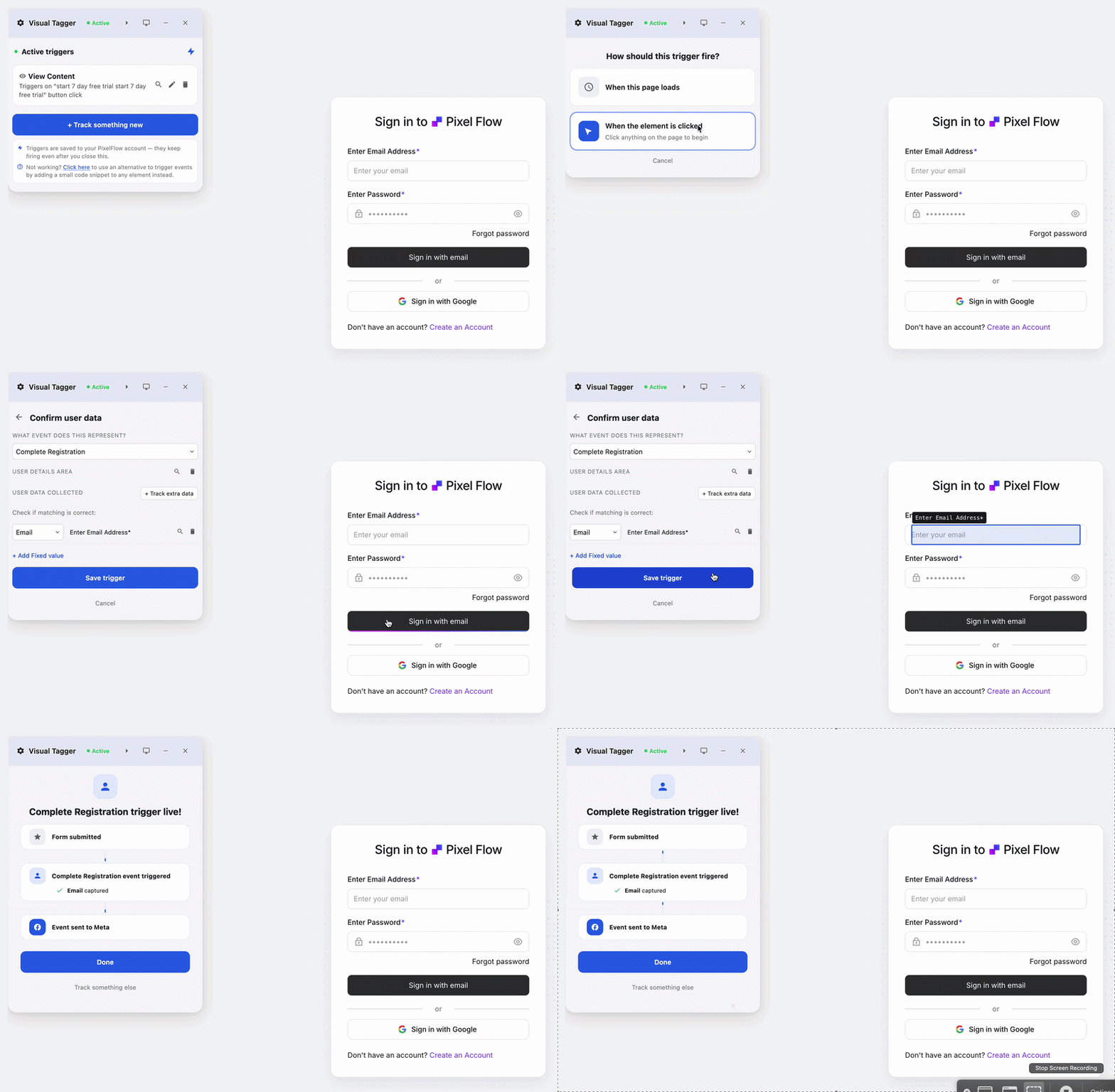
If you’ve used Meta’s Event Setup Tool, you already know how this works. PixelFlow’s visual tagger is just far more feature-rich, and it runs on any site you own. Tag buttons, forms, links, and any element in a few clicks.
Any website
Works on Webflow, Framer, WordPress, Squarespace etc. or any custom-coded site.
Buttons, forms & elements
Tag any clickable button, any form, or any element on the page. Nothing is off-limits.
Familiar, but better
Works like Meta’s Event Setup Tool, just more feature-rich and built for real campaigns.
Auto-detects name, email, phone and more
Tag a form and PixelFlow picks up the extra data from the form like name, email, phone etc.
Email, phone and name
Auto-detected on common inputs and sent hashed, so Meta can match the conversion to a person.
Manual field selection
Choose any field or element yourself when you want full control over what is captured.
Higher Event Match Quality
Richer customer data on the event means Meta matches more of your conversions and optimises better.
Works on any form
Webflow, Framer, WordPress, Squarespace or a custom-coded form. If PixelFlow runs on the page, it can be tagged.
Nothing stored in plain text
Email, phone and name are hashed before they leave. The event log shows exactly what was sent.
Tag once, track across every page
Tag a button once and PixelFlow tracks every matching element across your whole site, with no re-tagging page by page. Full eCommerce support is built in.
One tag, every page
Tag an element once and it tracks the same element everywhere it appears across your site.
eCommerce ready
Track products, carts, and checkouts across your store on all pages
Trigger events from clicks, forms or page visits
Choose what fires the event. Each trigger fires on every element that matches it, so one tag covers every page.
01
Click triggers
Buttons, links and any clickable element on the page.
02
Form triggers
Fire on submit and capture the fields visitors fill in.
03
Page visit triggers
Thank-you pages, confirmations, or any URL pattern you choose, with parameters mapped to value and customer fields.
Visual Tagger vs. Meta’s Event Setup Tool
Meta’s built-in tool tags clicks in the browser, and stops there. The Visual Tagger sends every event through both the Pixel and the Conversions API, and captures form fields for better matching.
Everything you need to know about tagging your site with the visual tagger.
Do I need Google Tag Manager or any code?
No. The visual tagger is fully point and click. You select a button, form, or page on your live site, pick the Meta event, and PixelFlow sends it server-side through the Conversions API. No tag manager, no code snippets, no developer.
How is it different from Meta’s Event Setup Tool?
It works the same way, so it will feel familiar right away. It is just far more feature-rich: form field capture, server-side delivery with deduplication, real-time event logs, and it runs on any site you own.
Does it auto-detect my forms?
You tag a form yourself with a click, so you stay in control. Once tagged, PixelFlow automatically detects fields like name, email, and phone and maps them to Meta customer parameters for higher Event Match Quality.
What can I set triggers on?
Buttons and any clickable element, form submissions, and page visits like thank-you or confirmation pages. Pick the trigger, choose the Meta event it should send, and you’re done.
Do I have to tag every page separately?
No. Tag an element once and PixelFlow tracks every matching element across your whole site. Products, carts, and checkouts are covered too, with full eCommerce support built in.
Will it work on my website?
Yes. The visual tagger runs on Webflow, Framer, WordPress, Shopify, and custom-coded sites. If it loads in a browser, you can tag it.
Smarter, server-side tracking
Start sending accurate conversions today - no tag manager, no code, no developer required.
Compatible with


