
The Best Facebook Event Setup Tool Alternatives for 2026

Last updated 28 July 2026
•
11 min read
If you are looking for a Facebook Event Setup Tool alternative, it is usually for one of three reasons: the tool seems to have vanished from Events Manager, the events you built with it keep silently breaking, or Facebook keeps telling you to set up the Conversions API and the Event Setup Tool cannot do that.
This guide covers what actually happened to the tool, and the five realistic replacement paths depending on your stack and skills.
Disclosure: PixelFlow is our product. It appears below as one option among five, matched to the use case it genuinely fits. How we tested and evaluated: we created accounts and worked through the setup on the platforms we could test hands-on, aiming to cover the same functionality as the Facebook Event Setup Tool, and evaluated the others from their documentation and product accounts. We then compared each option’s ease of use, features and usability against the Event Setup Tool.
TL;DR: Facebook Event Setup Tool alternatives at a glance
There is no single best alternative; it depends on your stack. If you are on a site builder (Webflow, Squarespace, Framer, WordPress etc.) and want no-code Conversions API tracking, PixelFlow (our tool) is built for exactly that.
If you already run Google Tag Manager, server-side GTM with a hosting provider like Stape is the natural upgrade. If you want to keep point-and-click but move to durable triggers you own, Tag Companion builds them inside Google Tag Manager. Details, trade-offs and pricing for each below.
Tool
Best For
Starting Price
Pros
PixelFlow
Any platform spending real money on Facebook ads, no developer needed
From $29/€29/mo
No-code Visual Tagger, pixel + CAPI with automatic deduplication, Stripe and Calendly integrations
GTM (server side) via Stape
Marketers already fluent in GTM who want full control
Stape from $19/mo, plus setup time
Multi-platform: Facebook, Google and TikTok from one server
GTM (web only)
Free-budget setups that have outgrown point-and-click
Free
Robust, debuggable triggers; still browser-only, no CAPI
Tag Companion
Point-and-click GTM trigger building without a developer
Free; paid from $12.97/mo
Durable, editable GTM triggers; browser-only, no CAPI
SignalBeam
Webflow-only sites running both Facebook and TikTok ads
From $19/mo
Facebook CAPI + TikTok Events API from one no-code setup
Quick Verdict: The Best Event Setup Tool Alternative
PixelFlow is our top pick for the audience the Event Setup Tool actually served: site builders spending real money on Facebook ads (disclosure: PixelFlow is our product). You keep the no-code, point-and-click setup, but every event is delivered through both the browser pixel and the Conversions API with automatic deduplication and richer match data, from $29/€29/mo.
If you already live in Google Tag Manager, server-side GTM via Stape is the natural upgrade. Tag Companion can build durable GTM triggers for you if you want to keep the point-and-click workflow, Webflow sites running TikTok ads alongside Facebook should look at SignalBeam, and web GTM remains the free stepping stone if you can live without server-side delivery.
Did Facebook Remove the Event Setup Tool? (And Where Did It Go?)
The Event Setup Tool is a feature inside Facebook Events Manager that lets you create standard pixel events (Purchase, Lead, Add to Cart and so on) by clicking on buttons and pages of your live website, with no code.
If you cannot find it any more, you are not imagining it. In the updated Events Manager, the old access point in the Add Events dropdown is gone. It now lives under Settings, then Event Setup, then Open Event Setup Tool, several steps deeper than before. Facebook did not remove it, but the burying tells you where Facebook’s priorities sit: its 2026 guidance pushes advertisers toward the Conversions API, which the Event Setup Tool cannot send.
Conversions API (CAPI): Facebook’s server-side tracking channel. Instead of your visitor’s browser sending events to Facebook (where ad blockers and privacy features interfere), a server sends them directly. Facebook recommends running it alongside the pixel.
Deep dive: how the Conversions API works.
Why replace the Event Setup Tool?
The short version: it only covers the browser side of tracking, and even that side is fragile.
No real Conversions API path. Every event it creates is browser-only. Ad blockers, strict privacy settings and iOS features can stop those events entirely, and even Facebook’s one-click CAPI mirror can only resend what the browser managed to capture.
Events break when your site changes. It remembers which button or URL you clicked during setup. Redesign a page or change a button label and the event silently dies.
Standard events with limited data. No meaningful way to enrich events with customer data, so event match quality stays low.
Struggles with modern builders. Single-page apps, dynamic content, embedded checkouts and iframes are where point-and-click selection is least reliable.
The interface keeps moving. The 2026 relocation is the latest sign the tool is in maintenance mode.
A note on Facebook’s one-click Conversions API: since April 2026, Events Manager can mirror your existing pixel events server-side in one click (officially the Meta-enabled Conversions API). It is worth switching on, but it is a mirror, not a fix: it sends only what the pixel already sends, with no custom events, no added match data, and nothing at all when an ad blocker stops the browser event from firing in the first place. The alternatives below exist to fix those underlying problems.
How we chose these alternatives
We required each option to:
(a) create Facebook events without depending on the Event Setup Tool’s fragile point-and-click selectors
(b) offer a path to Conversions API where the category allows it, and
(c) be realistically maintainable by the kind of team that was using the Event Setup Tool in the first place.
The 5 Best Facebook Event Setup Tool Alternatives
1. PixelFlow
Best for: Users on any platform including Webflow, Squarespace, Framer, GHL, Hubspot, WordPress, WooCommerce etc. that spend real money on Facebook ads and want CAPI without a developer.
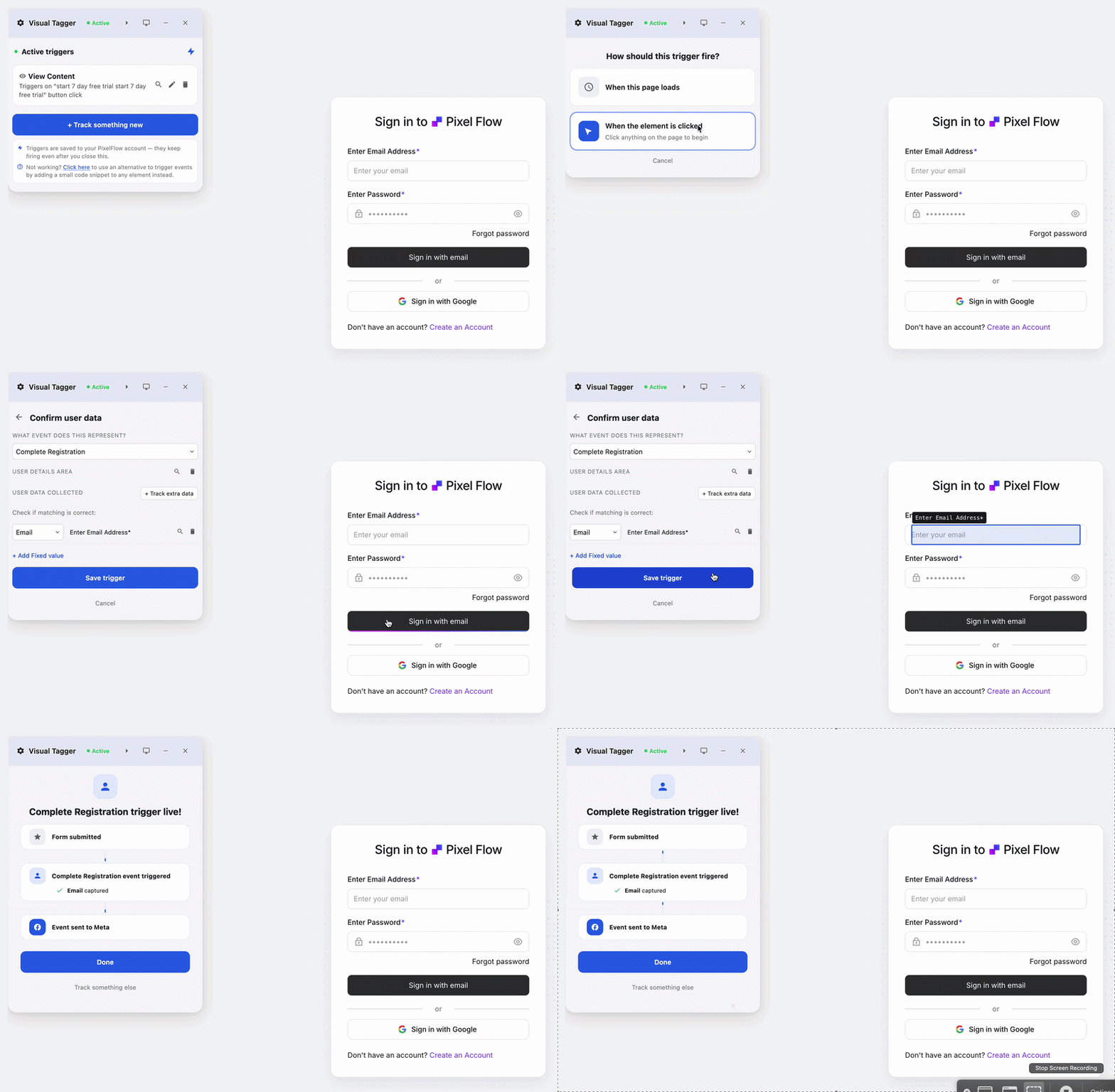
PixelFlow keeps what people like about the Event Setup Tool (visual, no-code event creation) and replaces what fails. Events are created with a point-and-click Visual Tagger or URL triggers, then sent through both the browser pixel and the Conversions API with a shared event ID, so Facebook deduplicates automatically. Every event carries match data the Event Setup Tool never sends (fbp, fbc, IP, user agent, hashed geo, an anonymous external ID, plus email/phone/name where configured), which lifts event match quality and ad delivery.
It also covers cases the Event Setup Tool cannot touch: automatic purchase-funnel tracking on Webflow Commerce, Squarespace and WooCommerce; Stripe and Calendly webhook integrations that capture purchases and booked calls server-side even when they happen off your site; and triggers you edit in a dashboard instead of re-clicking through your live site after a redesign.
It also provides pre-built integrations covering Stripe, Calendly etc. to provide browser enriched CAPI events to maximise EMQ scores.
Honest limits: PixelFlow sends to Meta and TikTok only (no Google Ads or GA4 dispatch), it is not a tag manager or attribution platform, and like any script-based tool it cannot tag inside cross-origin iframes.
Pricing: Starts at $29 per month with unlimited events and pixels on every plan. You can set up your first server-side event in about two minutes on the free trial.
2. GTM via Stape
Best for: marketers already comfortable in GTM who want full control of a proper server-side setup.
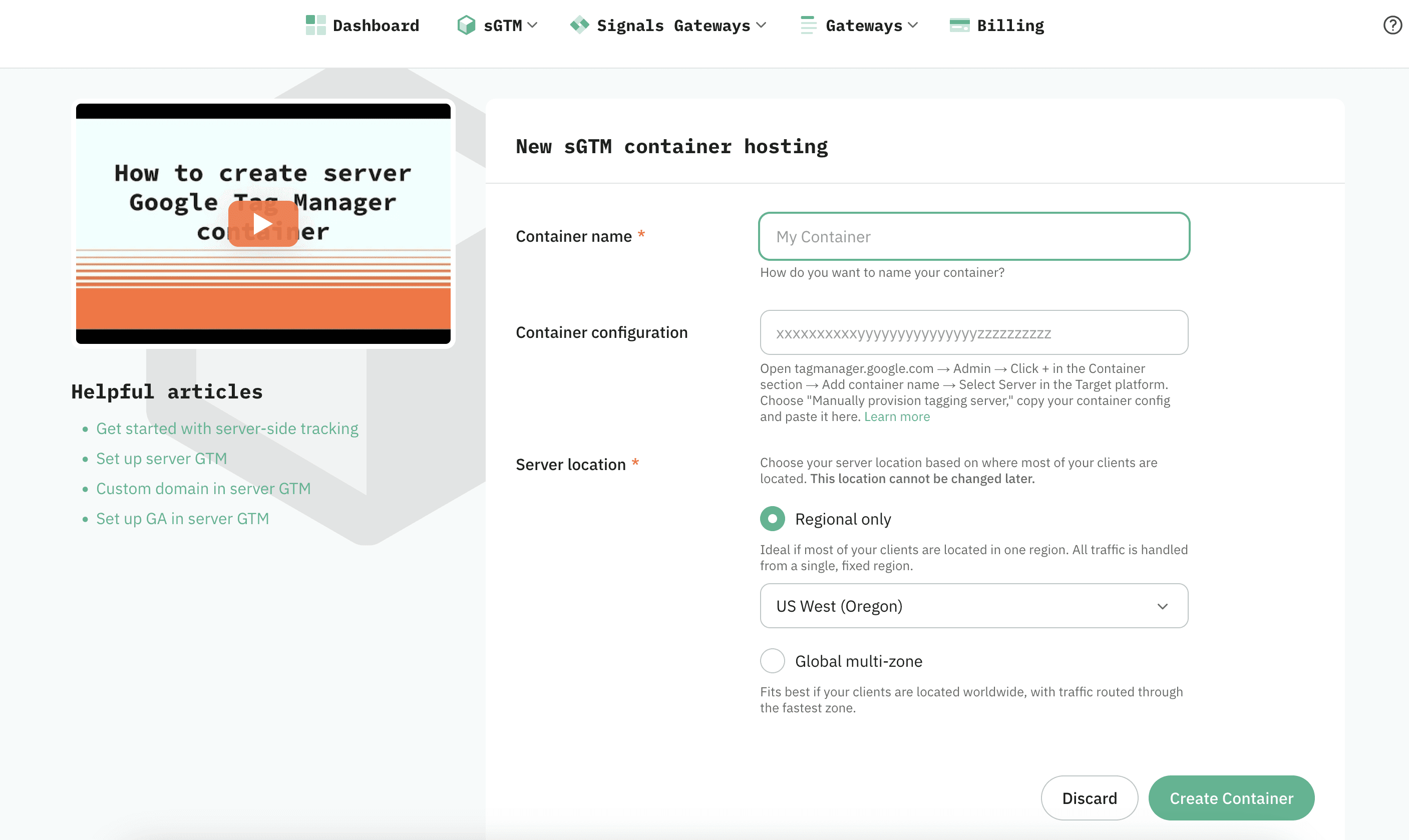
Server-side GTM runs a tagging server that receives events from your site and forwards them to Facebook’s Conversions API. Hosting providers like Stape make the server part affordable (plans from a few dollars a month) so you avoid raw cloud infrastructure. It is however generally missing the visual aspect of the Event Setup Tool.
The trade-off is complexity: you are configuring containers, clients, tags and triggers across web GTM and server GTM, plus deduplication between pixel and CAPI. Powerful and multi-platform (Facebook, Google, TikTok from one server), but it is a project, not an afternoon task, and misconfiguration quietly costs data. We compare this route in depth in our Stape alternative guide.
Pricing: Stape from $19/month plus your time.
3. Google Tag Manager (web only)
Best for: free-budget setups that have outgrown point-and-click but cannot justify a paid tool yet.
Web GTM replaces the Event Setup Tool’s fragile selectors with proper triggers (clicks, form submissions, page views) that you control and can debug. It is free, well documented, and far more robust than clicking on your live site.
The honest caveat: web GTM alone is still browser-only. You gain reliability and flexibility, but not the Conversions API; ad blockers block GTM events just like pixel events. It is a stepping stone, not a destination, which is why most GTM users eventually add option 2 or a tool like option 1.
Pricing: free.

4. Tag Companion
Best for: marketers who want the Event Setup Tool’s point-and-click workflow, but with triggers they own in Google Tag Manager.
Tag Companion is a visual builder for GTM: you point and click at buttons, forms and page elements exactly like you did in the Event Setup Tool, and it generates a standard GTM container file with proper triggers and GA4 events that you import into your own workspace. Those triggers replace fragile selector-based events with rules you can see and edit, and once they exist in GTM you can reuse them to fire your Facebook pixel tags.
Honest limits: it is GA4-first and browser-only. There is no Conversions API delivery, wiring Facebook tags to its triggers is a manual GTM step, and it does not support single-page apps (React, Vue, Angular) or standard Shopify checkout pages (Shopify Plus only).
Pricing: free plan; Basic $12.97/mo; Pro $27.97/mo (adds GA4 eCommerce events); or $19.97 one-time for 7 days of full access. Paid plans have a 7-day free trial and a 30-day money-back guarantee.

5. SignalBeam
Best for: Webflow sites running both Facebook and TikTok ads that want one no-code tool for server-side events.
SignalBeam is built exclusively for Webflow. Like PixelFlow, it pairs a point-and-click visual event mapper with dual delivery: events are sent through both the browser pixel and the server-side APIs with matching event IDs, so deduplication is automatic. The difference is platform coverage: one setup sends to both Facebook’s Conversions API and TikTok’s Events API.
It also shows an Event Match Quality score (0-10) for every event, keeps real-time event logs with timestamps and full payloads, and includes GDPR/CCPA consent mode with a server-side kill switch.
The trade-off is scope: SignalBeam is Webflow-only, so other sites will not work.
Additionally, in our testing, we found that any elements that are tracked which do not have unique identifiers cause multiple events to fire.
Pricing: $19/mo (1 site), $49/mo (5 sites), $99/mo (25 sites), each with a 7-day free trial.

Start scaling your ads with better data
No credit card required
5-minute setup
Which should you choose?
If you have real ad spend but no developer: choose PixelFlow. It pairs Event Setup Tool-style no-code setup with full CAPI delivery across every major site builder. Perfect for marketers and non technical users
If you’re already fluent in GTM and want multi-platform support: choose server-side GTM with Stape.
If you have no budget at all with very modest needs: choose web GTM now, revisit when ad spend grows.
If you have a large in-house engineering team and a custom stack: build the Conversions API integration directly, or self-host server-side GTM for full control over event enrichment.
Final verdict
The Event Setup Tool was not removed, but Facebook’s actions (burying it in Events Manager while pushing the Conversions API) make its direction clear. The right replacement depends on your stack: GTM routes for tag-manager people, direct CAPI for developers, native integrations where platforms provide them.
For the site-builder audience the Event Setup Tool actually served, PixelFlow is the closest like-for-like upgrade: the same no-code philosophy, minus the browser-only ceiling.
Key takeaways
The Event Setup Tool was not removed; Facebook buried it under Events Manager’s Settings tab in the 2026 update.
It creates browser-only pixel events with no Conversions API support, which Facebook now recommends for all advertisers.
Five realistic replacements exist: PixelFlow (no-code + CAPI), sGTM with Stape (GTM users), web GTM (free, still browser-only), Tag Companion (visual GTM triggers, browser-only), and SignalBeam (Webflow sites running Facebook + TikTok).
Match the option to your stack; there is no universal winner.
Free is only cheaper if you ignore the cost of conversions Facebook never sees.
More tracking comparisons: WeTracked alternative · Hyros alternative · PixelYourSite alternative · GTM + Stape alternative.
Frequently Asked Questions
What is the best alternative to the Facebook Event Setup Tool?
It depends on your stack. For site builders without developers, PixelFlow is the closest replacement that adds Conversions API delivery. For Webflow-only sites that also run TikTok ads, SignalBeam covers both platforms from one tool. For GTM users, server-side GTM hosted on Stape is the natural upgrade. If you want to keep the point-and-click workflow but move it into GTM, Tag Companion builds durable triggers visually. Web GTM and platform-native integrations round out the free and low-effort ends.
The event setup tool worked fine for a year, then my button events just stopped firing. What should I use instead?
That is the classic Event Setup Tool failure mode: it stores a reference to the exact button or URL you clicked during setup, so a redesign, template change or new button label silently kills the event. The fix is to move to triggers that do not depend on fragile page selectors. PixelFlow gives you dashboard-managed triggers, URL-based rules and direct integrations (Stripe, Calendly, eCommerce funnels), so events survive redesigns. Web GTM and server-side GTM via Stape let you define robust click and form triggers you control, SignalBeam does the same for Webflow sites, and Tag Companion can build those GTM triggers visually and export the container for you. Whichever you choose, re-test your key events in Events Manager after any major site change.
Did Facebook remove the Event Setup Tool?
No. As of mid-2026 it still exists, but the updated Events Manager moved it: the old Add Events path is gone and it now opens from Settings, under Event Setup. Many advertisers reasonably concluded it was removed, which is part of why searches for alternatives have grown.
Does the Facebook Event Setup Tool support the Conversions API?
No, not by itself. Everything the Event Setup Tool creates is a browser pixel event. Facebook's one-click Conversions API can mirror those events server-side, but the events themselves are still created and captured in the browser, so the tool's fragility problems carry straight through (see the next question). Facebook's 2026 guidance recommends every advertiser implement the Conversions API alongside the pixel, and that gap is the main reason to replace the tool. Of the options in this guide, PixelFlow, SignalBeam and server-side GTM deliver CAPI events; web GTM and Tag Companion stay browser-only.
Doesn't Facebook's one-click Conversions API solve this?
It helps, but only partially. The Meta-enabled Conversions API, rolled out in April 2026, mirrors your existing pixel events server-side in one click, with automatic deduplication and no developer needed. The catch is that it sends exactly what the pixel sends: events are still created and captured in the browser, so ad-blocked visitors still go missing, Event Setup Tool selectors still break on redesigns, and you cannot add custom parameters, richer match data, or off-site conversions like Stripe payments or Calendly bookings. Treat it as a free baseline worth enabling, and use a dedicated tool when you need reliable coverage beyond it.
Can I use the Event Setup Tool and the Conversions API together?
Yes, and plenty of advertisers do: browser events from the Event Setup Tool plus CAPI events from another source. But you then own deduplication between the two channels, and the Event Setup Tool's fragility problems remain. Tools that send both channels from one system with a shared event ID (like PixelFlow, or a properly configured sGTM setup) avoid the double-counting risk.
Is PixelFlow a replacement for the Facebook Event Setup Tool?
Yes, for its core audience. It replaces point-and-click event creation with a Visual Tagger and URL triggers, then adds what the Event Setup Tool cannot do: Conversions API delivery with automatic deduplication, richer match data, automatic eCommerce funnel tracking on Webflow, Squarespace and WooCommerce, and off-site conversion capture via Stripe and Calendly webhooks.
See how PixelFlow can help your business
 Ask ChatGPT
 Ask Gemini
 Ask Claude
 Ask Perplexity