
Meta One-Click Conversions API vs a Dedicated CAPI Tool: Do You Still Need One?

Last updated 3 August 2026
•
9 min read
Meta now offers a free, one-click Conversions API setup inside Events Manager. If you are paying for a CAPI tool, or about to, the obvious question is whether you still need one. The honest answer turns on three things:
whether the conversions you care about actually fire in the browser
how good your Event Match Quality is today
whatever platform your site runs on
This page compares Meta’s one-click CAPI against a dedicated tool on the same site and the same traffic, and says plainly when the free option is enough.
“Meta has one-click CAPI now, so why would I pay for a tool?”
Disclosure: PixelFlow is our product. It is the dedicated tool used as the concrete example below, because it is the one we can describe accurately. Where one-click CAPI is the better choice, this page says so.
TL;DR: one-click CAPI vs a dedicated tool
If you are Pixel-only today, turn on Meta’s free one-click Conversions API. It is the correct first move for most small advertisers. It mirrors your Pixel’s browser events to Meta’s servers, it is free, and it takes one click.
A dedicated tool like PixelFlow is usually the better choice once you need events the browser never sees (subscriptions, trials, refunds, bookings, offline sales), higher match quality from server-side data, or clean CAPI on any platform without writing code.
One-click CAPI raised the floor. It did not remove the reasons dedicated tools exist. The honest way to think about it: one-click CAPI is browser-derived redundancy, and a dedicated CAPI tool is server-side coverage. Those are different jobs.
The two are not mutually exclusive either. But if you run both, read the deduplication warning below before you trust the numbers.
Meta one-click CAPI
PixelFlow
Cost
Free
From $29/€29/mo ($21/mo billed annually)
Setup
One click in Events Manager
5 to 10 minutes, no GTM, no server container
What it sends
A server copy of existing browser Pixel events
Browser events plus server-side and webhook events
Server-native events (subscriptions, trials, refunds, bookings, offline)
No, only what the browser fired
Yes, via Stripe and Calendly webhooks
Match quality enrichment
Limited to the Pixel payload
Adds fbp, fbc, hashed geo and external_id on every event
Works on any platform, no code
Generic, not builder-aware
First-class per builder
Deduplication
Automatic
Automatic via shared event_id
Data hosting / GDPR posture
Meta-hosted
Consent-aware, EU-friendly delivery
Multi-platform (Google, TikTok)
No
Meta and TikTok
Best for
Pixel-only advertisers wanting free redundancy
Sites needing server-side events, higher match quality, or no-code CAPI
Quick verdict: do you still need a CAPI tool?
If you are Pixel-only, enable Meta’s one-click Conversions API today. It is free, it takes one click, and it is better than browser-only tracking. Most small advertisers should do that before paying for anything.
Move to a dedicated tool when your conversions stop happening in the browser, when your Event Match Quality is mediocre, or when you are on a no-code builder and want clean CAPI without server-side GTM. On raw cost and speed one-click wins outright, and it should: it is free and instant. On coverage it does not compete, because it was never trying to.
What Meta’s one-click Conversions API actually does
Meta’s one-click setup creates a server-side connection that re-sends the events your browser Pixel already fires, and deduplicates them automatically. You enable it in Events Manager: no developer, no server work. For a Pixel-only advertiser that is a real improvement, because some of your browser events get a server-side backup, so ad blockers and dropped browser calls cost you less.
What it does not do is the part that starts to matter as you scale:
It can only forward what the Pixel already saw. Events that never fire in the browser (a Stripe subscription renewal, a refund, an offline sale, a call booked on an external page) are not captured, because the browser never generated them.
It does not add match quality beyond the Pixel’s existing payload. There is no server-side enrichment adding hashed identifiers the browser did not already collect.
Meta’s own documentation limits it to standard web events. Offline events, custom event logic and cross-channel scenarios still require a direct or partner integration.
The data is Meta-hosted. For EU-heavy advertisers, where the data is processed is part of the decision, not a footnote.
None of that makes one-click bad. It makes it a floor.
One-click Conversions API: a setting in Meta Events Manager that mirrors your existing browser Pixel events to Meta’s servers and deduplicates them for you, with no developer work. Deep dive: how the Conversions API works and how deduplication works.
What a dedicated CAPI tool does differently
A dedicated tool sends events from your server and from webhooks, not just a copy of the browser Pixel. Using PixelFlow as the concrete example, because it is our product and the one we can describe accurately:
It fires server-side events the browser cannot. Stripe Purchase, Subscribe and StartTrial arrive through Stripe webhooks, with browser attribution (fbc, fbp, IP, user agent) merged back in. Calendly bookings arrive through a native webhook.
It sends a richer identifier set on every event by default: fbp, fbc, hashed IP-inferred location (city, state, ZIP, country), client_user_agent, and a hashed external_id (an anonymous per-browser ID). Higher Event Match Quality is the point, not a side effect.
It sets up clean CAPI on no-code builders. any platform, without Google Tag Manager or a server container.
It handles consent-aware, EU-friendly delivery, which matters for the roughly one in four PixelFlow users based in Germany.
None of that is magic. It is work that has to happen somewhere other than the browser, and that is the whole difference between the two options.
STANDOUT DIFFERENTIATOR
Standout difference: PixelFlow has an MCP server. Meta’s Event Setup Tool does not.
Events Manager, the Event Setup Tool and one-click CAPI are clicks in Meta’s dashboard. There is no MCP server behind any of them. PixelFlow ships one, so Claude, ChatGPT, Cursor, Codex or any MCP client can run your tracking for you.
Meta’s tools
PixelFlow
MCP server
None. Events Manager is clicks only
Official, hosted at one URL, included on every plan
Set up tracking from a chat
No
Yes. It proposes the events you are missing and adds the triggers you approve
Verify the live site
By hand
The assistant checks the published page, the pixel token, consent and the last accepted event
Ask about your data
No
Overview, attribution by campaign, ad set and ad, journeys, event logs and blocked events
Audit and weekly report
No
One prompt audits a site, another writes the weekly report
Meta’s own tools offer nothing comparable. If you want an assistant to set up, check and explain your tracking, PixelFlow is the only option here. See the PixelFlow MCP server
How we tested this
Same site, same 14-day window, same standard events. I turned on Meta’s one-click CAPI in Events Manager on a live Webflow site, recorded the delivered events and Event Match Quality in Meta Events Manager, then ran PixelFlow alongside it and compared what each one sent to Meta.
PixelFlow is our product, so treat this as informed rather than independent. Everything described about one-click CAPI is what Meta documents and what we observed in Events Manager, and the cases where one-click is the better choice are stated plainly below.
When each one wins
Use Meta’s one-click Conversions API
Free, instant, and enough for most Pixel-only advertisers
Best for: Pixel-only advertisers tracking standard web events that all fire in the browser.
Choose one-click, and skip a dedicated tool, if:
You are Pixel-only and want a free upgrade to some server-side redundancy.
You track standard web events (PageView, ViewContent, AddToCart, InitiateCheckout, Lead, Purchase) that all fire in the browser.
You are on Shopify and already using Meta’s native app, which sets up Pixel and CAPI for you.
You have no server-side events, offline sales, or a CRM funnel feeding Meta.
Honest limits: it forwards what the Pixel already captured and nothing more, so it cannot raise Event Match Quality or see conversions that happen off-site.
Cost: free. For that profile a paid tool is hard to justify, and we would tell you so.
Use a dedicated CAPI tool
When the browser cannot see your conversions
Only tool on this list with an MCP server, so an AI assistant can set it up and audit it for you. Best for: sites with server-side events, mediocre Event Match Quality, or a no-code builder to work around.
Choose PixelFlow (or another dedicated CAPI tool) if:
You need server-native events the Pixel cannot see: subscription renewals, trial starts, refunds, booked calls or offline conversions.
You’re using a second tool like Calendly, Stripe, Tally etc. where the user is generating the “conversion” event in another tool
Your Event Match Quality is mediocre and you want the enrichment that raises it.
You are on a no-code builder, or any platform where you would rather not write tracking code and want clean CAPI without wiring up server-side GTM.
You care where the data is processed for GDPR reasons.
You want event logs and a health view so you can answer “is it still tracking everything?” without guessing.
Honest limits: it costs money where one-click is free, and PixelFlow sends to Meta and TikTok only. If you need Google Ads or GA4 server-side, look at Stape or a multi-platform setup instead.
Pricing: from $29/€29/mo ($21/mo billed annually) with a 7-day free trial.
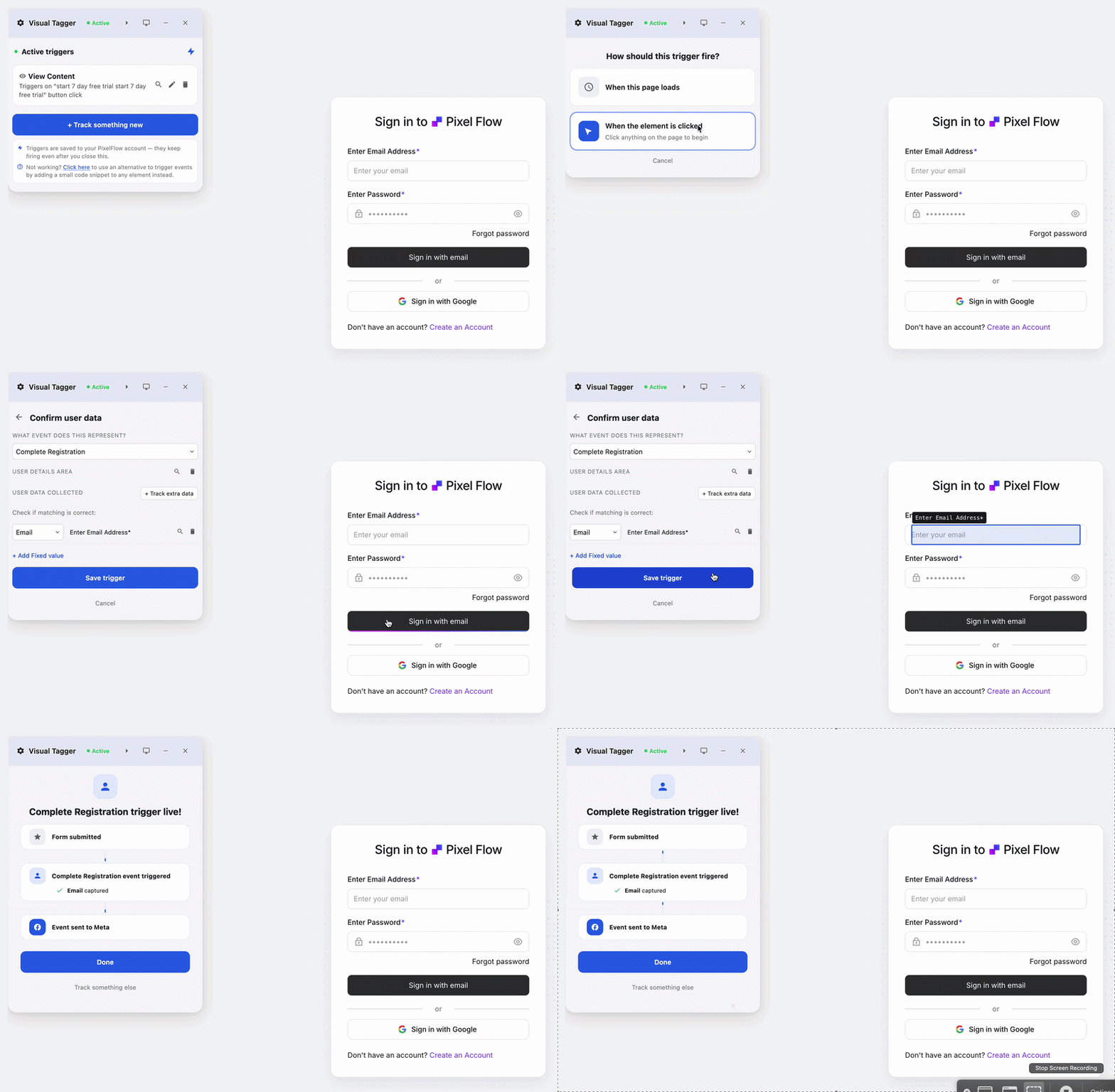
Fix your Meta tracking today
No credit card required
5-minute setup
Which should you choose?
Pixel-only, standard browser events, modest spend: Meta’s one-click CAPI. Free, and enough.
On Shopify with Meta’s native app: you already have Pixel plus CAPI. Nothing to add.
Stripe subscriptions, trials or refunds: a dedicated tool. The browser never sees those events.
any platform with mediocre match quality: a dedicated tool, or server-side GTM if you want to build it yourself.
Google Ads or TikTok server-side as well: neither of these. Look at a multi-platform server-side setup.
Already running a dedicated tool: leave one-click off unless you have verified deduplication first.
An important warning if you already run a CAPI tool
Do not blindly turn on one-click CAPI on top of an existing server-side integration without checking deduplication. Pixel plus CAPI is the normal, recommended setup. Two CAPI pipelines sending the same event without matching event_id values is not: Meta can count a single conversion twice, which inflates reported ROAS and can distort optimisation.
Know what each pipeline sends. Your dedicated tool sends Pixel and CAPI events that share an event_id. One-click adds a second server copy derived from the same browser Pixel.
Test in a controlled window, not permanently. Enable one-click and watch a single standard event rather than the whole account.
Verify deduplication in Events Manager. Open the event and confirm Meta reports it as deduplicated, not as two separate server events.
If the counts do not match, turn one-click back off. Meta does not reliably deduplicate two server events when the event IDs differ, so the safe default is one server-side source of truth.
For most people already running a dedicated tool the answer is simple: leave one-click off. It duplicates work your tool already does, and adds a reconciliation problem you did not have.
Bottom line
If you are Pixel-only, enable Meta’s one-click CAPI today. It is free and it is better than browser-only tracking. If your attribution depends on server-side events, higher match quality, no-code builder support or EU data handling, one-click is a starting point rather than a destination, and a dedicated tool is usually the better choice.
The two are not mutually exclusive, and the smartest setup for a growing advertiser often uses a dedicated tool as the source of truth with deduplication handled properly.
Key takeaways
Meta’s one-click Conversions API is free, takes one click in Events Manager, and mirrors your existing browser Pixel events server-side.
It cannot send what the browser never saw: subscription renewals, trials, refunds, bookings and offline sales are outside its reach.
It does not raise Event Match Quality, because it forwards the Pixel’s existing payload rather than enriching it.
A dedicated tool earns its cost through server-side and webhook events, richer identifiers, no-code builder support and EU-friendly delivery.
If you run both, verify deduplication in Events Manager before you trust the numbers.
More tracking comparisons: PixelFlow vs Stape · Stape alternatives · Facebook Event Setup Tool alternatives · Best Meta CAPI tools in 2026 · Meta Conversions API for Webflow · PixelFlow pricing.
Frequently Asked Questions
Does Meta’s one-click Conversions API replace tools like PixelFlow?
For a Pixel-only advertiser tracking only standard browser events, one-click CAPI covers most of what a basic tool would. Where it stops is server-side coverage. One-click re-sends what your browser Pixel already fired, so it cannot capture a Stripe subscription renewal, a refund, a Calendly booking or an offline sale, because none of those originate in the browser. A dedicated tool sends those from the server. So one-click replaces the simplest use case and leaves the harder ones untouched.
Is one-click CAPI as accurate as server-side tracking?
Not quite, and the reason is mechanical rather than a matter of quality. One-click forwards the Pixel’s existing payload, so its match quality is capped by whatever the browser already collected. A server-side tool can attach additional hashed identifiers (for example fbp, fbc, IP-inferred location and an anonymous external_id) to every event, which is what lifts Event Match Quality. If your match quality is already high and your events all fire in the browser, the gap is small. If it is not, the gap is the whole point.
Should I turn on one-click CAPI if I already use PixelFlow?
Usually no, unless you have verified deduplication first. Running two CAPI pipelines for the same events without matching event IDs can cause Meta to count a single conversion twice, which inflates reported results and can distort optimisation. If you want to test one-click alongside PixelFlow, do it in a controlled window and confirm in Events Manager that events are deduplicated before relying on the data.
Is Meta’s one-click CAPI really free?
Yes. Meta does not charge for the Conversions API itself, and the one-click Events Manager setup is a free, Meta-hosted path with no server hosting cost to you. A dedicated tool charges because it does more than forward browser events: it runs server-side and webhook integrations, enriches the payload, and gives you logs and a health view. You are paying for coverage and control, not for access to the API.
Does one-click CAPI work on no-code builders?
It can run on any site that has the Meta Pixel installed, including no-code builders, because it forwards Pixel events regardless of platform. What it does not do is understand each builder’s quirks. On Webflow, Framer and Squarespace, purchase and lead events, single-page navigation and form submissions often need builder-aware handling, which is what a first-class no-code tool provides and a generic Pixel copy does not.
See how PixelFlow can help your business
 Ask ChatGPT
 Ask Gemini
 Ask Claude
 Ask Perplexity