
Event logs
Every event PixelFlow sends, in real time, with the full payload
Free trial. No card, no tag manager.
Watch events arrive as they happen
Click a button on your site and see the event appear in the log a moment later. Each row shows the timestamp, the event name, where it came from and whether Meta accepted it.
600
400
200
0
See what data was added
Open any event to see the full "payload" - ie. exactly what user data was tracked and sent along with the event
Delivery status
Every event shows whether it was processed, deduplicated or rejected, with Meta’s response when there is one.
Filter and export
Filter by event, source, pixel or time, then export the rows you need for a client or a support ticket.
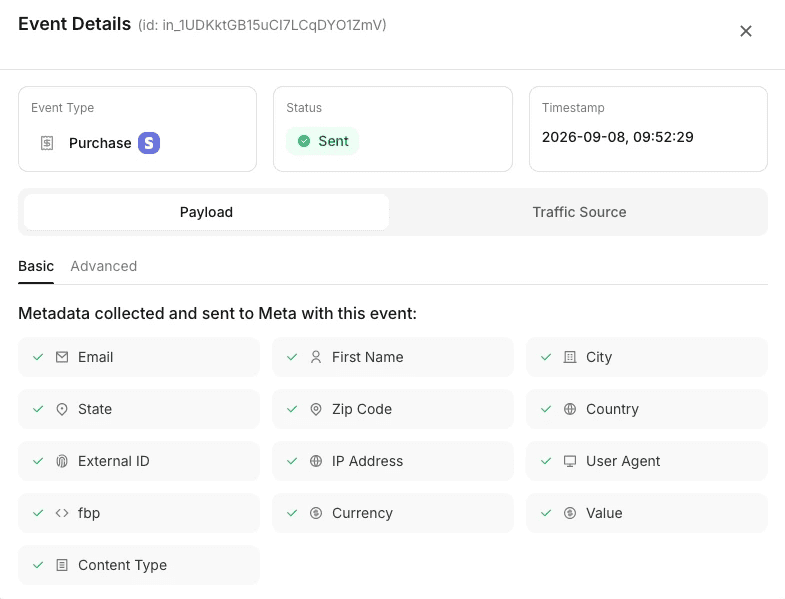
See what data was sent
With every event, see the ful data sent along with it.
Event data
event_name, event_id, event_time, action_source and the page URL it fired on.
Customer data
Email, phone, IP, user agent, fbp and fbc. Personal fields are hashed the way Meta requires.
Custom data
value, currency, content_ids and any parameters you added to the event.
Browser and server events side by side
Every conversion shows up twice, once from the browser pixel and once from the Conversions API, with the shared event ID that lets Meta count it once. If one side is missing you will see it here first.
Lead
Processed
Browser
Lead
Processed
Browser
Lead
Deduplicated
Server
Purchase
Processed
Browser
Purchase
Processed
Browser
Purchase
Deduplicated
Server
FAQ
Everything you need to know about the event log.
How long are events kept in the log?
Events are retained in your account so you can look back at past days and weeks. Older events roll off according to your plan’s retention.
Does the log show Stripe and Calendly events?
Yes. Server-side integration events appear in the same log, marked with their source.
Can I see the exact data sent to Meta?
Yes. Each event opens into the full JSON payload PixelFlow sent, including the hashed identifiers.
What does Deduplicated mean?
The browser pixel and the server event carried the same event ID, so Meta kept one and discarded the other. That is the intended outcome, not an error.
Can I use the log to test a new setup?
Yes. Trigger the event on your site and watch it arrive. For Meta’s side, use the Test Events tool in Events Manager alongside it.
Is there a limit on logged events?
No. PixelFlow does not cap events on any plan.
Smarter, server-side tracking
Start sending accurate conversions today - no tag manager, no code, no developer required.
Compatible with


