Order tracking built for Shopify and WooCommerce stores, or one script for any site and any conversion?
Prices and features were checked on both vendors’ sites on 16 November 2026. Where WeTracked is the better choice, this page says so.


The short answer
WeTracked is a server-side ad tracking app built for Shopify and WooCommerce stores. It sends orders to a long list of ad platforms through their conversion APIs. PixelFlow is a no-code tracking tool for any site, built around leads, bookings and payments as well as purchases, with attribution and an event log built in.
PixelFlow is usually the better choice if you run a site builder, a lead-gen site or a service business, take payments through Stripe or bookings through Calendly, or want customer journeys, bot filtering and a full event log in one dashboard.
WeTracked may be the better fit if you run a Shopify or WooCommerce store, advertise on Google, Bing, X or Taboola as well, or want an ad spend dashboard across several stores.
PixelFlow vs WeTracked at a glance
PixelFlow Standard against WeTracked Starter. Green means it is handled for you, amber means it is partial or you configure it, grey means it is not available or not documented.
 PixelFlow
 WeTracked
What each tool is
Both tools send conversions to ad platforms from a server. WeTracked is built around store orders. PixelFlow is built around any conversion on any site.
WeTracked
WeTracked is a tracking app for Shopify and WooCommerce. It sends orders to Meta, Google Ads, TikTok, Snapchat, Pinterest, Reddit, X, Bing, Taboola and ChatGPT Ads through their conversion APIs, and to Klaviyo. WeTracked says more than 11,000 merchants use it.
Alongside tracking, its Pulse dashboard shows spend, revenue, ROAS and CPA for Meta, TikTok and Google Ads, and Creative Analytics, in beta, scores your ad creatives. It also supports funnel and checkout tools such as Funnelish and Checkout Champ.
PixelFlow
PixelFlow is a no-code tracking tool. Add one script, choose the events to send, and it sends each one through both the browser pixel and the server-side API of every ad platform you connect: Meta, TikTok, ChatGPT Ads, Snapchat, Pinterest and Reddit.
Deduplication, bot filtering and consent are handled for you, and one dashboard shows attribution, customer journeys and a full event log.
In short: WeTracked is server-side order tracking for online stores, across a long list of ad platforms. PixelFlow is server-side tracking for any site and any conversion, plus the attribution and logs to check it.
Setup
Both tools need no code and no Google Tag Manager. The difference is the platform you run on.
WeTracked
Step 1: Add your store in the WeTracked dashboard, choose your checkout type and add the pixel for each ad platform.
Step 2: Install the wetracked.io Connect app on Shopify, paste your API key and turn on the app embed. WooCommerce stores install a plugin with an API token instead.
Step 3: Wait for WeTracked’s team to review the store before tracking is switched on, then remove other copies of the same pixels.
Stores only. WeTracked documents Shopify and WooCommerce. If your site runs on Webflow, Framer, Squarespace or plain WordPress, or your conversions are leads and bookings rather than orders, check with WeTracked before you sign up.
PixelFlow
Step 1: Add your site and connect your ad accounts in the dashboard.
Step 2: Add one script, or install the plugin for Webflow, Framer, WordPress or WooCommerce.
Step 3: Point and click the buttons, links and forms you want to track with the Visual Tagger, or fire events on page load with a URL trigger, then watch them arrive in the event log.

Pro tip: PixelFlow has an MCP server, so you can ask Claude, Cursor or ChatGPT to install the script and set up your events for you.
Verdict: Both are quick. WeTracked is a natural fit for Shopify stores. PixelFlow wins everywhere else, with no review step before tracking goes live.
Ad platforms and integrations
This is the section where WeTracked is broader.
WeTracked
WeTracked has setup guides for Meta, Google Ads, TikTok, Snapchat, Pinterest, Reddit, X, Bing, Taboola and ChatGPT Ads, plus Klaviyo for email. Reddit arrived in December 2025, and Bing and Taboola in May 2026.
PixelFlow
PixelFlow sends to six ad platforms. Plans include one, three or five of them, and extra platforms cost $10 a month each.
Google Ads, Bing, X and Taboola: PixelFlow does not send to them. If they matter to your store, WeTracked covers more of your ad spend.
Where PixelFlow goes further is the website side: one-script installs for Webflow, Framer, Squarespace, WordPress, WooCommerce, Kajabi, ClickFunnels, GoHighLevel and plain HTML, plus built-in Stripe and Calendly integrations that send payments and bookings from a webhook, matched back to the ad click.
Verdict: WeTracked wins on ad platform breadth. PixelFlow wins on the sites, forms, payments and bookings that are not a store checkout.
Attribution and customer journeys
Sending better data is half the job. You also need to know which ads actually drove your sales.
WeTracked
WeTracked’s reporting uses a last-click model that relies on UTM parameters, and its help docs suggest using it alongside Ads Manager. Pulse adds a live view of spend, revenue, ROAS and CPA across Meta, TikTok and Google Ads.
WeTracked does not document a customer journey view showing every visit before a sale.
PixelFlow
PixelFlow uses the same events it sends to the ad platforms to build its own attribution. The attribution table lists every source, campaign and ad with visitors, sessions, leads, purchases and revenue, so you can check Ads Manager against what actually happened on your site.
Open any purchase or lead and you get the journey behind it: the ad they clicked first, every page they viewed, the days between visits and the event that converted them.

One limit: PixelFlow's attribution covers traffic to sites running its script. It does not reconcile ad spend across channels the way a dedicated attribution platform does.
Verdict: PixelFlow wins on attribution depth, with a journey behind every lead and sale. WeTracked wins if you want ad spend and ROAS from several ad accounts in one dashboard.
Data quality
Both tools recover conversions a browser pixel misses. The differences are in what is documented and what you can check.
Deduplication
WeTracked’s guidance on duplicates is to remove other copies of the same pixel and turn off data sharing in the native Meta, TikTok and Pinterest Shopify apps. PixelFlow generates one event ID for both the browser and server copy of every event, so each platform counts it once with nothing to configure.
Watch this with any store app: if the native Meta or TikTok Shopify app is still sending events, the same purchase can count twice. Check Events Manager after you switch.
Bot filtering and blocking rules
WeTracked does not document bot filtering. Its Smart Event Filtering, in beta, filters events by UTM, country, order type and value, and is switched on by asking support.
PixelFlow drops crawlers, scrapers and other automated traffic before anything reaches an ad platform, and blocking rules let you stop a repeat of the same event within a set time, block events with no click ID, or block by URL or referrer.
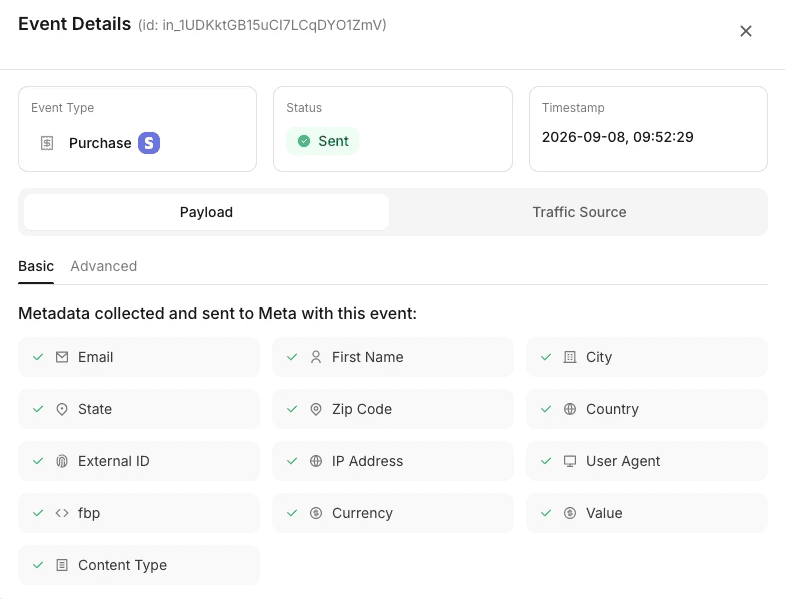
Event logs
Match quality
PixelFlow attaches the browser and click identifiers, IP address, user agent, a hashed location and an anonymous external ID to every event automatically, and captures email, phone and name from tagged forms or URL parameters. WeTracked says it sends advanced matching data with each order but does not publish which parameters.
Verdict: PixelFlow wins on what you can see: automatic deduplication, bot filtering and a full payload log. WeTracked publishes less about how its data is handled.
Consent and privacy
WeTracked
WeTracked’s Shopify listing mentions GDPR compliance, but its help docs do not describe how it reads your cookie banner or consent choices. Ask its team how consent is handled before you rely on it.
PixelFlow
PixelFlow reads the choice from the banner you already use, including CookieYes, Cookiebot, Complianz, OneTrust and any banner that supports Consent Mode v2. Tracking runs when a visitor accepts and stays off when they decline.
Global Privacy Control and Do Not Track are honoured, even over an Accept click
Custom banners connect with one line of code
Consent mode is on by default for every site
Either way: making sure your site complies with the law is still your responsibility. The tools help you respect choices; they do not make the site compliant on their own.
Verdict: PixelFlow wins on clarity. It reads your banner, honours Global Privacy Control and has consent mode on by default for every site.
Pricing
WeTracked prices by orders per month, with several stores per plan. PixelFlow charges a flat price per site with unlimited events. Both offer annual discounts. Prices checked on each vendor’s site on 16 November 2026.
PixelFlow
WeTracked
A store with more than 500 orders a month moves up to WeTracked’s $149 plan. PixelFlow’s price does not change with how many sales you make. It depends on sites and ad platforms instead.
Verdict: PixelFlow is cheaper to start and does not charge more as orders grow. WeTracked includes more stores per plan, which suits owners running several shops.
Which should you choose?
There is no universal winner. It comes down to what you sell, and where.
Choose PixelFlow if
You run Webflow, Framer, Squarespace, WordPress or another site builder
Your conversions are leads, bookings or Stripe payments, not just orders
You want customer journeys and attribution built in
You want bot filtering, consent and an event log handled for you
You want a price that does not rise with your order volume
Choose WeTracked if
You run a Shopify or WooCommerce store
You advertise on Google Ads, Bing, X or Taboola as well
You use Funnelish or Checkout Champ
You run several stores and want them on one plan
You want an ad spend and creative dashboard alongside tracking
Final verdict: WeTracked is a strong choice for Shopify and WooCommerce stores that advertise on many platforms. PixelFlow is server-side tracking and attribution for any site and any conversion. If you are not running a store checkout, or want to see exactly what was sent, PixelFlow is usually the better choice.
SWITCHING
Switch from WeTracked in three steps
Run PixelFlow next to WeTracked, check the events in the log, then switch off WeTracked for the pixels you have moved. Most sites are done in under fifteen minutes.
“After implementing PixelFlow with CAPI, we started seeing significantly more conversion events registered in Meta than we got with the pixel alone. Our TrialStarted event match quality jumped almost immediately from 4/10 to 8.5/10.”

Mike Flieder
Founder & CEO, SimpleCheck

Smarter, server-side tracking
Start sending accurate conversions today - no tag manager, no code, no developer required.
Compatible with


